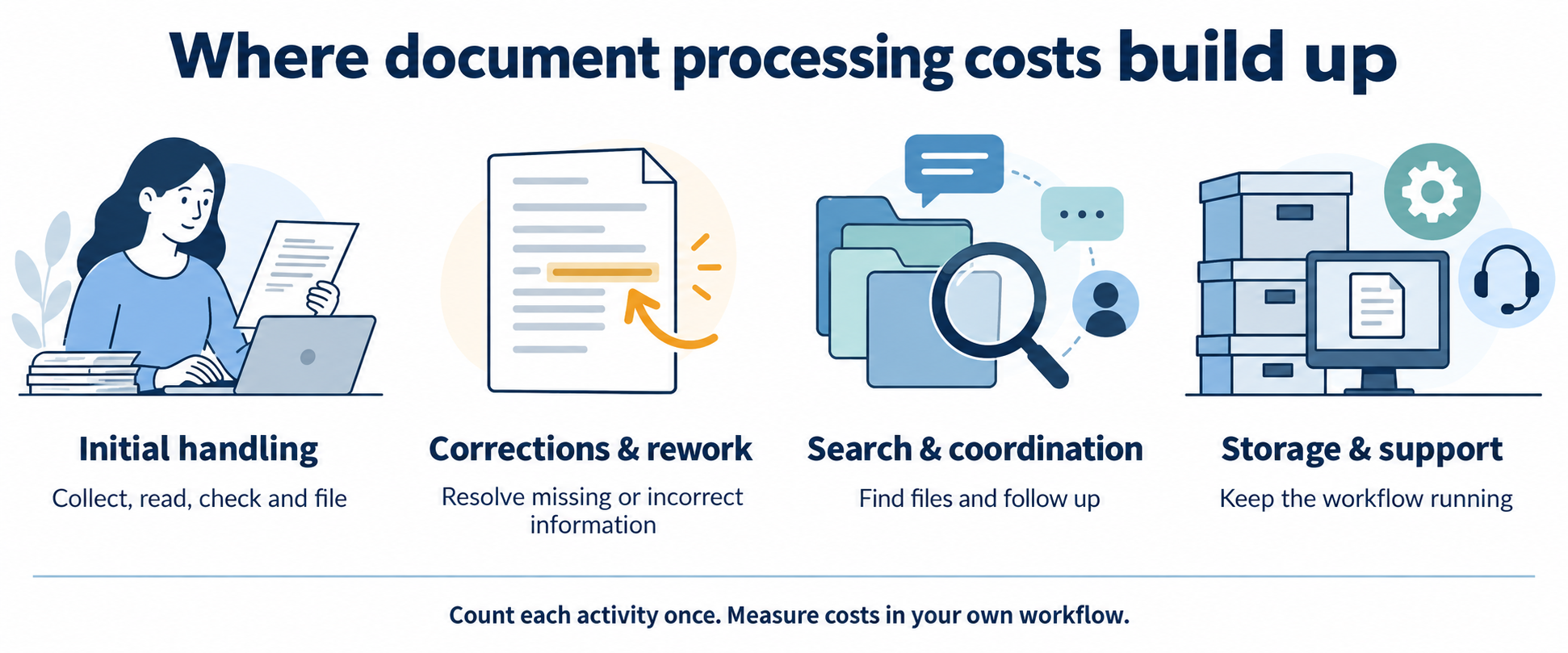
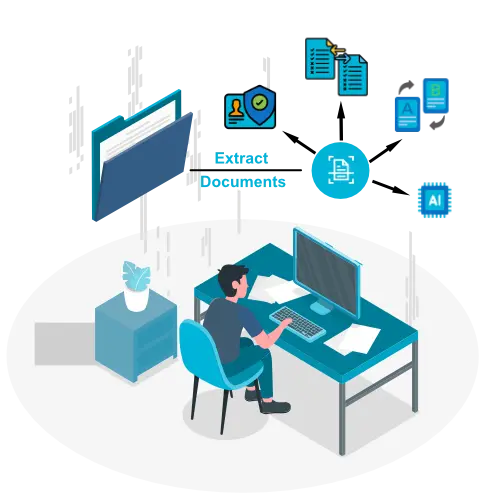
The cost of manual document processing includes more than data entry. Document collection, checking, corrections, retrieval and coordination all consume staff time. Storage, existing software and supervision can add further expense.
Build a reliable estimate by measuring each activity once, then compare it with the full cost of the proposed automated workflow—including human review and implementation.
Which hidden costs should you count?
Count the work required to complete a document, including what happens when it is incomplete or incorrect. Use records and measured time rather than a generic hidden-cost multiplier.
Collection, reading, entry, checking and filing time.
Include these activities once in the initial handling time.
Corrections and rework
Share of documents reworked × extra correction time.
Use incremental time beyond the initial review.
Search and coordination
Retrieval, reminders and status enquiries.
Exclude time already captured in processing or rework.
Overhead
Attributable storage, software, supervision and support.
Exclude costs already included in the loaded hourly rate.
Delays and risk
Recorded missed deadlines, service incidents and other outcomes.
Keep uncertain opportunity costs separate from operating expenses.
How do enterprises measure the cost of document-processing exceptions and rework?
Short answer: count exception files separately from clean ones, then multiply exception volume by the extra handling time and a loaded hourly rate, and add any downstream rework. Example: 10,000 files a month with 12% exceptions at 15 extra minutes each is 300 staff hours a month before rework.
Select a representative document sample and record both normal and exception cases. Separate staff effort from elapsed waiting time: a file waiting overnight does not represent eight hours of labour.
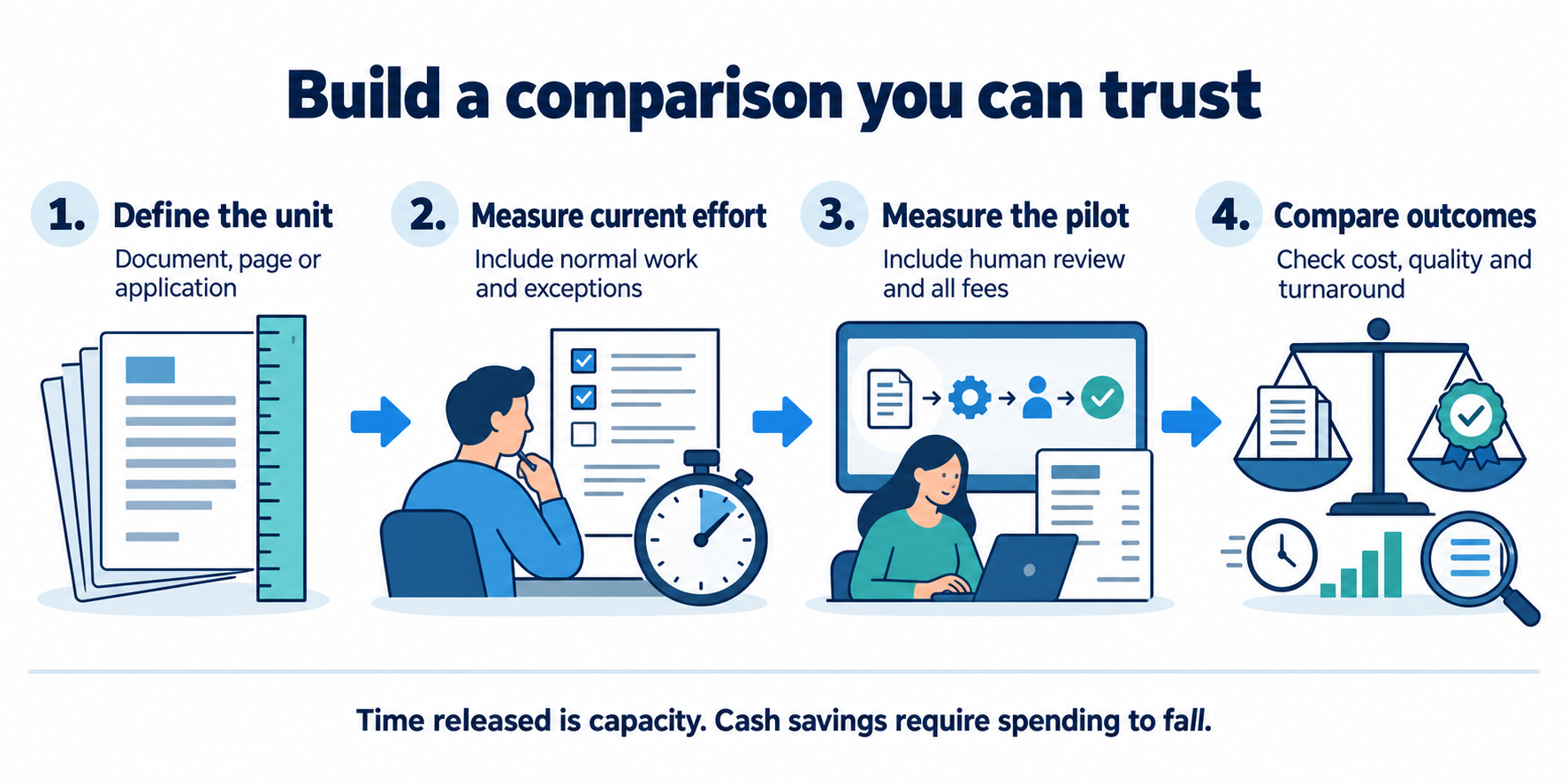
Define one unitChoose a document, page or application packet. Use the same unit throughout.
Measure effortTrack initial work and extra rework across the document mix.
Add actual costsUse a loaded hourly rate and attributable overhead.
Compare a pilotMeasure human review, fees and quality after automation.
Estimate your monthly processing cost
Change the inputs to explore a scenario. Defaults are illustrative assumptions in INR, not market benchmarks, customer results or a DocuExprt price quote. Inputs stay in this page and are not submitted.
Manual monthly cost
Automated monthly cost
Monthly operating-cost difference
Simple modelled payback
First-year modelled net benefit
Released staff time is not automatically a cash saving. First-year benefit assumes 12 full months at the entered operating level, with no ramp-up. Tax, financing, discounting, transition losses and uncertain risk benefits are excluded. Validate your own case before budgeting.
For the default example, 5,000 × (6 + 0.05 × 8) ÷ 60 × ₹300 + ₹10,000 = ₹170,000/month manually. The automated scenario is ₹37,500 in human effort + ₹15,000 in variable fees + ₹20,000 recurring overhead = ₹72,500/month. The modelled difference is ₹97,500/month, with ₹150,000 implementation cost.
What changes when document processing is automated?
Automation changes the mix of work and costs. Some entry and classification tasks may reduce, while exception review, quality checks, software fees, monitoring and integration support remain.
Compare equivalent outcomes: the same document mix, required checks, quality criteria and review scope. A low extraction fee is not the complete cost of a verified application. Include implementation, training and any parallel operation during rollout separately from recurring costs.
Run a pilot against a measured baseline. Record quality and effort together so that speed improvements do not hide missed checks or additional downstream work.
Agree on the unit of work, document mix and required checks.
Measure normal cases, unclear inputs and exceptions in the current process.
Include the same cases in the proposed workflow and measure human review.
Track incorrect results, rework, completion time and recurring costs.
Estimate released capacity and identify which expenses can actually fall.
Compare conservative and expected scenarios before a wider rollout.
A useful result may be increased capacity or shorter turnaround rather than fewer staff. State that benefit accurately instead of presenting every saved hour as reduced expenditure.
Questions about document processing costs
How do I calculate cost per document?
Divide the attributable operating cost for a period by the number of documents processed in that period. Use the same definition of a document and include processing effort, incremental rework and overhead once each.
Are hidden costs always several times direct costs?
No universal multiplier applies. The result depends on your workflow, what you already include in direct costs, exception frequency and overhead. Measure the components rather than assuming a multiplier.
Are staff hours released by automation cash savings?
Not necessarily. Released hours can provide capacity for other work. They reduce cash expenditure only when spending such as overtime, external processing or staffing costs actually falls.
What if the automated scenario costs more?
A negative operating-cost difference means the entered automated scenario costs more per month. There is no cost-based payback under those assumptions; assess whether other measured benefits justify the difference.
Is this calculator a DocuExprt quote?
No. It is an illustrative model using values you can change. Confirm supported services and actual implementation and recurring prices with the team.
What if I say there is actually one AI-supported software that can extract the data from documents and verify it? Yes, it exists, the software can extract the information from the document and can tell you if the document is as per pre-defined requirements or not.
As you can imagine, this software not only helps in automating the industrial manufacturing processes right from Raw Material verification to Final label review but also saves the data to give you insights on process capability and for improving the process to attain operational excellence.
With its wide array of features, the tool helps in two major pillars of Industry 4.0, automation and operational excellence.
Introduction:
As the manufacturing industry moves towards Industry 4.0, the need for automation and digitization is becoming increasingly important. With advancements in artificial intelligence (AI) and machine learning (ML), businesses can now leverage powerful software tools to verify documents and automate various processes.
One such tool which is helping industries in progressing towards smart automation is Automated document verification software. The tool can extract information from documents and verify them against predefined requirements or available databases.
Verify Supplier Documents in Seconds
Certificates, test reports and QC records, checked.
Now we know what the document verification tool is, let us know more about the features that this AI-supported document verification tool has:
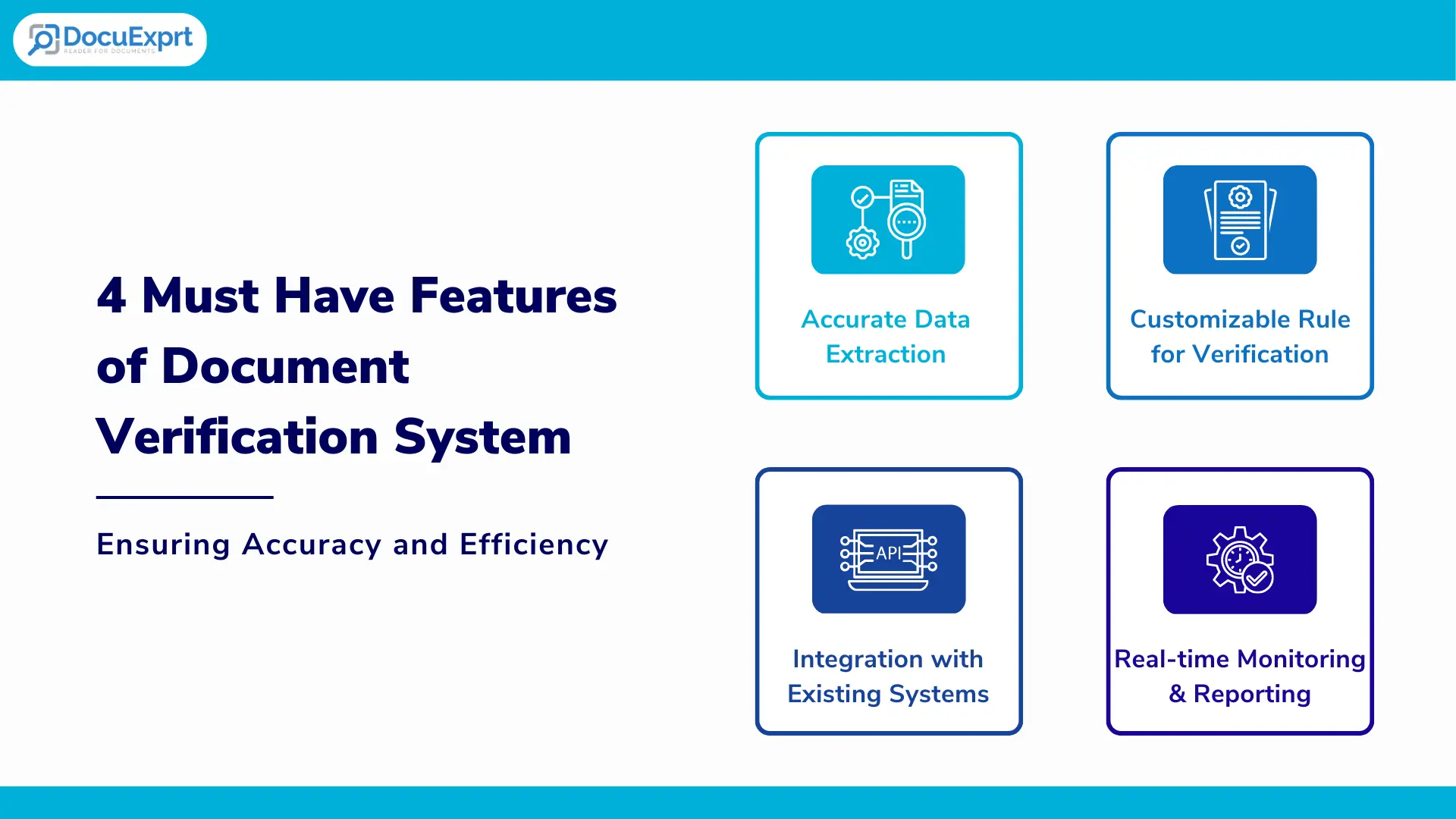
4 must-have features of document verification system for manufacturing automation–
1. Accurate data extraction for document verification:
Accuracy is highly important in the document verification process as it is directly linked to the reliability of the process.
The tool has a high degree of accuracy in extracting data from various types of documents, such as PDFs, images, and scanned documents. This has become possible with robust machine learning algorithms and natural language processing capabilities. System should be able to extract information of Identity from the document.
2. Customizable rule sets for verification:
Based on the scale of operation, the system might need to verify 100s of different types of documents, it is a must for the tool to meet the need of verifying custom documents.
The tool allows users to create customizable rule sets that define what data is extracted and how it is verified. This allows for greater flexibility in adapting the tool to different use cases and industries. The tool learns from the sample data, once the data is fed to the system, the system becomes capable of verifying any such documents in future.
3. Integration with existing systems:
It is always preferable to improve the existing set-up than installing a whole new set-up, especially in the manufacturing environment.
The tool can integrate with existing systems, such as ERP, CRM, and other manufacturing systems, to facilitate data transfer and automate workflows. This feature greatly helps in making the implementation smoother as the data migration task from the existing to a new system for document verification gets nullified.
4. Real-time monitoring and reporting:
In-process document verification is the key to identifying the mistakes in the process or documentation and mitigating the risk in finished goods.
The tool provides real-time monitoring and reporting of the document verification and data extraction process. This allows users to quickly identify and address any issues or errors that arise.
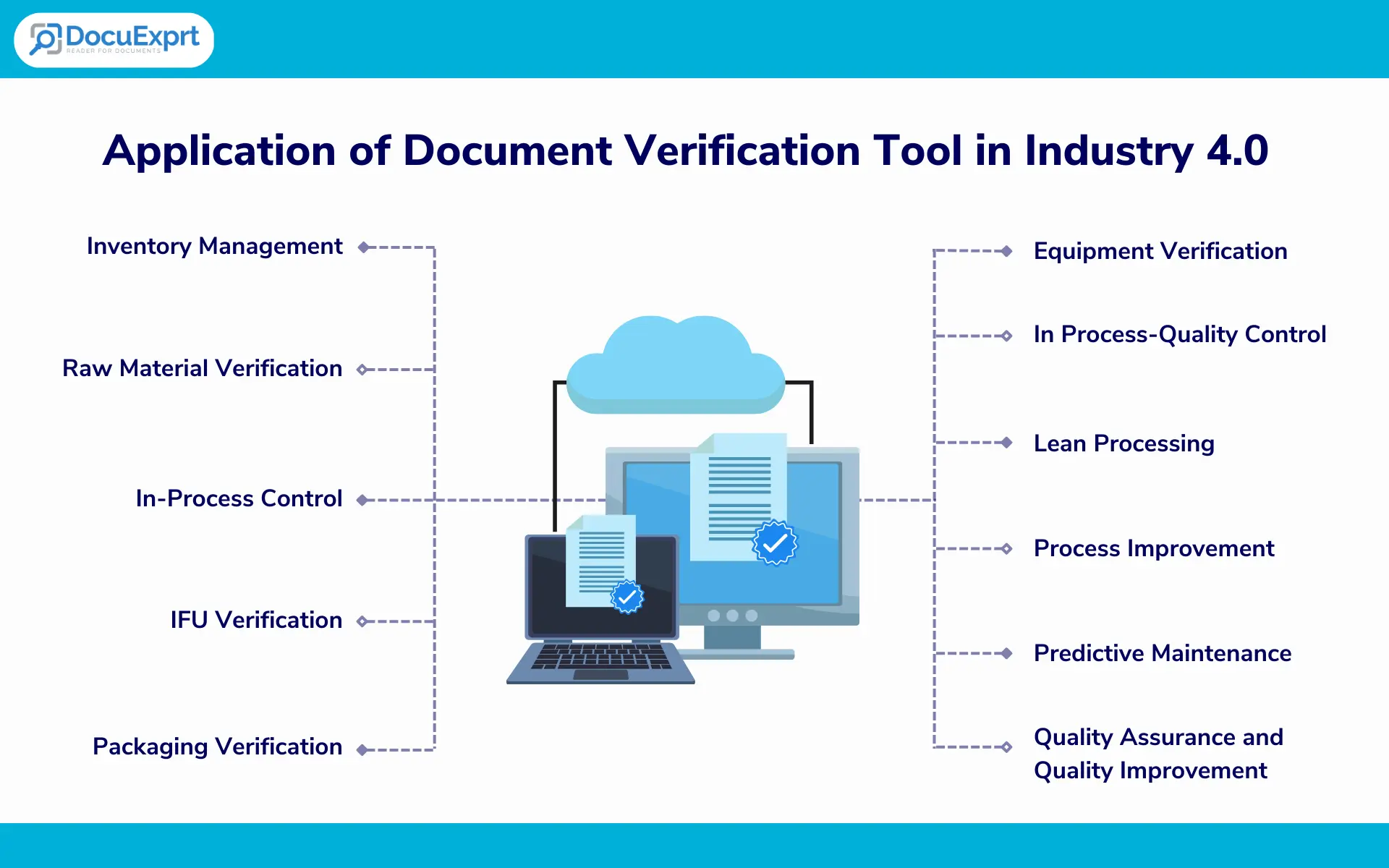
Applications of document verification tools in manufacturing environments for automation that supports Industry 4.0 objectives:
Inventory Management:
The software can verify documents related to inventory management, such as purchase orders, invoices, and bills of lading, to ensure that the correct items are being received and recorded. Document verification can be done in real-time. Further, the data can be extracted and saved in the form of an Excel sheet for future reference and better data management.
Raw Material Verification:
The software can verify the documents related to raw materials, such as material safety data sheets (MSDS) and certificates of analysis (COA), to ensure that the right materials are being used in the manufacturing process. Raw material verification is a very important process as it directly impacts the final product being manufactured.
In-Process Control:
The software can verify different types of documents related to in-process control, such as work instructions, process control plans, and quality control reports, to ensure that the manufacturing process is meeting the required specifications. In industries, the in-process documents are usually reviewed manually, if the manual controls are missed, this may lead to issues with the final product that increases the financial and customer risks. Automating this verification greatly helps in reducing the chances of manual verification errors.
IFU Verification:
For the majority of products, Instructions for use (IFUs) are a very important component of the packaging. These IFUs are critical to guide the user on how to use the product, use of IFUs is dominant in the food, pharmaceutical and medical devices industries. The IFU verification process is largely done manually, the allocated personnel reads through the IFU completely as part of finished good (FG) testing which turns out to be a time-consuming, tedious and error-prone process.
The software can verify documents related to instructions for use (IFU), such as user manuals and product labels, to ensure that they are accurate and comply with regulatory requirements.
Packaging Verification:
The software can verify documents related to packaging, such as packaging specifications, artwork text, and labels, to ensure that they are accurate and comply with regulatory requirements.
This verification helps in identifying if or not the correct information is printed on the final package or not. This process is usually done in industries in a semi-automatic way by installing the vision systems on the final packaging lines, these vision systems verify a few variable components like batch number, lot number, manufacturing date and expiry date.
The document verification tool can greatly help in identifying and verifying the whole information on samples without adding to operation time.
Details on the cartons of the product remain to be highly regulated parts of the products, automation of the packaging verification greatly helps in reducing the operation time while remaining 100% compliant with the regulations laid down by authorities (Like FSSAI, FDA or standard acts like LMA).
Equipment Verification:
Calibration and maintenance of the equipment are one of the best ways you keep your equipment in a manufacturing-ready state. The software can verify documents related to equipment, such as maintenance records, calibration certificates, and inspection reports, to ensure that the equipment is operating properly and meeting the required specifications.
Document verification software can greatly benefit the manufacturing industry by automating document verification and ensuring compliance with regulatory requirements. By leveraging the power of AI and ML, businesses can streamline their operations and improve the quality and efficiency of their manufacturing processes.
The document verification tool has a unique ability to not just extract the data, but also to validate the extracted data against the requirement. This greatly helps as the majority of the operations in the industry require process parameters to be within a certain range.
Let’s take a look at a few more applications of this document verification tool in manufacturing:
In Process- Quality Control:
The software can extract data from inspection reports and compare it with the quality control database in Excel to ensure that the products are meeting the required quality standards.
For example, at the end of the powder mixing stage, a report is produced by the system that tells about the process parameters like speed and frequency of rotation, time of rotation and amount of powder loaded in the mixer.
For getting the final mixture of desired quality, the speed, frequency and amount of powder in the mixer must be within the defined range. Once the data of required ranges are fed into the document verification tool, after each and every mixing run, the document verification tool can check after each and every run if the process was done rightly or not.
Thus, in case the process is done wrongly, that can save a lot of time, effort and loss made by leading to a nonconforming product at the end.
Lean Processing in the manufacturing environment:
The software can extract data from production reports and compare it with the production database in Excel to identify areas where waste can be reduced and efficiency can be improved. This is greatly helpful in yield improvement and waste reduction. In routine processing, the data of wastage is logged in the manual format and makes the supervisor and management miss the key insights on how the waste could be minimized by making the process more efficient.
Process Improvement:
The software can extract and save the process data that can be used to improve the process, which in other words is called operational excellence.
By leveraging the data extraction and comparison feature of this tool, manufacturers can not only automate document verification, but also improve their operations and processes in a variety of areas. This can lead to greater efficiency, cost savings, and ultimately, increased competitiveness in the marketplace. Document Validation can become streamlined task.
Predictive Maintenance:
The data of current manufacturing can be leveraged to predict any possible future failures and prevent them.
By extracting data from maintenance records and equipment performance reports, manufacturers can create a digital database of equipment performance and use this data to predict when maintenance is needed, preventing equipment breakdowns and reducing downtime.
Quality Assurance and Quality Improvement:
By extracting data from quality control reports and defect logs, manufacturers can create a digital database of quality performance and use this data to identify trends and patterns in defects, improving quality control processes and reducing the risk of quality issues.
By leveraging the data extraction feature of this tool, manufacturers can create a powerful digital database of manufacturing data that can be used for a variety of applications, ultimately improving efficiency, reducing costs, and increasing competitiveness.
The application of document verification software spans all industries like food, beverage, pharmaceutical, medical devices and automobile industries to count a few.
Here’s a case study on how a car manufacturing company used AI-powered document verification and data extraction software to improve their manufacturing process.
Case Study: AI-Powered Document Verification and Data Extraction Software in Car Manufacturing Automation
Overview
A major car manufacturing company was facing a challenge in their manufacturing process. They were struggling to keep up with the increasing demand for their cars while maintaining the quality and accuracy of their production. They needed a solution that could help them automate their manufacturing process and reduce the risk of errors and delays.
Solution
The car manufacturer decided to implement an AI-powered document verification and data extraction software that could automatically verify the accuracy and completeness of manufacturing documents, such as purchase orders, production reports, and quality control records.
The software could also extract relevant data from these documents and compare it with the existing data in their database, ensuring that all information was up-to-date and accurate.
Implementation
The implementation process was smooth and efficient. The software was integrated into existing manufacturing processes, allowing the documents to be automatically verified and the relevant data to be extracted and compared with their existing database.
Results
After implementing the AI-powered software, the company saw significant improvements in their manufacturing process. Here are some of the key results:
Higher accuracy:
The software was able to identify and correct errors in the manufacturing documents, ensuring that all data was accurate and up-to-date. This reduced the risk of errors and delays in the manufacturing process.
Better efficiency:
By automating the document verification and data extraction process, the company was able to save time and improve efficiency in its manufacturing process. This allowed them to keep up with the increasing demand for their cars while maintaining quality and accuracy.
Reduced costs:
The software helped the manufacturer to reduce costs by eliminating the need for manual document verification and data entry. This also reduced the risk of errors and delays, which could have resulted in additional costs.
Improved quality:
The software allowed the manufacturer to maintain a high level of quality in their manufacturing process by ensuring that all data was accurate and up-to-date. This reduced the risk of quality issues and helped to maintain customer satisfaction.
Takeaway of the success case
The implementation of AI-powered document verification and data extraction software helped the manufacturer to improve their manufacturing process and maintain their competitiveness in the market. The software improved accuracy, increased efficiency, reduced costs, and improved quality, ultimately leading to a more streamlined and effective manufacturing process. Manufacturing automation is one of the greatest revolutions that have happened in the last few decades, AI document verification tool is yet another example of such a breakthrough.
Run It on Your Own Documents
Bring one supplier packet. We run it on the call.
Supplier and QC workflows mapped
30+ government databases, real time
Inspection-ready audit trails
Cloud, private cloud or on-premise
Trusted by enterprises and government boards
CERT-IN CertifiedISO/IEC 27001:2013Data stays in India
Free trial tokens available for testing.
Conclusion:
The advantages of document verification tools are many, right from automation to the processes for supporting lean manufacturing to data collection for workflow and process improvement. With the advent of AI and the introduction of tools like DocuExprt, it is the best time for industries to utilize the tools which are ‘nice to have’ now, but will soon become ‘must have’ to remain competitive in the world of manufacturing.
Frequently Asked Questions
What is document verification?
Document verification; also called document authentication is the process of checking the documents for their correctness, a verified document is considered to be complying with the expectations for that particular document.
What is the use of document verification tools in manufacturing?
The AI document verification tool can be used in manufacturing in various ways, right from the automation of document verification to building the data for process improvement. The AI document verification tool finds its application in all major departments of manufacturing including RM verification, In Process Control, Quality assurance and non-conformance handling
What are the benefits of using an AI document verification tool?
There are various benefits of using the AI tool for document verification. The tool can process documents with high accuracy and supports 24×7 document verification. It also reduces the manual errors of document verification.
Your team spends 40 hours per week on manual document checks. AI-powered document verification software can do it in 4. That's not a projection - it's what enterprises processing 10,000+ documents monthly are already reporting after switching to automated verification platforms.
The document verification software market has hit $5.07 billion in 2025 and is racing toward $10.32 billion by 2029 at a 19.4% CAGR. Meanwhile, sophisticated fraud attempts surged 180% in 2025 alone, and AI-generated document forgeries jumped from 0% to 2% of all detected fakes in just one year.
If your organization still relies on manual document checks or fragmented point solutions, you're operating with a widening gap between your verification capabilities and the threats targeting your business.
This guide breaks down everything enterprise decision-makers need to know: what document verification software actually does, which features matter most, how the top 10 platforms compare, and how to calculate ROI for your specific use case.
$5.07B
Market Size in 2025 Growing at 19.4% CAGR
⚠
180%
Surge in Sophisticated Fraud Attempts (2025)
⚡
100x
Faster Processing vs. Manual Verification
90-95%
Cost Reduction with AI Verification
What Is Document Verification Software?
Document verification software is an enterprise technology platform that uses artificial intelligence, machine learning, and natural language processing to automatically extract, validate, authenticate and verify information from documents - then cross-reference that data against authoritative databases in real time.
Think of it as the difference between a security guard checking IDs by eye at a gate versus a system that instantly scans the document, reads every field, verifies it against the issuing government database, checks for signs of tampering, and flags anomalies - all in under 10 seconds.
What Document Verification Software Actually Does
Modern document verification platforms handle four core functions:
Function
What It Does
Example
Data Extraction
AI-powered OCR + NLP reads text, tables, and fields from PDFs, images, and scanned documents
Extracting vendor name, invoice number, and line items from 500 invoices in 10 minutes
Document Authentication
AI image forensics detect tampering, forgery, and alterations
Identifying a digitally altered PAN card where the photo has been swapped
Database Verification
Real-time cross-referencing against government and third-party databases
Verifying a GSTIN number against the GST portal to confirm active status
Workflow Automation
Conditional routing, approvals, and actions based on verification results
Auto-approving KYC applications that pass all checks, flagging exceptions for human review
The Evolution: From Manual Checks to Agentic AI
Document verification has evolved through three distinct generations:
Generation 1: Manual Verification (Pre-2015)
Teams of clerks physically inspected documents, compared signatures, and called issuing authorities by phone. Accuracy was inconsistent, and processing a single document could take hours.
Generation 2: Template-Based OCR (2015-2022)
Software could scan documents and extract text using optical character recognition, but required rigid templates for each document type and couldn't handle variations, multi-language content, or verification logic.
Generation 3: Agentic AI Verification (2023-Present)
Today's platforms use agentic AI - intelligent systems that don't just follow rules, but make decisions based on what they find. They extract data from any document format, verify it against live databases, apply conditional logic, flag exceptions, and route documents through multi-step workflows - all without human intervention.
DocuExprt operates at Generation 3, using its visual no-code workflow builder with 5 node types (Input, Processing, Condition, Output, Evaluation) to create sophisticated verification pipelines that adapt to each document's unique characteristics.
DocuExprt Agentic AI Verification Pipeline
Step 1
Input Node
→
Step 2
AI Extraction
→
Step 3
Gov DB Verify
→
Step 4
Conditional Logic
→
Step 5
Output / Action
Why Enterprises Need Document Verification Software in 2026
If document verification software was a "nice-to-have" five years ago, it's now a strategic imperative. Here's why:
Sophisticated fraud attempts surged 180% - from 10% of all fraud in 2024 to 28% in 2025
AI-assisted document forgery rose to 2% of all fake documents detected, up from 0% the prior year
Deepfake selfies increased 58%, making biometric-only verification insufficient
AI fraud agents - automated systems that create synthetic identities and interact with verification platforms in real time - are expected to become mainstream within 18 months
Fraudsters now use tools like ChatGPT, Grok, and Gemini to generate convincing fake documents. ID cards represent 72% of forged documents, followed by passports (13%) and driver's licenses (10%).
Manual verification teams simply cannot detect AI-generated forgeries at the speed and scale enterprises require.
2. Regulatory Penalties Are Escalating
Non-compliance with KYC and AML regulations carries steep financial consequences:
The RBI imposed 353 penalties totalling ₹54.78 crore during FY 2024-25 - an 88% surge over three years
ICICI Bank was fined ₹97.80 lakh for KYC guideline violations in a single enforcement action
Kotak Mahindra Bank, IDFC First Bank, and PNB collectively received ₹1.29 crore in penalties for compliance shortfalls
Globally, 40% of companies reported being targeted by fraud in 2025, and over 20% reported losses above $100,000
Beyond fines, the operational cost of remediation, reputational damage, and increased regulatory scrutiny makes compliance failures extremely expensive.
3. Manual Processing Is Bleeding Money
The economics of manual document processing are stark:
Cost Factor
Manual Processing
AI-Powered Verification
Cost per document
$5-$8 per document
$0.10-$0.50 per document
Processing speed
15-30 minutes per document
5-30 seconds per document
Error rate
10-15% data entry errors
Less than 1% with AI verification
Hidden cost multiplier
For every $1 in direct labor, $2.30-$4.70 in hidden costs (rework, delays, errors)
Minimal hidden costs
Annual cost (100+ employees)
$430,000-$850,000
$50,000-$120,000
Manual document processing still accounts for 20-30% of total operational costs in finance-heavy industries like banking and insurance. Organizations using AI-powered verification report 60-80% cost reduction within the first year.
4. Speed Is Now a Competitive Advantage
In customer onboarding, insurance claims, and vendor verification, verification speed directly impacts revenue:
Banks that complete KYC in minutes win customers over those that take days
Insurance companies that process claims documents faster have higher customer retention
Real estate transactions that verify property documents in hours instead of weeks close sooner
Enterprises processing documents 100x faster than manual review gain measurable competitive advantages in customer experience, operational throughput, and time-to-revenue.
How AI Document Verification Works
Three technologies do the work: OCR reads the document, NLP understands what it read, and machine learning decides whether to trust it.
Understanding the split matters when you evaluate vendors. Many claim "AI" but only ship the first layer.
🖹
OCR — Optical Character Recognition
Extracts text from scanned, photographed and handwritten documents at 99.2%+ accuracy. Legacy OCR manages 60–75%.
🧠
NLP — Natural Language Processing
Interprets the extracted text in context, identifying names, dates, amounts and the relationships between fields.
⚙
Machine Learning Models
Learn from every verified document to detect fraud patterns, adapt to new formats and improve extraction accuracy.
👁
Computer Vision
Analyses visual elements, patterns and security features. Detects alterations and inconsistencies, and verifies document structure against known templates.
🔮
Deep Learning Neural Networks
Processes complex patterns and subtle anomalies that rule-based algorithms miss. Handles unstructured and semi-structured documents.
What each layer actually does
Layer
Capabilities
OCR
Processes scanned, digital and handwritten inputs · auto-corrects orientation, lighting and skew · supports 100+ languages and scripts · extracts structured data from unstructured documents
Self-improving accuracy over time · anomaly and fraud pattern detection · adapts to organisation-specific formats · detects deepfakes and AI-generated forgeries
The 6-step verification process
Every document that enters the system follows the same path, whether it arrives one at a time or in a batch of fifty thousand.
Step
What happens
1. Capture & classification
Documents arrive via API, mobile capture, email or scanner. AI classifies the type — ID card, passport, invoice, tax certificate, GSTIN — and applies the matching verification rules automatically.
2. Enhancement & OCR extraction
Image quality is auto-corrected for brightness, contrast, orientation and skew, then every text field, security feature and structural element is extracted at 99.2%+ accuracy.
3. NLP data validation
Extracted data is interpreted in context. Field relationships are validated — date of birth against stated age, address format against country — and inconsistencies are flagged.
4. Government database cross-referencing
Data is validated in real time against government registries (Aadhaar, PAN, GSTIN, MCA, EPFO) and third-party databases to confirm authenticity.
5. Fraud detection & authentication
ML models examine watermarks, holograms and microprinting, and detect digital tampering, photocopies and AI-generated forgeries through pixel-level analysis and metadata verification.
6. Decision & confidence scoring
The system returns approved, rejected or review, with a confidence score, a full audit trail, and automatic routing to a human reviewer when confidence falls below your threshold.
The step most buyers underestimate: step 4. Extraction and fraud detection are widely available. Real-time cross-referencing against government registries is what separates a document reader from a document verifier.
AI versus manual review
Metric
Manual review
AI-powered verification
Accuracy rate
85–92%
98–99.5%
Processing speed
20–30 docs/hour
10,000+ docs/hour
Cost per document
$5–15
$0.10–0.50
Fraud detection
Inconsistent, reviewer-dependent
Pattern-based, continuously improving
Scalability
Requires proportional hiring
Absorbs volume spikes instantly
Audit trail
Manual logging, inconsistent
Automated, tamper-proof, compliance-ready
Onboarding time
3–5 business days
Seconds to minutes
Deepfake detection
Very low
AI-powered pattern analysis
Cost figures vary by document type, volume tier and the number of government API calls each verification requires.
8 Key Features to Look For in Document Verification Software
Not all document verification platforms are built equal. Here are the eight capabilities that separate enterprise-grade solutions from basic tools:
1. AI-Powered Data Extraction
Intelligent OCR combined with NLP that reads and understands documents - not just scans them. AI-powered extraction hits 95-99% accuracy for printed text vs. 85-92% for traditional OCR.
2. Government Database Integration
Real-time API connections to government databases that verify document authenticity at the source. A document can look perfect but contain fabricated data - only source verification confirms it.
3. Agentic AI Workflow Builder
Visual, no-code interface for building multi-step document processing pipelines with conditional logic. Build in hours what would take months in code.
4. Fraud & Tampering Detection
AI image forensics that identify altered, manipulated, or AI-generated documents. Detects pixel-level manipulation, font inconsistencies, and metadata anomalies.
5. Multi-Language Support
Process documents in 20+ languages including Hindi, Telugu, Tamil, Gujarati, Bengali, and more - critical for enterprises operating across India.
6. API-First Architecture
RESTful APIs that allow developers to integrate verification into existing CRM, ERP, and onboarding platforms. Code snippets in 7 languages.
7. Enterprise Security & Access Control
5-level RBAC, complete audit trails with IP tracking, credential encryption, workspace isolation between departments, and copy/paste/print restrictions.
8. Scalability & Bulk Processing
Handle volume spikes, batch processing from cloud storage (AWS S3, Azure, GCP), and automated document ingestion. Support for 10,000+ documents per day.
Feature 1: AI-Powered Data Extraction
What it is: Intelligent OCR combined with NLP that reads and understands documents - not just scans them.
Why it matters: Traditional OCR achieves 85-92% accuracy. AI-powered extraction hits 95-99% accuracy for printed text and 85-95% for handwritten documents. That gap of 7-14 percentage points means thousands of fewer errors at enterprise scale.
What to look for: Support for PDFs, images (PNG, JPG, WEBP), scanned documents, and complex layouts including tables and nested fields.
DocuExprt capability: 99% extraction accuracy across all supported formats, with customizable AI prompts that let you define exactly what data to extract. Output can be structured as JSON with nested fields for seamless system integration.
Feature 2: Government Database Integration
What it is: Real-time API connections to government databases that verify document authenticity at the source.
Why it matters: A document can look perfectly legitimate but contain fabricated data. The only way to confirm authenticity is to verify against the issuing authority's records.
What to look for: Breadth of database coverage, response time, uptime reliability, and compliance with data protection regulations.
DocuExprt capability:30+ pre-built government database APIs covering:
Aadhaar-to-UAN, UAN-to-Employment History, PAN-to-Employment Status
Banking
Bank Account Verification, IFSC Validation, UPI Verification
Compliance
TDS Compliance, PAN-Aadhaar Linking Status, TAN Verification
Feature 3: Agentic AI Workflow Builder
What it is: A visual, no-code interface for building multi-step document processing pipelines with conditional logic.
Why it matters: Enterprise document verification isn't a single step - it's a pipeline. You need to extract data, verify it, apply business rules, route exceptions, and deliver results to downstream systems. Building this in code takes months. A no-code builder does it in hours.
What to look for: Visual drag-and-drop interface, conditional branching, multiple node types, API output, and the ability to handle complex decision trees.
DocuExprt capability: Visual workflow builder with 5 node types:
Input Node - Configure document sources and global processing rules
Simple Processing Node - AI-powered extraction with custom prompts
Conditional Node - AND/OR logic for intelligent routing (e.g., "If invoice > ₹10 lakh, route to manager approval")
Output Node - Structured JSON delivery to databases, cloud storage, or APIs
Evaluation Node - Weighted scoring for applications, compliance checks, and resume screening
Feature 4: Fraud and Tampering Detection
What it is: AI image forensics that identify altered, manipulated, or AI-generated documents.
Why it matters: With AI-generated forgeries rising to 2% of detected fakes and sophisticated fraud surging 180%, traditional visual inspection is no longer sufficient. AI forensics can detect pixel-level manipulation, font inconsistencies, metadata anomalies, and digital watermark tampering.
What to look for: Detection accuracy rates, types of fraud detected, false positive rates, and integration with verification workflows.
DocuExprt capability: AI-powered anomaly detection integrated directly into verification workflows. When the system detects potential tampering, it can automatically flag the document, route it to a human reviewer, and log the finding in the audit trail.
Feature 5: Multi-Language Support
What it is: Ability to extract and process documents written in multiple languages and scripts.
Why it matters: India alone has 22 official languages and hundreds of regional document formats. Global enterprises process documents in dozens of languages. A platform that only handles English is useless for real-world enterprise operations.
What to look for: Number of languages supported, accuracy across scripts (Latin, Devanagari, Dravidian, etc.), and ability to handle mixed-language documents.
DocuExprt capability: Processing documents in 20+ languages including Hindi, Telugu, Tamil, Gujarati, Bengali, Marathi, Kannada, Malayalam, Punjabi, and more - critical for enterprises operating across India.
Feature 6: API-First Architecture
What it is: RESTful APIs that allow developers to integrate document verification into existing applications, websites, and systems.
Why it matters: Document verification rarely operates in isolation. It needs to plug into your CRM, ERP, onboarding platform, claims system, or custom application. Without robust APIs, you're stuck with manual data transfer between systems.
What to look for: Comprehensive API documentation, code snippets in multiple languages, webhook support, rate limits, and authentication mechanisms.
DocuExprt capability: Full REST API with ready-to-use code snippets in 7 languages (Python, JavaScript, cURL, Java, Go, PHP, Ruby). API key management with IP whitelisting, expiration controls, and usage tracking.
Feature 7: Enterprise Security and Access Control
What it is: Role-based permissions, audit trails, encryption, and workspace isolation that meet enterprise security requirements.
Why it matters: Document verification involves sensitive personal data - identity documents, financial records, health information. A platform without proper security controls is a compliance liability.
What to look for: Role-based access control (RBAC), audit logging, encryption at rest and in transit, SOC 2 compliance, IP whitelisting, and data residency options.
DocuExprt capability:5-level RBAC (Super Admin, Admin, Template Manager, Workflow Manager, Workspace Manager), complete audit trails with IP tracking, credential encryption, workspace isolation between departments, and copy/paste/print restrictions for sensitive documents.
Feature 8: Scalability and Bulk Processing
What it is: Ability to handle volume spikes, batch processing, and automated document ingestion from multiple sources.
Why it matters: Enterprise document volumes are unpredictable. Year-end financial audits, open enrollment periods, regulatory filing deadlines - all create spikes that manual teams can't absorb.
What to look for: Batch upload capabilities, automated ingestion from cloud storage, processing speed at scale, and queue management.
DocuExprt capability: Automated integrations with AWS S3, Azure Blob, Google Cloud, MS SQL Server, Excel, and local folders. Documents are auto-fetched, processed through assigned workflows, and results delivered - all without manual intervention. Support for 10,000+ documents per day.
Test the Features That Matter
Bring your checklist. We go through it line by line.
How DocuExprt Leads with Government API Integration
DocuExprt's deepest competitive moat is its 30+ pre-built government database verification APIs - the most comprehensive coverage of Indian government databases available in any single platform.
Why Government Database Integration Matters
A fraudster can create a visually perfect fake PAN card. It will pass visual inspection by a trained human. It might even pass AI-based image forensics.
But it won't pass a real-time API verification against the Income Tax Department's database. That's the difference between document inspection and document verification.
DocuExprt's Government API Coverage
Identity Verification
PAN - Detailed verification, status check, phonetic matching, PAN-to-PAN linking, PAN-to-TDS challan
Aadhaar - Face-Aadhaar linking via DigiLocker, Aadhaar-to-UAN mapping
Passport - Real-time verification against passport authority records
Voter ID - Electoral roll verification
Driving License - Advanced DL verification with complete record details
Vehicle RC - Registration certificate verification with challan details
Business Verification (KYB)
GSTIN - Basic and detailed GST registration verification
CIN - Company identification number verification with PAN cross-reference
TIN - Tax identification number validation
Director Lookup - Verify company directors against MCA records
FSSAI - Food license verification for food industry compliance
Shop & Establishment - License verification for retail and commercial entities
MCA Charge Check - Verify registered charges against company assets
UAN-to-Employment History - Verify employment records through EPFO
Aadhaar-to-UAN - Cross-reference identity with employment records
PAN-to-Employment Status - Verify employment through tax filings
Banking Verification
Bank Account - Verify account existence and holder details
IFSC - Bank branch code validation
UPI - UPI ID verification
How It Works in Practice
Here's a real-world example: An NBFC needs to verify a loan applicant's identity, employment, and financial standing.
Without DocuExprt
Manually check PAN card against IT portal
Call employer to verify employment
Manually check GSTIN if self-employed
Wait for bank statement verification
Total time: 2-3 business days
VS
With DocuExprt
Auto-extract applicant data from documents
Verify PAN against Income Tax database
Cross-reference Aadhaar-to-UAN for employment
Validate GSTIN if self-employed
Verify bank account details
Apply conditional logic and deliver results
Total time: Under 3 minutes
NBFC Loan Applicant Verification Workflow
Input
Applicant Docs
→
Extract
AI Data Read
→
Verify
PAN + Aadhaar + Bank
→
Condition
Risk Scoring
→
Output
Approve / Escalate
Industry-Specific Use Cases
BFSI (Banking & Financial Services)
Challenge: KYC/AML compliance requires verification of identity, address, income, and employment documents for every customer - with RBI penalties reaching ₹54.78 crore in FY25 for non-compliance.
Solution with DocuExprt:
Automated KYC with PAN, Aadhaar, and bank account verification in real-time
Agentic workflows that flag high-risk applications for enhanced due diligence
Bulk processing for account opening drives and portfolio reviews
Complete audit trails for regulatory inspections
Result: KYC processing time reduced from 3 days to 3 minutes. Compliance accuracy improved to 99%.
Challenge: Employee onboarding requires verification of educational certificates, employment history, identity documents, and address proof - for potentially hundreds of new hires per quarter.
Solution with DocuExprt:
Bulk verification of academic marksheets and certificates
Employment history verification via UAN-to-Employment History API
PAN and Aadhaar verification for every new hire
Evaluation nodes for resume scoring and candidate ranking
Result: Employee onboarding time reduced from 5 days to 4 hours. Background check accuracy improved to 99.5%.
Challenge: Contract review, deed processing, and power of attorney verification require extracting key terms, dates, and obligations from complex legal documents - then verifying the identity and authority of all parties.
Solution with DocuExprt:
AI extraction of key terms, clauses, obligations, and dates from contracts
Conditional workflows that route high-value contracts for senior attorney review
Identity verification of signatories via PAN and Aadhaar
Talk to Document feature for quick conversational querying of lengthy legal documents
Result: Contract review time reduced by 70%. Key term extraction accuracy at 98%.
Challenge: Citizen services, welfare scheme eligibility, and inter-department document processing require verification of millions of documents across diverse formats and languages.
Solution with DocuExprt:
Multi-language document processing (20+ Indian languages)
Verification against the agency's own databases plus cross-departmental checks
Batch processing for scheme applications and eligibility screening
Audit trails and role-based access for government compliance
Result: Citizen document processing speed improved 100x. Error rates reduced from 12% to under 1%.
Challenge: Property transactions require verification of title deeds, encumbrance certificates, owner identity, tax receipts, and legal clearances - across multiple parties and jurisdictions.
Solution with DocuExprt:
Property document data extraction (sale deeds, lease agreements, NOCs)
GSTIN verification for commercial property transactions
Document expiry triggers for lease renewals and license expirations
Result: Property document verification time reduced from weeks to hours. Fraud detection rate improved by 85%.
Healthcare
Challenge: Patient registration, clinical credentialing and pharmacy dispensing each depend on documents that must be checked quickly and cannot be checked casually - insurance cards, medical licences, and prescriptions for controlled substances.
Solution with DocuExprt:
Verify insurance cards and identity documents at patient registration
Automate medical licence and certification checks, with expiry monitoring for clinical staff
Validate prescription authenticity and authorisation before dispensing
Extract structured data from medical records and discharge summaries
Result: Registration and credentialing move from manual review to automated checks, with expiry tracking that surfaces lapsed licences before they become a compliance finding.
E-commerce and Retail
Challenge: Age-restricted categories require genuine identity checks at checkout, and account or payment fraud depends on documents that look right at a glance.
Solution with DocuExprt:
Authenticate government-issued IDs for age-gated products
Verify identity documents and payment instrument ownership together
Detect tampered or synthetic IDs through pixel-level forensics
Run checks through an API so verification sits inside the existing checkout flow
Result: Age and identity checks complete in seconds rather than diverting the customer to manual review, while tampered documents are caught before an order is accepted.
Education
Challenge: Admissions windows concentrate enormous document volume into a few weeks - transcripts, mark sheets, category and income certificates - and forged academic credentials are widespread.
Solution with DocuExprt:
Bulk verification of transcripts, mark sheets and certificates during admission drives
Cross-verification against board and university records
Forgery detection on mark sheets and degree certificates
Scholarship and category certificate validation against issuing authorities
Result: 3.5 lakh admission documents processed at 99% accuracy in a single admissions cycle.
Scenario: A mid-size NBFC processing 5,000 KYC documents per month.
Component
Value
Current annual cost (manual processing)
Rs. 2.5 crore ($300,000)
DocuExprt annual cost (token-based pricing)
Rs. 15 lakh ($18,000)
Net annual savings
Rs. 2.35 crore ($282,000)
Implementation cost (one-time)
Rs. 5 lakh ($6,000)
Payback period
Less than 1 month
First-year ROI
4,600%
Early adopters of AI-powered document verification are seeing up to 4x ROI in year one, with processing cost reductions of 40% and turnaround time cuts of 70%.
4,600%
First-Year ROI for Mid-Size NBFC
< 1 Mo
Payback Period on Implementation
$282K
Net Annual Savings at 5,000 docs/month
75-85%
Team Redeployment to High-Value Work
Beyond Cost: Strategic Value
The ROI of document verification software extends beyond direct cost savings:
Revenue acceleration - Faster customer onboarding means faster time-to-revenue
Scalability - Handle 10x volume without proportional cost increases
Risk reduction - Catch fraud that manual processes miss
Talent redeployment - Free skilled employees from repetitive verification tasks to focus on high-value decision-making
Pricing Models and Total Cost of Ownership
Per-document pricing looks cheapest on a quote and is frequently the most expensive model in practice.
The reason is volume variability. A common pattern: a team budgets $0.15 per document against a projected 10,000 documents a month. Volume doubles during a seasonal peak, overage rates trigger at three times the base rate, and the monthly bill lands several times over budget.
Ask every vendor two questions: what is the overage rate, and at what volume does it start? Those two numbers decide your real cost, not the headline per-document price.
The four pricing models
Model
How it works
Best for
Typical range
Trade-off
Per document
Pay for each document processed
Variable volume, seasonal businesses
$0.10–5.00 per doc
No upfront cost and scales with usage, but expensive at high volume
Monthly subscription
Fixed monthly fee for a document tier
Predictable volumes, mid-market
$500–5,000/month
Predictable and budget-friendly, but overage charges accumulate
Annual license
Yearly contract with included volume
Enterprise, stable high volume
$20,000–200,000/year
Lowest per-document cost, but a large upfront commitment
API call-based
Pay per API request
Developers, custom integrations
Varies by call type
Granular and precise, but hard to forecast
Three-year total cost of ownership
Licence fees are usually under half of what the platform actually costs you. Work through all seven lines before comparing vendors.
Cost line
What to calculate
Software licensing
Base subscription or licence fees × 36 months
Implementation
One-time setup and configuration
Integration
API development and connecting your existing systems
Training
User training and change management
Support & maintenance
Annual support contracts
Infrastructure
Server, storage or cloud costs, if on-premise or hybrid
Staff time
Internal resource for management and day-to-day operations
Document verification software handles identity documents, financial records and biometric data. The security review is usually what decides whether a deal closes.
Security and compliance checklist
✅ Data security — encryption in transit and at rest, key management, tenant isolation
✅ Certifications — SOC 2 Type II, ISO 27001, and any sector-specific standard you are held to
✅ Data residency — where documents are physically stored and processed
✅ Retention and deletion — configurable retention windows and verifiable deletion
✅ Audit and monitoring — complete, tamper-proof audit trails with exportable logs
✅ Access control — role-based permissions, SSO, and least-privilege defaults
Data residency is the one that stalls deals late. If your regulator requires documents to remain in-country, confirm it in the contract, not the sales deck — retrofitting residency after signature is rarely possible.
Integration capabilities
Document verification rarely operates in isolation. It has to reach the systems where your work already happens.
Whether workflows can be changed without vendor professional services
Deployment options
Model
Suits
Consider
Cloud (SaaS)
Fastest deployment, lowest operational overhead
Data leaves your perimeter
On-premise
Strict residency or air-gapped environments
You own infrastructure, patching and scale
Hybrid
Sensitive processing local, non-sensitive in cloud
Most complex to operate and monitor
How to Choose the Right Solution
10-Point Enterprise Evaluation Checklist
Use this framework when evaluating document verification platforms:
#
Criteria
What to Ask
1
Accuracy
What is the documented extraction accuracy rate? Can they demonstrate it on your document types?
2
Government API Coverage
How many government databases can they verify against? Are the integrations pre-built or do you need custom development?
3
Workflow Flexibility
Can you build conditional, multi-step verification pipelines without coding?
4
Language Support
How many languages and scripts are supported? Test with your actual documents.
5
Scalability
What's the maximum daily processing volume? How do they handle spikes?
6
Security & Compliance
RBAC, audit trails, encryption, data residency options - do they meet your compliance requirements?
7
Integration
REST APIs, webhook support, cloud storage integrations - how easily does it plug into your tech stack?
8
Pricing Transparency
Pay-per-document, subscription, or hybrid? Are there hidden costs for API calls, storage, or support?
9
Implementation Timeline
How long from contract to production? Does the vendor provide onboarding support?
10
Vendor Stability
How long have they been operating? Customer references in your industry? Product roadmap visibility?
Questions to Ask During Vendor Demos
"Can you run our actual documents through the system live, right now?"
"What happens when the system encounters a document type it hasn't seen before?"
"Show me how a conditional workflow works - if document X fails verification, what happens next?"
"What is your average API response time for government database verifications?"
"How do you handle document types with variable layouts?"
"Can I export audit trail data for regulatory compliance reporting?"
Pilot/POC Best Practices
Start with a defined use case - Don't try to automate everything at once. Pick your highest-volume, highest-pain verification workflow.
Use real documents - Test with actual documents from your operations, not sample data.
Measure before and after - Document current processing time, error rates, and costs so you can calculate actual ROI.
Involve end users - Let the people who will use the system daily participate in the evaluation.
Set success criteria upfront - Define what "success" looks like before the pilot starts (e.g., 95%+ accuracy, under 30 seconds per document, 10,000 documents processed without errors).
Key Takeaways
The document verification market hit $5.07B in 2025 and is growing at 19.4% CAGR - every enterprise needs a strategy.
AI-generated document fraud is real - sophisticated fraud surged 180% in 2025, and manual checks cannot keep up.
Manual processing costs $5-$8 per document vs. $0.10-$0.50 with AI - that's a 90-95% cost reduction.
Government database verification is non-negotiable - visual inspection alone cannot confirm document authenticity.
DocuExprt offers the most comprehensive Indian government API coverage with 30+ pre-built integrations, a no-code agentic workflow builder, and 99% extraction accuracy.
Vendor Scorecard Template
Shortlists get decided by whoever demos best unless you score against fixed weights agreed before the first demo.
Copy this scorecard, adjust the weights to your priorities, and have every stakeholder score independently.
Criteria
Weight
Vendor A
Vendor B
Vendor C
Product functionality
25%
Document type coverage
5%
OCR accuracy
10%
Processing speed
10%
Integration & technical
20%
API quality and documentation
7%
Pre-built connectors
5%
Customisation flexibility
5%
Mobile SDK quality
3%
Security & compliance
20%
Relevant certifications
10%
Data residency options
5%
Audit trail completeness
5%
Pricing & value
15%
Total cost of ownership
10%
Pricing transparency
3%
ROI potential
2%
Vendor viability
10%
Financial stability
3%
Customer base size
2%
Roadmap alignment
3%
Market reputation
2%
Support & services
10%
Implementation support
3%
Ongoing support and SLAs
4%
Training and documentation
2%
Account management
1%
Questions worth asking in every demo
✅ What is the overage rate, and at what volume does it trigger?
✅ Which government databases do you query directly, and which through a reseller?
✅ What happens to a document when confidence falls below threshold?
✅ Can we change a verification workflow without raising a professional-services ticket?
✅ Where is our data stored, and can that be contractually fixed?
✅ What is your measured accuracy on our document types, not your benchmark set?
Run the Shortlist on Real Files
Bring 20 of your documents. We run them live.
Your workflows mapped on the call
30+ government databases, real time
Inspection-ready audit trails
Cloud, private cloud or on-premise
Trusted by enterprises and government boards
CERT-IN CertifiedISO/IEC 27001:2013Data stays in India
Free trial tokens available for testing.
Frequently Asked Questions
The best document verification software depends on your specific needs. For enterprises requiring comprehensive document verification with government database integration (especially in India), DocuExprt leads with 30+ pre-built government APIs, a no-code agentic workflow builder, and 99% extraction accuracy. For identity-only verification focused on global KYC, Onfido and Jumio are strong options. Evaluate based on your document types, verification depth, volume, and integration requirements.
Pricing varies significantly by vendor and model. DocuExprt uses token-based pricing (pay per document processed), making costs predictable and scalable. Competitors like Nanonets ($499+/month) and Docsumo ($500+/month) use subscription models. Identity verification platforms like Onfido and Jumio charge per verification, typically $1–$5 per check. For most enterprises, the cost is far less than the $5–$8 per document spent on manual processing.
Yes - modern platforms use AI forensics to detect digital manipulation, including AI-generated forgeries. However, the most reliable approach combines image forensics with live government database verification. A forged PAN card might look perfect visually, but it won't match records in the Income Tax Department's database. DocuExprt uses both approaches: AI-based tampering detection plus real-time verification against 30+ government databases.
Implementation timelines vary by complexity. Basic deployments with pre-built templates and APIs can be operational within 1–2 weeks. Complex enterprise deployments with custom workflows, integrations with existing systems, and multi-department rollouts typically take 4–8 weeks. DocuExprt's no-code workflow builder significantly reduces implementation time since verification pipelines can be built visually without developer involvement.
Document validation confirms that a document's format, structure, and fields are correct - for example, checking that a PAN card has 10 characters in the correct alphanumeric pattern. Document verification goes further by confirming that the document's content is authentic and matches official records - for example, verifying that the PAN number belongs to the person named on the card by checking against the Income Tax Department's database. Enterprise platforms like DocuExprt handle both validation and verification in a single workflow.
Document scrutiny is the review of submitted documents for completeness, readability, consistency and suitability for a specific application. It can also include authenticity checks against an issuing authority or another trusted source, where those checks are available and authorized. Passing scrutiny means meeting the checks used by that reviewing organization; it does not automatically establish every fact in a document.
Use this guide to understand the checks, prepare a document set and design a review workflow. The exact documents, accepted formats and deadlines depend on the organization receiving the application.
How do scrutiny, verification and validation differ?
These terms overlap, and organizations may use them differently. In a practical review workflow, validation checks whether submitted information meets a rule, verification checks a claim against evidence, and scrutiny brings those checks together to reach a documented decision.
Check
Question it answers
Example
What it does not establish
Validation
Is the file or field acceptable under the rule?
Required pages are present; date field can be read.
That the document is genuine.
Verification
Does this claim match a trusted source?
A qualification matches a record supplied by its issuer.
That every other claim in the application is correct.
Scrutiny
Does the complete submission satisfy the review requirements?
Reviewer checks documents, discrepancies and supporting evidence before recording an outcome.
Approval for every later stage of an application.
What should a document scrutiny checklist include?
A useful checklist covers the required documents, the checks for each document and the action to take when evidence is missing. Start with the receiving organization’s published requirements; the checklist below is a general working template, not a universal document list.
Check
Applicant preparation
Reviewer action
Required documents
Match the submission to the official checklist.
Record each required item as present, missing or not applicable.
Complete and readable files
Include all required pages without cropping important details.
Request a clearer or complete copy when evidence cannot be read.
Consistent identity details
Check names and dates across the application and supporting documents.
Identify the exact mismatch and request acceptable supporting evidence.
Relevant dates
Check issue, expiry and qualifying dates where applicable.
Apply the relevant validity period or eligibility cut-off.
Issuer and source evidence
Supply the document type and issuer information requested.
Use authorized issuer checks where available; record unavailable checks.
Required format
Follow the portal’s file type, size and signing instructions.
Distinguish a format problem from a substantive discrepancy.
Decision record
Retain the submission acknowledgement.
Record findings, unresolved items, reviewer and decision date.
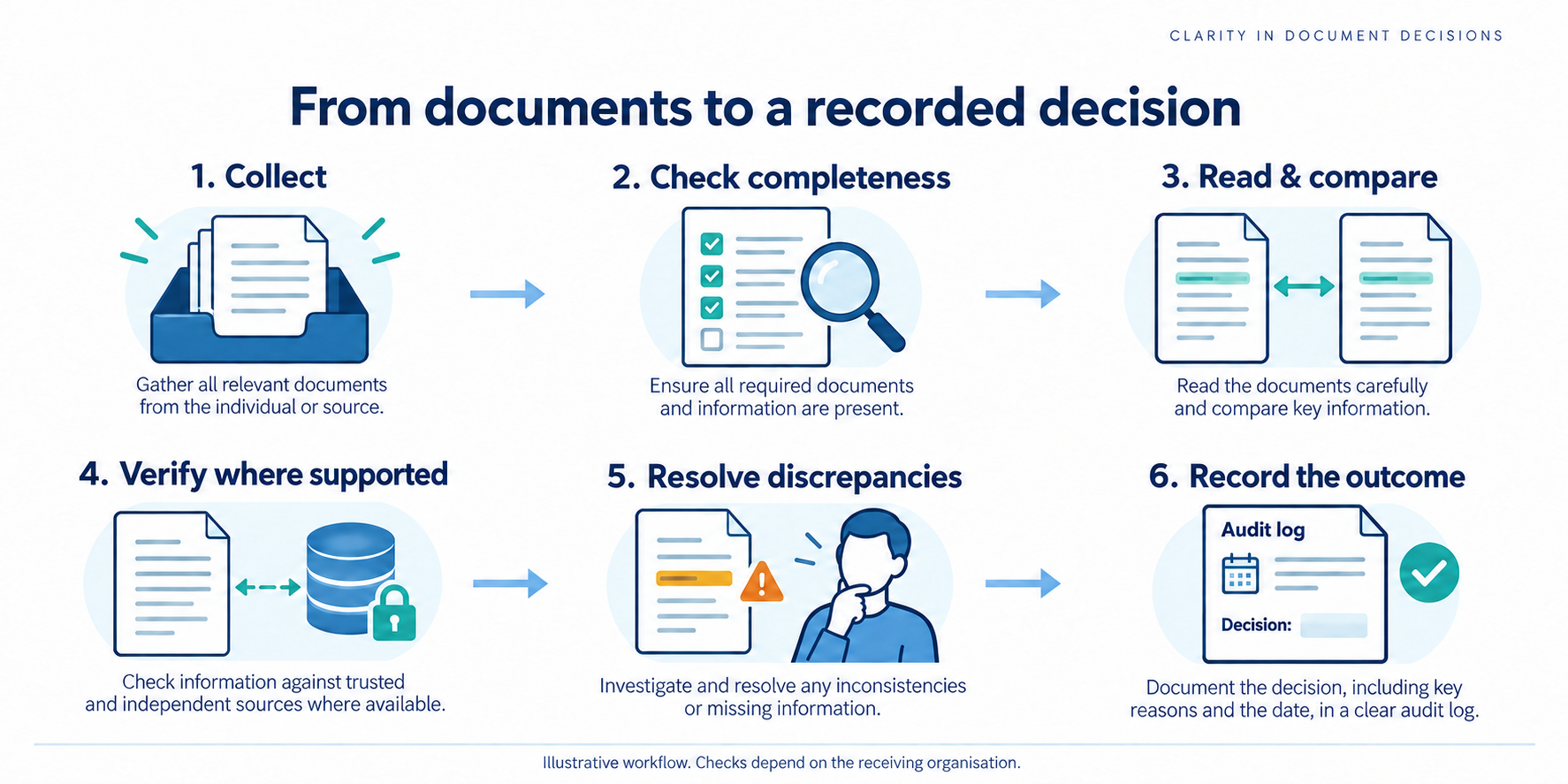
A visual summary of the review process. Define the requirements before collecting documents. View full-size illustration
How does the document scrutiny process work?
A scrutiny workflow collects the required documents, checks them against defined rules, resolves exceptions and records the result. The following eight stages are a proposed operating model; an individual portal may combine stages or use different names.
Define requirements. List document types, accepted formats, relevant dates and the checks needed for the application. Assign an owner for unclear cases.
Collect the submission. Associate documents with the correct application and retain a submission reference. Separate required items from optional supporting evidence.
Check completeness and readability. Identify missing pages, unsupported files and unreadable scans before relying on extracted information.
Read the relevant fields. Capture only the information needed for the defined review. Compare extracted values with the original when uncertain.
Validate and verify. Check consistency and applicable rules. Where supported and authorized, compare relevant claims with issuer records or other trusted evidence.
Resolve discrepancies. State precisely which item needs attention and which correction or evidence is acceptable. Distinguish missing evidence from confirmed contradictory evidence.
Record the outcome. Use defined outcomes such as complete, correction requested or further review required. A source being unavailable should remain distinguishable from a confirmed mismatch.
Retain the review record. Record the checks performed, evidence consulted, unresolved issues and decision rationale under the organization’s access and retention rules.
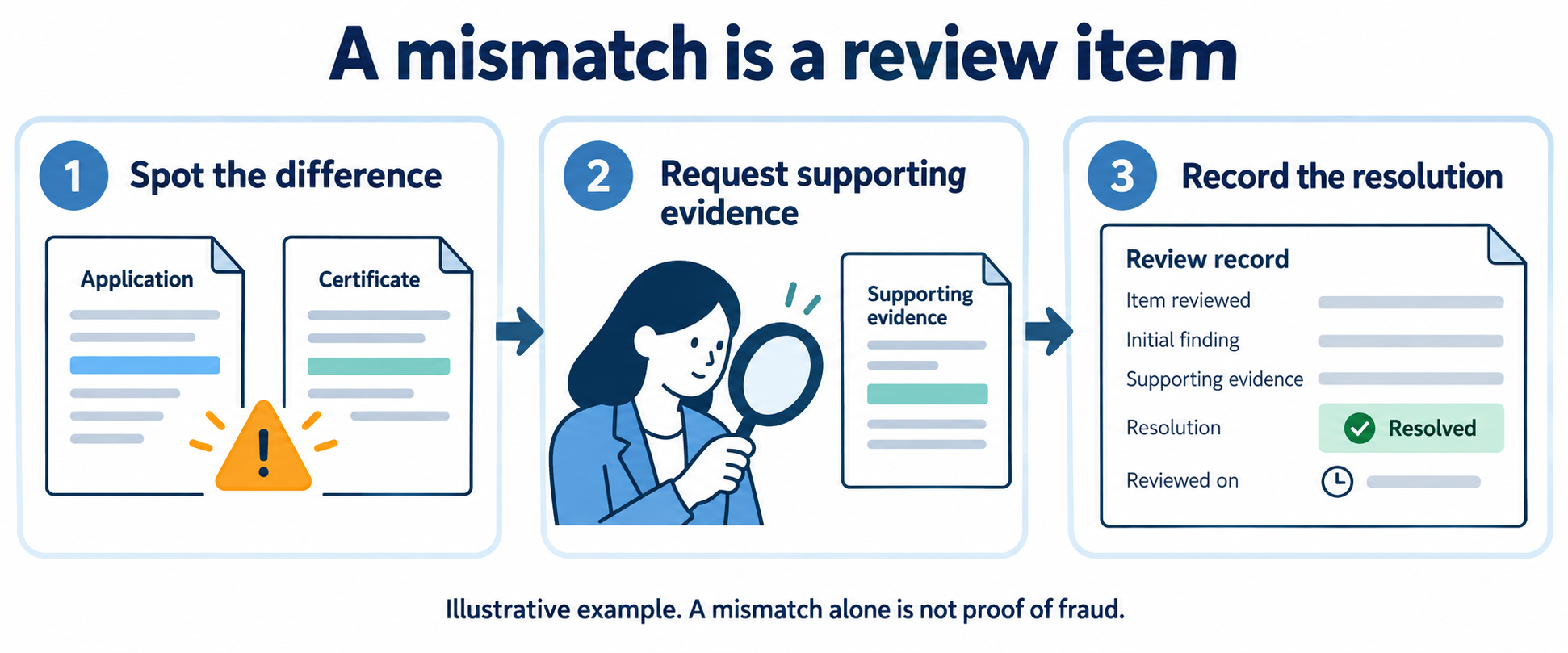
Illustrative admissions example: an uploaded marksheet is readable, but the name differs from the application. The reviewer records the mismatch and requests the supporting evidence allowed by the institution. The mismatch is a review item, not by itself proof of fraud.
What happens when a document needs correction?
The reviewing organization may request a replacement file, supporting evidence or a corrected application. Read the specific notice before taking action, because correction steps and deadlines vary by portal and application cycle.
For example, Maharashtra State CET Cell’s 2026–27 postgraduate engineering admissions instructions describe returning an application with errors through the candidate login so the candidate can correct and resubmit it. That is a named workflow example, not a rule for every admission, recruitment or licensing portal. Official CET Cell instructions
Spot the difference. Identify which field differs between the application and its supporting document.
Request supporting evidence. Explain what the applicant should provide under the receiving organisation’s rules.
Record the resolution. Keep the initial finding, evidence received, outcome and review date together.
Which parts of scrutiny can AI assist with?
AI can assist with reading document fields, organizing submissions and flagging items for review. A workflow may combine those functions with rule checks and supported source verification; extracting text from a document is not the same as proving its authenticity.
Evaluate automation against your actual document types and review rules. Use representative, appropriately protected samples, including unclear scans, missing pages, conflicting values and unavailable source checks. Agree which outcomes can proceed automatically and which require an authorized reviewer.
Measure field-level extraction errors, incorrect acceptances, unnecessary referrals, correction requests and end-to-end turnaround time. Report sample size and conditions beside performance figures. Software processing time and the time until an applicant receives a decision are different measures.
Admissions, recruitment and vendor onboarding are examples of workflows that review supporting documents. Each organisation defines its own required evidence and decision rules.
Admissions: review academic records and evidence supporting eligibility claims. See education document scrutiny.
Recruitment: compare submitted qualifications and employment details with supported evidence. See employment verification APIs.
Vendor onboarding: check submitted business records against the procurement requirements. See the software buyer’s guide.
Which proof documents should you prepare?
Use the receiving organisation’s checklist to select the required documents. Academic records, identity documents, employment records and business registrations support different claims; a single generic list cannot determine what your application needs.
For each requested document, record the claim it supports, the acceptable issuer or format, relevant validity dates and the required verification method. Mark unavailable checks explicitly instead of treating them as passed.
What to remember
Start with the receiving organisation’s requirements.
Reading a field does not prove that it is authentic.
Keep missing evidence separate from a confirmed mismatch.
Record the checks performed and the reason for the outcome.
Questions about document scrutiny
Does document scrutiny mean my application is approved?
Not necessarily. A completed document check may be one stage of a larger application process. Check the portal’s outcome, remaining steps and official instructions before treating it as final approval.
How long does document scrutiny take?
There is no single turnaround time. It depends on the organization, workload, document quality, required checks and whether corrections are needed. Use the receiving organization’s published timeline or helpdesk for application-specific information.
Is OCR enough to verify a document?
No. OCR reads text from a document. Verification requires appropriate evidence or checks beyond extracting the text; the required checks depend on the claim being verified.
What if two documents show different details?
Read the discrepancy notice and provide the correction or supporting evidence permitted by the reviewing organization. A mismatch needs investigation and is not automatically proof that either document is fraudulent.
Can DocuExprt update my government application status?
DocuExprt’s commercial document workflows are separate from an authority’s applicant helpdesk. Use the official portal or reviewing authority to ask about a personal application status.
Discuss your document scrutiny workflow
Tell the team about the documents you handle and the review process you want to improve.
It was 3:47 PM on a Tuesday when a Chief Compliance Officer at MegaCorp Financial, received the call that would haunt her for years.
The federal auditor’s voice was calm, almost clinical: “We’ve identified significant gaps in your loan documentation. We need to discuss immediate remediation.”
What started as a routine compliance audit had uncovered a nightmare. 73% of required loan documents were either missing, incomplete, or improperly filed. The manual document management system that MegaCorp had relied on for decades had finally failed them spectacularly.
Six months later, the headlines told the story: “$47 million Fine Rocks Regional Banking Giant.” But the fine was just the beginning of MegaCorp’s compliance crisis.
The Hidden Epidemic: Why 73% of Companies Fail Document Audits
This story isn’t unique. It’s happening in boardrooms across America every single day.
73% of companies fail their document compliance audits.
This shocking statistic represents one of the most comprehensive analyses of document compliance performance ever conducted. It encompasses over 2,500 organizations across 15 industries and multiple regulatory frameworks.
The cost isn’t just financial. It’s reputational damage that can take years to recover from. It’s the sleepless nights of executives wondering if their company will survive the next audit.
Human Error: The 37% Factor
Even the most dedicated employees make mistakes. Cognitive psychology research shows that trained professionals make errors at rates of 3-5% when performing routine document review tasks.
Under pressure, that error rate skyrockets. One healthcare system discovered that 4.2% of patient records contained privacy violations despite having well-trained staff and established procedures.
$2.3 million fine + $1.8 million remediation costs = One expensive human error
Missing Documents: The 27% Crisis
A financial services firm recently faced a devastating discovery. 18% of required loan documentation was missing or incomplete. The documents weren’t intentionally destroyed. They were lost in the chaos of manual filing systems.
$4.1 million fine for missing paperwork
The missing documents accumulated over years through inconsistent filing procedures, system migrations and staff turnover. Each missing document represented a potential regulatory violation.
Audit Trail Gaps: The 20% Vulnerability
A manufacturing company couldn’t prove who had reviewed critical safety documents. Despite having the documents, the lack of proper audit trails resulted in “inadequate controls” findings.
Complete documents ≠ Compliance without proper audit trails
Industry-Specific Compliance Nightmares
Financial Services: The $12.8 Billion Annual Burden
Financial institutions face the most stringent document compliance requirements. Dodd-Frank, Basel III, GDPR and consumer protection laws create massive compliance burdens.
$12.8 billion paid in document-related compliance fines in 2024 > 34% increase from the previous year
A major regional bank’s manual document processing system couldn’t keep pace with regulatory requirements. The result? A $47 million fine for missing loan documentation and incomplete customer verification records.
Healthcare: HIPAA Violations and Patient Safety
The Department of Health and Human Services reported alarming statistics for 2023:
729 healthcare data breaches, 67% involved inadequate document controls, $301 million in fines, 133 million patient records affected
A large hospital system paid $8.3 million to settle HIPAA violations. Manual access management procedures failed to properly restrict access to patient records.
Manufacturing: Quality and Safety Documentation
The FDA’s 2023 inspection results were sobering:
78% of manufacturing facilities received 483 citations, Documentation deficiencies = most common violation, Average remediation cost: $2.1 million per facility
A pharmaceutical manufacturer faced a $23 million fine and temporary production shutdown when FDA inspectors discovered systematic documentation failures in quality control processes.
The True Cost of Compliance Failure
Beyond the Headlines: Hidden Costs
Regulatory fines represent only 25-35% of the total financial impact. The hidden costs can destroy companies:
Legal and Professional Services:
18-24 months of intensive support required
$2-8 million in additional costs
One healthcare organization: $1.2 million fine → $4.7 million total cost
Operational Disruption:
Senior management diverted from strategic initiatives
40% of IT resources redirected for 8 months
$3.2 million in delayed product launches and reduced capabilities
Customer Impact:
28% decrease in new customer acquisition
19% increase in customer churn
$12 million revenue impact over two years
Insurance Cost Increases:
25-50% premium increases
Costs persist for 3-5 years
Ongoing financial burden
The AI Solution: Eliminating the 73% Failure Rate
How AI Transforms Compliance
AI-powered document processing systems address the fundamental causes of compliance failure. Unlike manual systems vulnerable to human error, AI provides consistent, reliable, and auditable document processing.
99.7% accuracy rates, 100% compliance achievable with proper implementation
Elimination of Human Error
AI systems don’t experience fatigue, distraction, or cognitive overload. Every document receives the same level of attention and accuracy, regardless of volume or complexity.
The consistency eliminates the 37% of compliance failures caused by human error. Advanced AI systems provide confidence scoring that identifies uncertain results for human review.
Complete Documentation Assurance
AI systems ensure every required document is captured, processed, and properly filed. Automated workflows prevent documents from being lost or misfiled.
Comprehensive Audit Trails
AI systems provide immutable logging capabilities and comprehensive metadata capture. Every action is recorded with timestamps, user identification, and change tracking.
Regulatory frameworks require detailed audit trails, and AI systems deliver this automatically without additional human effort.
Implementation Strategy: From Crisis to Compliance
Regulatory Framework Mapping
AI systems must be configured to address specific compliance requirements relevant to your industry and jurisdiction. This involves:
Detailed analysis of regulatory requirements
Identification of document types and processing needs
Configuration validation testing
Compliance documentation for audit purposes
Audit Trail Architecture
The system architecture must address:
Data retention requirements
Access controls and segregation of duties
Reporting capabilities for regulatory frameworks
Immutable logging and metadata capture
Change Management and Training
Compliance teams need comprehensive training on:
How AI systems make decisions
Validation of AI results
Exception handling procedures
New compliance workflows and reporting processes
Continuous Monitoring and Optimization
Ongoing monitoring ensures continued compliance effectiveness:
For organizations facing the 73% probability of compliance failure with manual document processing systems, AI represents not just an improvement but a fundamental solution to an existential threat.
The question isn’t whether AI can improve compliance. It’s whether organizations can afford to continue gambling with manual systems that have a documented 73% failure rate.
The compliance crisis is real, the costs are escalating, the solution is available.
Organizations that act quickly to implement AI document processing systems will eliminate their compliance vulnerabilities while gaining competitive advantages through improved efficiency, reduced costs, and enhanced regulatory relationships.
Ready to transform your compliance strategy? Get started with AI document processing today.
In the healthcare sector, the accuracy and efficiency of document processing are critical. Medical records, insurance claims, patient histories, and research documents require meticulous scrutiny. Integrating AI into document verification processes offers transformative benefits, enhancing accuracy, efficiency, and security. Here’s how AI document scrutiny can revolutionize healthcare.
AI Document Verification in Healthcare
1. Automated Data Extraction and Verification
Optical Character Recognition (OCR): AI-powered OCR technology can convert handwritten or scanned medical records into machine-readable text. This technology is essential for digitizing patient records, prescriptions, and diagnostic reports, enabling quick and accurate data retrieval.
Cross-Referencing Data: AI systems can automatically cross-reference extracted data with existing databases, such as electronic health records (EHRs), insurance databases, and clinical trial registries. This ensures the accuracy of patient information, streamlines billing processes, and enhances the integrity of medical records.
2. Enhanced Accuracy and Fraud Detection
Pattern Recognition: AI can identify patterns and anomalies in medical documents, detecting potential fraud or errors. For example, it can flag unusual billing patterns or discrepancies in patient records that might indicate fraud or clerical mistakes.
Machine Learning Models: Advanced machine learning models improve over time by learning from vast datasets. These models can identify common types of errors or fraudulent activities, significantly enhancing the reliability of document verification processes.
3. Time Efficiency and Cost Reduction
Batch Processing: AI systems can process large volumes of medical documents simultaneously, drastically reducing the time required for verification. This capability is particularly beneficial for hospitals and insurance companies that handle substantial paperwork.
Resource Allocation: By automating routine verification tasks, AI frees healthcare professionals to focus on patient care and more complex issues that require human judgment. This not only optimizes labour utilization but also reduces operational costs.
AI-Powered Document Verification in Healthcare Sector
Reduces the time required for patient admissions.
Manage medical records and lab reports efficiently.
Accelerates the claims processing and reimbursement cycle.
Streamlined Workflows: AI can integrate with existing healthcare IT systems to create seamless workflows, ensuring verified documents are quickly and efficiently routed to the appropriate departments or officials.
Real-Time Updates: AI systems provide real-time updates on the status of document verification, enabling faster responses to issues and improving overall operational efficiency.
5. Reducing Human Intervention
Minimizing Manual Input: Automating the majority of the verification process reduces the need for manual data entry and checks, which are prone to errors. This not only speeds up the process but also enhances accuracy.
Decision Support: AI can support healthcare professionals by providing decision-making tools that highlight potential issues or areas needing further investigation, ensuring that human intervention is only required for complex cases.
Real-World Applications
Electronic Health Records (EHRs): AI can automate the updating and verification of EHRs, ensuring that patient records are accurate and up-to-date. This helps in providing better patient care and reducing administrative burdens.
Insurance Claims Processing: AI can streamline the processing of insurance claims by automatically verifying patient information, treatment codes, and billing details. This reduces the time and effort required for claims processing and helps in quickly identifying fraudulent claims.
Clinical Trials: AI can assist in managing clinical trial documentation by ensuring that all records are accurate and compliant with regulatory requirements. This improves the efficiency of trial management and accelerates the approval process for new treatments.
Conclusion
Implementing AI for document verification in the healthcare sector offers significant benefits, including enhanced efficiency, accuracy, and security. By automating routine tasks, detecting fraud, and improving workflows, AI can transform how healthcare providers manage and verify documents, leading to better patient outcomes and more efficient operations.
ROI for HR TeamsThe business case for automated HR document verification is clear and the cost of NOT automating is growing. 90-95% Faster verification per candidate 60-80% Lower cost per background check 92-98% Document fraud detection...
3.5 Lakh+ Documents Verified 99%+ Verification Accuracy 180+ Colleges Served 50,000+ Student Applications Why Document Scrutiny Is Mission-Critical Document scrutiny is a critical task, especially for authorities handling millions of applications for entrance exams,...
Building a Payment Verification WorkflowDocuExprt's visual workflow builder lets you create an automated payment verification pipeline that checks every outgoing payment before it clears.Payment Verification Workflow ArchitectureStep 1Input NodeInvoice PDF, Payment...