Enterprise Document Verification Platform: The Complete Buyer’s Guide

Enterprise Document Verification Platform: The Complete Buyer’s Guide

78%
Enterprise executives prioritize document automation
10K+
Documents/day enterprise-grade throughput
30+
Pre-built government database API integrations
3-5x
Hidden cost multiplier when using SMB tools at enterprise scale
The Enterprise Document Verification Lifecycle
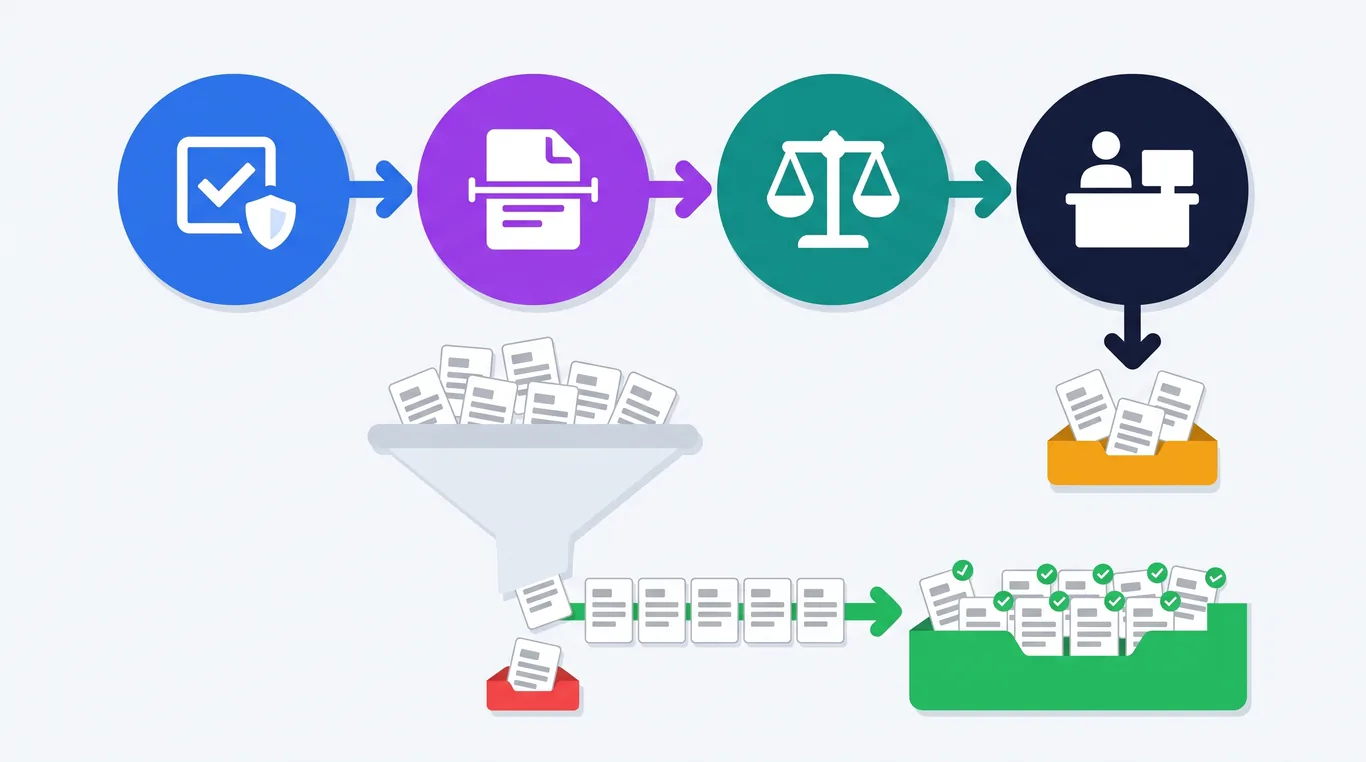
1. INGEST Upload / S3 / Azure GCP / API push 2. EXTRACT AI OCR + LLM 99% accuracy 3. VERIFY 30+ govt APIs PAN/Aadhaar/GST 4. DECIDE Conditional logic Pass / Refer / Fail 5. DELIVER JSON / Webhook CRM / ERP / HRMS End-to-end in under 30 seconds, at 10,000+ documents per day

Introduction

78% of enterprise executives list document automation as a top priority in their digital transformation initiatives (BizData360).

Yet most evaluation processes stall at the same question: "Is this platform actually enterprise-grade, or is it an SMB tool wearing an enterprise badge?" The difference matters.

An SMB document verification tool handles basic OCR and data extraction for a small team.

An enterprise document verification platform handles 10,000+ documents per day across multiple departments, integrates with 30+ government databases, and enforces role-based access for hundreds of users.

It maintains immutable audit trails for regulatory compliance, and scales without breaking.

Choosing the wrong platform means your compliance team discovers security gaps six months into deployment. Choosing the right one means your verification operations run autonomously, accurately, and at the scale your organization demands.

This buyer's guide gives you the framework to tell the difference - with a detailed checklist, feature-by-feature comparison, and implementation roadmap built for large organizations.

What Makes a Platform "Enterprise-Grade"?

"Enterprise-grade" is one of the most overused labels in B2B software. Every vendor claims it. Few deliver it. A genuinely enterprise-grade document verification platform meets six criteria that SMB tools do not.

6 Pillars That Define Enterprise-Grade
1SCALE10K+ docs/day, burst-readyNo degradation at year-end audits,seasonal spikes, bulk re-verifications. 2SECURITYRBAC + audit + encryptionTLS 1.2+, workspace isolation,immutable trails, IP whitelisting. 3INTEGRATIONCRM, ERP, HRMS, cloudREST APIs, webhooks, pre-builtconnectors for S3, Azure, GCP. 4GOVERNANCERBI / SEBI / IRDAI readyExportable audit trails, dataretention aligned with mandates. 5MULTI-DEPTHR, Finance, Legal, OpsWorkspace per team, isolatedworkflows, no cross-contamination. 6STABILITYVendor track record + SLAsReferences, roadmap, supportSLAs, full data portability.
1

Scale Without Degradation

Process 10,000+ documents per day without slowdowns, failures, or accuracy drops.

Handle burst volumes - year-end audits, seasonal spikes, bulk re-verifications - without manual queue management.

2

Security That Passes Audits

Layered architecture: RBAC with granular permissions, workspace isolation, immutable audit trails.

Encryption at rest/transit (TLS 1.2+), API key management with IP whitelisting.

3

Integration Architecture

Plug into CRM (Salesforce), ERP (SAP, Oracle), HRMS (Workday), Loan Management, Cloud Storage (S3, Azure, GCP), and Databases.

Connect via REST APIs, webhooks, and pre-built connectors.

4

Governance & Compliance

Demonstrate who verified what, when, and the decision made.

Data retention aligned with industry mandates (RBI: 5+ years for KYC). Exportable audit trails for regulatory inspections.

5

Multi-Department Operations

Serve HR, Finance, Legal, Compliance, and Procurement simultaneously.

Each department gets its own workspace, templates, workflows, and access controls without interference.

6

Vendor Stability & Support

Long-term commitment requires proven track record and customer references from your vertical.

Look for an active product roadmap, support SLAs, and full data portability.

The Vendor Evaluation Test

When evaluating any vendor for enterprise readiness, apply these concrete tests.

  • Scale test: Ask the vendor to process 1,000 documents in a single batch during your evaluation. Monitor speed and accuracy across the entire batch, not just the first 10.
  • Security test: Request SOC 2 Type II compliance documentation. SOC 2 validates that security controls operate effectively over time, not just that they exist on paper (Venn SOC 2 Guide).
  • Integration test: Ask for REST API documentation, code snippets in your language, and webhook support. If you get "coming soon," walk away.
  • Multi-tenant test: Verify that Department A truly cannot see Department B's documents, workflows, or results.

Enterprise Requirements Checklist (10-Point Framework)

Use this 10-point checklist when evaluating any document verification platform for enterprise deployment. Score each vendor on a 1-5 scale across all dimensions.

1. Processing Scale & Performance

10K+ docs/day capacity, burst handling (3-5x normal), sub-30s processing, batch upload, auto-ingestion from S3/Azure/GCP

2. Security & Access Control

5-level RBAC, workspace isolation, comprehensive audit trails, encryption, API key management with IP whitelisting, document access controls

3. Government Database Integration

30+ pre-built APIs: PAN, Aadhaar, Passport, Voter ID, DL, GSTIN, CIN, FSSAI, UAN, Bank Account, IFSC, UPI. 2-5s response time

4. Workflow Automation

Visual drag-and-drop builder, conditional AND/OR logic, 5 node types (Input, Processing, Conditional, Output, Evaluation), trigger system

5. Data Extraction Capabilities

99% accuracy on printed text, PDF/PNG/JPG/WEBP support, 20+ languages including Indian regional, JSON output, customizable AI prompts

6. Template System

Pre-built templates for education, finance, government docs. Custom template creation with prompt config, output field definition, cross-workflow reusability

7. Conversational AI

Talk to Document with natural language queries, voice input via speech-to-text, conversation context retention, quick action prompts

8. Integration Ecosystem

AWS S3, Azure, GCP, Digital Ocean, iDrive, MS SQL Server, Excel. API docs in 7 languages. Webhook support for event-driven architectures

9. Analytics & Billing Transparency

Full billing dashboard: input/output tokens, cost trends, daily/weekly/monthly views. Excel export. Filter by workflow, template, key, date. 60s auto-refresh

10. Pricing Model

Token-based pay-per-document pricing - transparent and predictable. No hidden fees for API usage or storage. Enterprise volume discounts. Free trial available

Detailed Checklist: Processing Scale & Performance

RequirementWhat to EvaluateDocuExprt
Daily capacityCan it handle 10K+ documents/day without degradation?10,000+ documents/day
Burst capacityCan it handle 3-5x normal volume during peak periods?Auto-scales with demand
Processing speedUnder 30 seconds per document with full verification?5-30 seconds per document
Batch processingUpload and process hundreds of documents simultaneously?Full batch upload + processing
Automated ingestionAuto-fetch documents from cloud storage without manual upload?S3, Azure, GCP, local folder auto-ingestion

Detailed Checklist: Security & Access Control

RequirementWhat to EvaluateDocuExprt
RBACHow many distinct roles? Can permissions be customized?5 roles: Super Admin, Admin, Template Mgr, Workflow Mgr, Workspace Mgr
Workspace isolationAre department workspaces fully isolated?Complete isolation with separate workflows, templates, data
Audit trailsAll actions logged with user, timestamp, and IP?Comprehensive logs with IP monitoring, login tracking
EncryptionData encrypted at rest and in transit?TLS encryption in transit, encryption at rest
API key securityIP whitelisting, expiration dates, usage tracking?Full API key management with IP whitelist, expiration, masking
Document controlsCopy/paste restrictions, print controls?Copy-paste and print restrictions configurable per role

Deployment Flexibility: Cloud, Private Cloud, and On-Premise

When evaluating enterprise document verification platforms, deployment options are a critical selection criterion - especially for regulated industries. Look for platforms that offer multiple deployment models with feature parity.

3 Deployment Models, Full Feature Parity
SaaS (Cloud)Best for:Fast deploymentElastic scalingData:Provider-managed✓ Live in days Private CloudBest for:Data residency rulesRegulated industriesData:Region-controlled✓ Same feature set On-PremiseBest for:Defense, classified dataGovernment, BFSIData:Full customer control✓ Air-gapped option
Deployment ModelBest ForData Sovereignty
SaaS (Cloud)Fast deployment, elastic scalingProvider-managed
Private CloudCompliance with data residency rulesRegion-controlled
On-PremiseDefense, government, regulated financeFull customer control

DocuExprt offers all three with full feature parity.

The same AI extraction engine, workflow builder, government API integrations, QR code validation, and fraud detection are available whether you deploy on AWS or in your own data center. Air-gapped deployment is available for organizations processing classified documents.

Key questions to ask vendors during your evaluation:

  • Is there feature parity between cloud and on-premise deployments?
  • Can you deploy in an air-gapped environment?
  • Who manages encryption keys in on-premise mode?
  • What is the typical on-premise deployment timeline?
  • Are government API connectors included in the on-premise license?

Detailed Checklist: Government Database Integration

RequirementWhat to EvaluateDocuExprt
Pre-built govt APIsHow many databases can it verify against out of the box?30+ pre-built APIs
Identity verificationPAN, Aadhaar, Passport, Voter ID, DL?All covered - PAN (6 variants), Aadhaar (DigiLocker), Passport, Voter ID, DL Advanced
Business verificationGSTIN, CIN, FSSAI, Udyam, Director Lookup?All covered - GSTIN (2 variants), CIN, FSSAI, Udyam, Director Lookup, MCA Charge Check
Employment verificationUAN, employment history, EPFO?UAN-to-Employment History, Aadhaar-to-UAN, PAN-to-Employment Status
Banking verificationBank account, IFSC, UPI?Bank Account, IFSC, UPI verification
API response timeUnder 5 seconds per verification?Average 2-5 seconds per API call
See How DocuExprt Scores Across All 10 Requirements
  • Extract & verify data from any document in seconds
  • Eliminate manual workload and boost accuracy.
  • Supports diverse types of documents.
  • Easily plug into your existing workflows.
Get A Platform Tour

DocuExprt Enterprise Capabilities Deep Dive

Agentic AI Workflow Builder

Docuexprt's workflow builder is the platform's core differentiator. Unlike competitors that offer linear, step-by-step document processing, DocuExprt enables intelligent, multi-branch verification pipelines that make autonomous decisions.

5 Node Types

Node 1
Input
Node 2
Processing
Node 3
Conditional
Node 4
Output
Node 5
Evaluation
  • Input Node - Define document sources (manual upload, cloud storage, API), set global processing rules, configure file format validation
  • Simple Processing Node - AI-powered extraction with fully customizable prompts. Chain multiple processing nodes for multi-step analysis. Upload reference files for industry-specific context
  • Conditional Node - Set AND/OR conditions on extracted data fields. Route documents to different paths based on results. Create complex decision trees
  • Output Node - Map extracted data to structured JSON. Set delivery destinations (database, cloud, API). Configure notifications on completion
  • Evaluation Node - Weighted scoring across multiple criteria groups. Pass/fail thresholds for automated decision-making. Detailed evaluation reports

Real-world example: A contract analysis workflow that extracts key terms, checks contract value, routes high-value contracts (above Rs 50 lakh) to senior legal review while auto-processing standard contracts, performs risk analysis on flagged contracts, and delivers structured results with email notifications - all built visually in minutes.

30+ Government API Integrations

DocuExprt's 30+ pre-built government database APIs represent the deepest Indian government verification coverage in any single platform.

30+ Government Database Integrations, 4 Categories
DocuExprt API Layer Identity (7)PAN, Aadhaar, PassportVoter ID, DL, Face-Aadhaar Business / KYB (8)GSTIN, CIN, TIN, FSSAIUdyam, MCA, Director Lookup Employment (4)Aadhaar-to-UAN, UAN historyPAN-to-Employment Status Banking (4)Bank Account, IFSCUPI, Statement Analysis Average response time: 2-5 seconds per verification call
Identity
  • PAN Verification (6 variants)
  • Aadhaar (DigiLocker)
  • Passport Verification
  • Voter ID Verification
  • DL Advanced
  • Face-Aadhaar Linking
  • Name Match, PPI
Business (KYB)
  • GSTIN (2 variants)
  • CIN-to-PAN
  • TIN Verification
  • Director Lookup
  • FSSAI License
  • Shop & Establishment
  • MCA Charge Check
  • Udyam Registration
Employment
  • Aadhaar-to-UAN
  • UAN-to-UAN
  • UAN-to-Employment History V2
  • PAN-to-Employment Status
Banking
  • Bank Account Verification
  • IFSC Verification
  • UPI Verification
  • Bank Statement Analysis

Each API is pre-built, tested, and maintained - no custom development required. Average response time: 2-5 seconds.

Enterprise Security Architecture

5-Layer Enterprise Security Architecture
PERIMETER: TLS 1.2+ encryption in transit, encryption at rest LAYER 4: API key management, IP whitelisting, expiration, masking LAYER 3: 5-level RBAC (Super Admin / Admin / Template / Workflow / Workspace) LAYER 2: Workspace isolation - data, workflows, templates per department CORE: Immutable audit log - user, timestamp, IP per action
LayerCapability
Access Control5-level RBAC: Super Admin, Admin, Template Manager, Workflow Manager, Workspace Manager
Workspace IsolationComplete data separation between departments - each workspace has its own workflows, templates, and processing history
Audit LoggingEvery action logged: user identity, timestamp, IP address, action type. Activity logs for compliance reporting
API SecuritySecret keys with partial masking, IP whitelisting, expiration dates, one-time display at creation, usage tracking, instant revocation
Data ControlsCopy-paste restrictions, print controls, configurable per role
User ManagementEmail-based authentication, password management, user blocking, role-wise access definitions

Template System & Talk to Document

DocuExprt's template system enables reusable document processing configurations.

  • Pre-built templates for common document categories: Education (marksheets, certificates), Financial (invoices, statements), Government (PAN, Aadhaar, GSTIN), and Application Forms
  • Custom templates with AI prompt configuration, structured output field definition, and sample file training
  • Template analytics tracking usage counts, success rates, processing times, and error patterns
  • Cross-workflow reusability - Define extraction logic once, deploy across unlimited workflows

The Talk to Document conversational AI interface transforms static documents into queryable knowledge sources. Ask questions in natural language, use voice input via speech-to-text, and maintain conversation context across follow-up questions.

Use cases include quick data lookup during calls, document verification before approval, training new team members, and accessibility for non-technical users.

Automate Document Verification with AI
  • Extract & verify data from any document in seconds
  • Eliminate manual workload and boost accuracy.
  • Supports diverse types of documents.
  • Easily plug into your existing workflows.
Book A Free Demo

Enterprise vs. SMB Document Verification

Not sure if your organization needs an enterprise platform? Here is a direct comparison.

SMB Solution

  • 50-500 documents/day
  • 1-10 users
  • Basic admin/user roles
  • 0-5 basic verifications
  • Linear processing only
  • Basic logging
  • API only integrations
  • Standard encryption
  • Self-service setup
  • $10-20/user/month
  • Email/chat support
VS

Enterprise Platform (DocuExprt)

  • 10,000+ documents/day
  • 50-500+ users across departments
  • 5-level RBAC with workspace isolation
  • 30+ pre-built APIs (identity, business, employment, banking)
  • Multi-branch conditional workflows with evaluation scoring
  • Comprehensive audit with IP tracking & exportable reports
  • S3, Azure, GCP, SQL Server, Excel + REST API + webhooks
  • Encryption + RBAC + isolation + API keys + doc controls
  • Guided implementation with dedicated support
  • Token-based pay-per-document with enterprise pricing
  • Dedicated account management + SLAs

When to Upgrade from SMB to Enterprise

You need an enterprise platform if any of these apply.

  • Volume threshold: You process more than 500 documents per day consistently
  • Multi-department: More than 2 departments use document verification
  • Compliance pressure: You are subject to RBI, SEBI, IRDAI, or similar regulatory oversight
  • Government verification: You need to verify against Indian government databases (PAN, Aadhaar, GSTIN, UAN)
  • Integration requirements: Results need to flow into your CRM, ERP, HRMS, or LMS automatically
  • Security audits: Your organization undergoes regular security or compliance audits that require audit trails and access controls
The Hidden Cost Iceberg: SMB Tools at Enterprise Scale
VISIBLE COST Sticker price $10-$20 per user/month HIDDEN COSTS (3-5x sticker) Manual workarounds Compliance gaps Custom connector maintenance Data silos isolating verification results Security incidents TCO: 3-5x the sticker price

Hidden Costs of Using Non-Enterprise Tools at Scale

  • Manual workarounds for missing features - 10-15 hours/week in admin overhead
  • Compliance gaps that surface during audits - average remediation cost of Rs 25-50 lakh per incident
  • Integration maintenance for custom-built connectors that break with vendor updates
  • Data silos when verification results are trapped in a tool that doesn't connect to your systems
  • Security incidents from inadequate access controls - average cost of a data breach in India: Rs 19.5 crore (IBM Cost of a Data Breach 2024)
The "cheaper" SMB tool often costs 3-5x more than an enterprise platform when total cost of ownership is calculated.
DimensionSMB SolutionEnterprise Platform (DocuExprt)
Daily volume50-500 documents10,000+ documents
Users1-10 users50-500+ users across departments
Access controlBasic admin/user roles5-level RBAC with workspace isolation
Government APIs0-5 basic verifications30+ pre-built APIs covering identity, business, employment, banking
Workflow complexityLinear processing onlyMulti-branch conditional workflows with evaluation scoring
Audit trailBasic loggingComprehensive audit with IP tracking, user activity, exportable reports
IntegrationsAPI onlyS3, Azure, GCP, SQL Server, Excel + REST API + webhooks
ComplianceBasicRBI, SEBI, IRDAI-ready with configurable data retention
SecurityStandard encryptionEncryption + RBAC + workspace isolation + API key mgmt + doc access controls
Pricing$10-20/user/month or per-docToken-based (pay-per-document) with enterprise volume pricing
ImplementationSelf-service setupGuided implementation with dedicated support
SupportEmail/chatDedicated account management + SLAs

Implementation Guide for Large Organizations

Enterprise implementation follows a structured four-phase approach over 6-10 weeks.

4-Phase Enterprise Implementation Timeline (6-10 weeks)
1Discovery + PilotWeeks 1-3Stakeholder align200-500 doc pilotSuccess criteria set 2IntegrationWeeks 3-5Govt API hookupRBAC configCRM/ERP wiring 3RolloutWeeks 5-810 -> 25 -> 50 -> 100%Train championsParallel validation 4OptimizeWeeks 8-10+New deptsMonthly reviewCompliance reports
1

Discovery & Pilot

Week 1-3
  • Stakeholder alignment meeting (IT, Compliance, Operations, Procurement)
  • Current-state audit: document types, volumes, costs, error rates, compliance gaps
  • Select pilot use case (highest volume, highest pain)
  • Set up DocuExprt workspace, configure initial templates
  • Run pilot with 200-500 real documents
  • Define success criteria for Phase 2
Best practice: Choose the use case your team complains about most. When they see 3-day KYC become 3-minute KYC, buy-in for full rollout follows naturally.
2

Integration & Configuration

Week 3-5
  • Connect government database APIs (start with most-used: PAN, Aadhaar, GSTIN)
  • Set up cloud storage integrations (S3, Azure, GCP)
  • Build production verification workflows using visual builder
  • Configure RBAC: Create roles, assign permissions, set up workspace isolation
  • Set up triggers: document expiry alerts, threshold notifications
  • Integrate output with downstream systems (CRM, ERP, HRMS, LMS) via API
Best practice: Test API integrations with your actual document types, not just sample data. Edge cases in your documents will surface during testing.
3

Department Rollout

Week 5-8
  • Train department champions (2-3 power users per team)
  • Gradual volume ramp: 10% → 25% → 50% → 100% per department
  • Monitor exception rates and accuracy daily
  • Fine-tune AI prompts and workflow conditional logic
  • Conduct parallel processing (manual + automated) for validation
  • Document quick-wins and ROI metrics for leadership reporting
Best practice: Don't go from 0% to 100% in one day. Ramp gradually. Each increment builds confidence and surfaces edge cases before they affect your full operation.
4

Optimization & Scale

Week 8-10+
  • Expand to additional departments and use cases
  • Build additional workflows for new document types
  • Establish refresh cadence for templates and prompts
  • Set up recurring compliance reports using audit trail data
  • Review billing analytics, optimize token consumption
  • Monthly performance review: accuracy, speed, exception rate, ROI

Success Metrics to Track

MetricBaseline (Before)Target (After 90 Days)
Cost per document verified$5-$8$0.10-$0.50
Processing time per document15-30 minutesUnder 30 seconds
Verification accuracy85-90%99%+
Daily processing capacityLimited by headcount10,000+ documents/day
Audit trail completenessPartial/manual100% automated
Compliance penalty riskHighNear-zero
Staff on repetitive verification8-12 FTE1-2 FTE (oversight)

Key Takeaways

  1. "Enterprise-grade" means six things: Scale, security, integration architecture, governance, multi-tenant operations, and vendor stability
  2. Use the 10-point checklist to evaluate every platform systematically - score each vendor on a 1-5 scale across all dimensions
  3. DocuExprt delivers the deepest enterprise capabilities for Indian enterprises: 30+ government APIs, 5-level RBAC, workspace isolation, agentic workflow builder, Talk to Document AI, and transparent token-based pricing
  4. SMB tools at enterprise scale cost 3-5x more in hidden costs than purpose-built enterprise platforms
  5. Implementation takes 6-10 weeks using a four-phase approach: Discovery → Integration → Rollout → Optimization
  6. Start with one use case, prove value, then scale - this is the implementation pattern that succeeds
Ready to Evaluate DocuExprt for Your Enterprise?
  • Extract & verify data from any document in seconds
  • Eliminate manual workload and boost accuracy.
  • Supports diverse types of documents.
  • Easily plug into your existing workflows.
Talk to our Team

Frequently Asked Questions

What is an enterprise document verification platform?

An enterprise document verification platform is a software system designed for large organizations (500+ employees) that need to verify documents at scale - typically 10,000+ documents per day.

Unlike basic document scanning tools, enterprise platforms provide AI-powered data extraction, real-time government database verification (PAN, Aadhaar, GSTIN, UAN), conditional workflow automation, role-based access control, audit trails, and integration with enterprise systems (CRM, ERP, HRMS).

DocuExprt is built specifically for enterprise operations with 30+ government APIs, 5-level RBAC, and a no-code agentic workflow builder.

How much does enterprise document verification cost?

Enterprise document verification costs vary by pricing model. DocuExprt uses token-based pricing (pay per document processed), making costs predictable and directly proportional to usage.

Typical enterprise costs range from $0.10-$0.50 per document, compared to $5-$8 per document for manual processing.

For an enterprise processing 5,000 documents per month, this translates to roughly Rs 15 lakh annually compared to Rs 2.5 crore for manual processing - a 90-95% cost reduction.

Subscription-based competitors like Nanonets ($499+/month) and Docsumo ($500+/month) may not scale as cost-effectively for high-volume enterprise deployments.

Can the platform integrate with our existing enterprise systems?

Yes.

DocuExprt provides full REST API integration with code snippets in 7 programming languages (Python, JavaScript, cURL, Java, Go, PHP, Ruby), pre-built cloud storage integrations (AWS S3, Azure Blob, Google Cloud, Digital Ocean, iDrive), database connectivity (MS SQL Server), and file format support (Excel, CSV).

Verification results are delivered as structured JSON that any modern CRM, ERP, HRMS, or loan management system can consume directly.

Webhook support enables event-driven architectures where downstream systems are notified automatically when verification completes.

What security certifications should I look for?

For enterprise document verification, prioritize platforms that offer: SOC 2 Type II compliance (validates security controls operate effectively over time), role-based access control with at least 3-5 distinct roles, workspace isolation between departments, encryption at rest and in transit (TLS 1.2+), API key management with IP whitelisting and expiration controls, comprehensive audit trails with user identity, timestamp, and IP logging, and data access controls including copy/paste and print restrictions.

DocuExprt provides 5-level RBAC, workspace isolation, full audit logging with IP tracking, API key management with whitelisting, and configurable document access controls.

How long does enterprise implementation typically take?

A typical enterprise implementation takes 6-10 weeks using a four-phase approach.

- Phase 1 (Discovery and Pilot, 2-3 weeks) establishes baselines and proves value with a single use case.
- Phase 2 (Integration and Configuration, 2 weeks) connects APIs, cloud storage, and downstream systems.
- Phase 3 (Department Rollout, 3 weeks) ramps volume gradually across teams with training.
- Phase 4 (Optimization, ongoing) expands to additional departments and fine-tunes performance.

DocuExprt's no-code workflow builder and pre-built government API integrations significantly reduce implementation time compared to custom-built solutions.

Automated Document Verification: How AI + Government APIs Transform Enterprise Compliance

Automated Document Verification: How AI + Government APIs Transform Enterprise Compliance

🚀 Free AI Document Verification — Try Now

Try Free Extractor →

Introduction

100x
Faster Processing
5-30 sec vs 15-30 min
99%+
Verification Accuracy
AI + Database Cross-Check
💰
90-95%
Cost Reduction
$5-8 down to $0.10-0.50/doc
⚠️
₹54.78 Cr
RBI Penalties in FY 2024-25
88% surge over 3 years

Aadhaar eKYC reduced the cost of identity verification in India from ₹1,000 per customer to just ₹6, a 99.4% cost reduction (Protean Technologies). And that's just one verification type for one document.

Now imagine applying that level of cost compression across every document your enterprise processes: PAN cards, GSTINs, bank statements, employment records, educational certificates, passports, driving licenses, and vendor compliance documents. That's exactly what automated document verification delivers when you combine AI-powered extraction with real-time government database APIs.

The enterprises that have already made this shift aren't just saving money. They're processing documents 100x faster, catching fraud that manual teams miss, maintaining continuous regulatory compliance, and freeing skilled employees from repetitive verification tasks.

This guide walks you through the complete landscape: where automated verification stands in 2026, how the technology works under the hood, what government API infrastructure makes it possible, and exactly how to build automated verification workflows for your organization.

The State of Document Verification in 2026

Four converging forces have made automated document verification a board-level priority for enterprises in 2026:

1. Document Volumes Are Overwhelming Manual Teams

Global data creation is projected to reach 463 exabytes per day (World Economic Forum). A significant portion of this consists of business documents like invoices, contracts, compliance filings, identity documents and forms that require verification before processing.

The average enterprise processes thousands of documents daily. Banks handle KYC documents for every new account. Insurance companies verify claims documentation. HR departments screen employee credentials. Government agencies process citizen applications. Each document demands extraction, validation, and authentication — tasks that don't scale with manual teams.

2. Compliance Burden Is at an All-Time High

60% of organizations now cite regulatory compliance as the top driver for adopting document automation (BizData360). The reasons are clear:

  • The RBI imposed 353 penalties totalling Rs. 54.78 crore in FY 2024-25 for KYC/AML violations — an 88% surge over three years (Business Standard)
  • SEBI, IRDAI, and NABARD have all tightened document verification requirements for regulated entities
  • India's Digital Personal Data Protection Act has added new obligations around document handling and consent
  • 40% of surveyed companies reported being targeted by fraud in 2025 (World Economic Forum)

Manual verification processes cannot maintain the consistency, speed, and audit trail depth that modern regulators demand.

3. AI Has Reached Enterprise-Grade Maturity

The intelligent document processing (IDP) market hit $3.0 billion in 2025 and is projected to reach $54.7 billion by 2035 at a 33.4% CAGR (Research Nester). This explosive growth reflects a technology that has moved from experimental to production-ready:

  • AI-powered OCR now achieves 95-99% accuracy on printed text, up from 85-92% with traditional OCR (Klearstack)
  • Over 75% of enterprises are expected to integrate IDP with their ERP systems by 2026
  • 78% of enterprise executives list document automation as a top priority in their digital transformation initiatives
  • The average deployment time has dropped to under 8 weeks thanks to pre-trained AI models and templates

4. India's Government API Infrastructure Is Now Best-in-Class

India has built one of the world's most comprehensive digital verification ecosystems:

  • Aadhaar Authentication processed over 15 crore transactions per month in March 2025 (Protean Technologies)
  • 150+ APIs are now available for KYC, KYB, and identity verification across government databases (BankU India)
  • RBI's Unified Lending Interface (ULI) connects lenders to Aadhaar e-KYC, PAN, land records, and account aggregators through a single API layer
  • 70% of all digital loans in India are now approved and disbursed within 24 hours, powered by API-based verification

This API infrastructure means document verification no longer needs to stop at reading a document — it can confirm the document's contents against the issuing authority's records in real time.

AI Verifification of Documents with Government APIs
  • Verify data from any document using govt. APIs.
  • Eliminate manual workload and boost accuracy.
  • Supports diverse types of documents.
  • Easily plug into your existing workflows.
Book A Free Demo

Manual vs. Automated Document Verification: The Data

Enterprise leaders often ask: "How much better is automated verification, really?" The data is unambiguous:

❌ Manual Verification

  • 15-30 min per document
  • 85-90% accuracy (human error)
  • $5-$8 cost per document
  • Limited by headcount
  • Inconsistent compliance
  • Limited fraud detection
  • Partial audit trail
  • 8-10 hrs/day operating hours
  • $2.30-$4.70 hidden costs per $1 labor
VS

✅ Automated Verification (AI + APIs)

  • 5-30 sec per document
  • 99%+ accuracy (AI + database)
  • $0.10-$0.50 cost per document
  • 10,000+ docs/day, scales instantly
  • 100% consistent rules
  • 65-85% more fraud detected
  • Complete audit trail
  • 24/7/365 operation
  • Near-zero hidden costs

Side-by-Side Comparison

Dimension Manual Verification Automated Verification (AI + APIs) Improvement
Processing time 15-30 minutes per document 5-30 seconds per document 100x faster
Accuracy 85-90% (human error, fatigue, inconsistency) 99%+ (AI extraction + database cross-reference) 10-15% error reduction
Cost per document $5-$8 per document (direct labor + hidden costs) $0.10-$0.50 per document 90-95% cost reduction
Scalability Limited by headcount; hiring takes weeks Handles 10,000+ documents/day; scales instantly Unlimited scalability
Compliance consistency Inconsistent — depends on individual reviewer Uniform — same rules applied every time 100% consistency
Fraud detection Limited — relies on human visual inspection AI forensics + government database cross-reference 65-85% more fraud detected
Audit trail Partial — manual logs, inconsistent Complete — every action timestamped Full audit trail
Operating hours 8-10 hours/day (business hours) 24/7/365 3x available hours
Hidden cost multiplier $2.30-$4.70 for every $1 in direct labor Near-zero hidden costs Eliminates hidden costs

Sources: Docsumo IDP Report 2025, SenseTask Document Processing Statistics

What "Hidden Costs" Really Mean

When enterprises calculate the cost of manual document processing, they typically account for direct labor: salaries, benefits, and desk space for verification staff. But research shows that for every $1 in direct labor, businesses incur an additional $2.30-$4.70 in hidden costs:

  • Rework costs — Documents rejected for data entry errors that need to be reprocessed
  • Delay costs — Revenue delayed because verification is stuck in a queue
  • Error costs — Incorrect data entered into systems, causing downstream problems in lending, insurance, or onboarding
  • Compliance costs — Failed audits, remediation programs, and regulatory penalties from inconsistent verification
  • Opportunity costs — Skilled employees spending time on repetitive tasks instead of high-value work

An enterprise processing 5,000 documents per month isn't spending $30,000 on manual verification. They're spending $100,000-$170,000 when hidden costs are included.

The Error Impact Chain

When a manual verification error occurs, the impact cascades:

Stage 1
Data Entry Error
Wrong PAN entered
Stage 2
Process Failure
Bad KYC record created
Stage 3
Compliance Exposure
Audit reveals mismatch
Stage 4
Remediation
Full re-verification
Stage 5
Penalty Risk
₹50 lakh+ per incident

Automated verification eliminates Stage 1 entirely — data is extracted by AI and verified against the government database, not typed by a human. The error chain never starts.

How AI Powers Modern Document Verification

Automated document verification in 2026 isn't a single technology. It's a layered AI stack where each layer handles a specific aspect of the verification process:

📄

Layer 1: Intelligent Data Extraction

AI OCR + NLP reads text, tables, handwriting from any document format. Understands context: "12,500" in "Total Amount" field is the invoice total. Achieves 95-99% accuracy on printed text.

📁

Layer 2: Document Classification

ML auto-identifies document type — PAN, Aadhaar, invoice, bank statement. Classifies in milliseconds and routes to the right verification workflow. Eliminates manual sorting.

🔎

Layer 3: Fraud Detection

Computer vision analyzes pixel-level patterns, font consistency, metadata anomalies. Detects digital photo swaps, text edits, AI-generated forgeries. Fraud attempts surged 180% in 2025.

🌐

Layer 4: Government DB Cross-Verification

Verifies extracted data against issuing authority's database in real time. A forged document may fool image analysis — but it cannot fool a live database check. The definitive layer.

Layer 1: Intelligent Data Extraction (OCR + NLP)

What it does: Reads text, tables, handwriting, and structured fields from any document format like PDFs, scanned images, photos, and even faxes.

How it works: Modern AI OCR goes far beyond character recognition. It uses natural language processing (NLP) to understand context. For example, when processing an invoice, it doesn't just read "12,500". It understands that this number appears in the "Total Amount" field, is denominated in INR, and represents the sum of the line items above it.

Accuracy benchmarks: AI-powered extraction achieves 95-99% accuracy on printed text and 85-95% on handwritten documents — a 67% improvement over traditional OCR for complex document formats (Firstsource).

Layer 2: Document Classification (Machine Learning)

What it does: Automatically identifies the document type — PAN card, Aadhaar, invoice, bank statement, employment letter — without requiring the user to specify.

How it works: ML models trained on millions of document samples recognize visual patterns, layouts, logos, and content structures. When a new document arrives, the system classifies it in milliseconds and routes it to the appropriate verification workflow.

Why it matters: In bulk processing scenarios (e.g., processing 500 employee onboarding documents), automatic classification eliminates the manual step of sorting documents by type before verification begins.

Layer 3: Fraud and Tampering Detection (Computer Vision)

What it does: Identifies signs of document alteration, digital manipulation, or AI-generated forgery.

How it works: AI analyzes pixel-level patterns, font consistency, compression artifacts, metadata anomalies, and visual authenticity markers. It can detect when a photo has been digitally swapped on an ID card, when text has been edited in a certificate, or when an entire document has been generated using AI tools.

Why it matters: Sophisticated fraud attempts surged 180% in 2025, and AI-generated document forgeries are rising rapidly. Human reviewers cannot detect pixel-level manipulation — AI can.

Layer 4: Government Database Cross-Verification (API Integration)

What it does: Takes the data extracted from a document and verifies it against the issuing authority's database in real time.

How it works: After extracting a PAN number from a document, the system calls the Income Tax Department's verification API to confirm the number is valid, matches the holder's name, and is currently active. This happens in seconds, without human intervention.

Why it matters: A forged document might fool visual inspection and even AI-based image analysis. But it cannot fool a live database check. This is the definitive layer of verification.

Layer 5: Agentic AI Workflow Orchestration

What it does: Coordinates all four layers above into intelligent, multi-step verification pipelines that make decisions based on results.

How it works: Agentic AI doesn't just follow a linear sequence. It evaluates results at each step and routes the document accordingly:

  • If the document passes all checks → Auto-approve and deliver to downstream system
  • If extraction confidence is below 80% → Route to human reviewer
  • If database verification returns a mismatch → Flag for fraud investigation
  • If a conditional threshold is triggered (e.g., loan amount > ₹50 lakh) → Escalate to senior approval

DocuExprt's implementation: The visual workflow builder uses 5 node types — Input, Processing, Conditional, Output, and Evaluation — to create these intelligent pipelines. No coding required. A compliance officer can build and modify verification workflows by dragging and connecting nodes on a visual canvas.

Layer 1
AI Extraction
Layer 2
Classification
Layer 3
Fraud Detection
Layer 4
Gov DB Verify
Layer 5
Agentic AI
Result
Decision

The Government API Advantage — Real-Time Database Verification

Here's a truth that most document verification vendors won't tell you: document-level verification alone is not enough.

A beautifully printed PAN card that passes every image forensics test is still fraudulent if the PAN number doesn't exist in the Income Tax Department's database. A GSTIN printed on a vendor's letterhead is meaningless if it's been cancelled or belongs to a different entity.

The only way to confirm that a document's contents are authentic is to verify against the issuing authority's records. And in India, that means government database APIs.

DocuExprt's Government API Coverage: 30+ Pre-Built Integrations

DocuExprt provides the most comprehensive Indian government database coverage available in any single platform:

Identity Verification (KYC) APIs

API What It Verifies Use Case
PAN Verification (Detailed) Name, DOB, PAN status, category KYC onboarding, tax compliance
PAN Status Check Active/inactive/deactivated Quick KYC validation
PAN Phonetic Match Name matching with phonetic variations Handling name discrepancies
PAN-Aadhaar Linking Status Whether PAN is linked to Aadhaar Regulatory compliance check
Aadhaar (via DigiLocker) Identity verification without storing Aadhaar Privacy-compliant identity check
Passport Verification Passport number, validity, holder details International verification
Voter ID Verification Electoral roll confirmation Address and identity proof
DL Advanced License validity, vehicle categories, violations Driver verification, fleet management

Business Verification (KYB) APIs

API What It Verifies Use Case
GSTIN Verification GST registration status, filing compliance Vendor onboarding, procurement
GSTIN Detailed Full GST profile including filing history Due diligence, credit assessment
CIN-to-PAN Company identity cross-reference Corporate KYC
Director Lookup Director identities for any registered company Background checks, due diligence
FSSAI License Food license validity and details Food industry compliance
Udyam Registration MSME certification status Vendor categorization, tenders
Shop & Establishment Business license verification Retail/commercial compliance
MCA Charge Check Registered charges against company assets Lending risk assessment
TDS Compliance Tax deducted at source filing status Vendor tax compliance

Employment Verification APIs

API What It Verifies Use Case
UAN-to-Employment History Complete employment history via EPFO Background checks, HR verification
Aadhaar-to-UAN Identity-employment linkage Employee onboarding
PAN-to-Employment Status Employment verification via tax records Income and employment proof

Banking Verification APIs

API What It Verifies Use Case
Bank Account Verification Account existence, holder name Payment verification, lending
IFSC Validation Bank branch code verification Payment routing
UPI Verification UPI ID validity and linked account Digital payment verification

Why This Coverage Matters: A Real-World Scenario

Scenario: A fintech lender needs to verify a loan applicant's identity, employment, income, and business (if self-employed) before disbursing a personal loan.

Without Government API Verification:

  1. Manually inspect submitted PAN card image — 10 minutes
  2. Call previous employer to verify employment — 1-2 business days (if they respond)
  3. Ask applicant to provide bank statement — manual review — 30 minutes
  4. If self-employed, manually check GSTIN on government portal — 15 minutes
  5. Document findings, create compliance record — 20 minutes

Total time: 2-3 business days. Fraud detection: Limited to visual inspection.

With DocuExprt's Automated Workflow:

  1. Document upload triggers automated extraction → 5 seconds
  2. PAN Verification API confirms identity → 2 seconds
  3. UAN-to-Employment History API confirms work experience → 3 seconds
  4. Bank Account Verification API confirms banking details → 2 seconds
  5. GSTIN Detailed API (if self-employed) confirms business status → 3 seconds
  6. Conditional node evaluates all results → auto-approve or flag → 1 second
  7. Results delivered to loan management system as structured JSON → instant

Total time: Under 20 seconds. Fraud detection: Database-level confirmation of every claim.

Building Automated Verification Workflows with DocuExprt

DocuExprt's visual workflow builder lets you create automated verification pipelines by dragging and connecting nodes — no coding required. Here are three production-ready examples:

Workflow 1: Employee Onboarding KYC

Use case: Verify identity, education, and employment for every new hire.

Input
Upload Resume + IDs
Processing
Extract PAN, Aadhaar, Education
Processing
PAN Verification API
Processing
UAN Employment API
Conditional
All Checks Pass?
Output
Auto-Approve to HRMS

Result: Employee onboarding verification reduced from 5 days to 4 hours. Background check accuracy improved to 99.5%.

Workflow 2: Vendor KYB (Know Your Business)

Use case: Verify vendor legitimacy, tax compliance, and business standing before onboarding.

Input
Upload Vendor Docs
Processing
Extract GSTIN, PAN, Directors
Processing
GSTIN Detailed API
Processing
Director Lookup API
Processing
Bank Account Verify
Conditional
GSTIN Active? Directors Verified?
Output
Add to Vendor DB

Result: Vendor onboarding time reduced from 2 weeks to 1 day. Fraudulent vendor detection improved by 78%.

Workflow 3: Loan Application Processing

Use case: Verify applicant identity, income, employment, and creditworthiness for lending decisions.

Input
Upload ID + Bank Stmts
Processing
Extract Details & Income
Processing
PAN + Aadhaar Verify
Processing
Bank Account + Statement
Evaluation
Score Applicant
Identity 25% | Income 30% | Employment 20% | Banking 25%
Conditional
Score ≥ 75%?
Output
Deliver Decision

Result: Loan application processing reduced from 3 days to under 10 minutes. Default rate reduced by 23% due to better verification.

ROI Calculator — Your Savings with Automation

Quick ROI Framework

Use this framework to calculate your organization's savings from automated document verification:

Step 1: Calculate Current Costs

Input Your Numbers Benchmark
Documents processed per month _____ Average: 5,000
Current cost per document (fully loaded) _____ Benchmark: $6.50 (Rs. 540)
Staff dedicated to document verification _____ Average: 8-12 for 5K docs/month
Average processing time per document _____ Benchmark: 20 minutes
Monthly compliance penalty exposure _____ Benchmark: Rs. 10-50 lakh

Step 2: Calculate Automated Costs

Input DocuExprt
Cost per document (token-based) $0.10-$0.50 (Rs. 8-42)
Processing time per document 5-30 seconds
Staff required 1-2 (oversight only)
Implementation cost (one-time) Rs. 3-5 lakh

Step 3: Calculate Savings

Metric Formula Example (5,000 docs/month)
Annual cost savings (Current cost - Automated cost) × 12 months Rs. 2.35 crore/year
Time recovered (Current time - Automated time) × documents × 12 19,500 hours/year
FTE redeployment Current staff - Required staff 6-10 staff to higher-value work
Payback period Implementation cost ÷ Monthly savings Less than 1 month
3-year ROI (3-year savings - Implementation cost) ÷ Implementation cost 1,400%+

Industry Benchmarks

Industry Key Metric Before Automation After Automation
BFSI KYC onboarding time 3-5 days Under 10 minutes
BFSI Processing cost reduction Baseline 60-80% reduction
Insurance Claims processing speed 7-14 days 1-2 days
HR Employee onboarding 5-7 days 4 hours
Lending Loan approval time 3-5 days Under 24 hours
Enterprise Overall processing cost $5-8/doc $0.10-$0.50/doc

Implementation Roadmap for Enterprise

The average time to deploy an enterprise-grade automated document verification solution has dropped to under 8 weeks (BizData360). Here's a proven roadmap:

Phase 1
Assessment & Pilot
Week 1-2
Phase 2
API Integration & Config
Week 3-4
Phase 3
Rollout & Optimization
Week 5-8

Phase 1: Assessment and Pilot Setup (Week 1-2)

Objective: Identify the highest-impact use case and prove value with a pilot.

Action Deliverable
Audit current document verification processes Process map with time/cost per document type
Identify the highest-volume, highest-pain verification workflow Pilot use case selected
Gather sample documents (50-100 per document type) Test dataset ready
Set up DocuExprt workspace and create initial templates Platform configured
Run pilot with real documents Accuracy, speed, and cost benchmarks established
Define success criteria for full rollout KPIs agreed with stakeholders
Critical success factor: Start with one workflow, not ten. Prove value fast, then expand.

Phase 2: API Integration and Workflow Configuration (Week 3-4)

Objective: Connect DocuExprt to your systems and build production workflows.

Action Deliverable
Configure government database API integrations 30+ APIs connected and tested
Build automated verification workflows using visual builder Production-ready workflows
Connect cloud storage integrations (S3, Azure, GCP) Automated document ingestion active
Integrate output with downstream systems (CRM, ERP, LMS) End-to-end data flow working
Set up RBAC, audit trails, and security controls Enterprise security configured
Configure triggers and notifications Automated alerts for expirations, failures
Critical success factor: Test API response times and accuracy with your actual document types, not just sample data.

Phase 3: Rollout, Training, and Optimization (Week 5-8)

Objective: Scale to production volume and optimize for performance.

Action Deliverable
Gradual volume ramp: 10% → 25% → 50% → 100% Production volume achieved
Train end users on platform (compliance officers, operations team) All users onboarded
Monitor accuracy, speed, and exception rates daily Performance dashboard active
Fine-tune AI prompts and workflow logic based on edge cases Accuracy optimized
Establish content refresh cadence for templates Ongoing maintenance plan
Document ROI results and present to leadership Business case validated
Critical success factor: Don't flip the switch to 100% on day one. Ramp gradually and build confidence with each increment.

Common Implementation Challenges (and Solutions)

Challenge Solution
"Our documents are too varied/messy" DocuExprt's AI handles variable layouts, poor scan quality, and multi-language content. Upload sample documents to test during pilot.
"We need to integrate with legacy systems" DocuExprt's REST API and webhook support connect to virtually any system. Output is structured JSON that any system can consume.
"Our team resists change" Start with the most painful workflow — when the team sees 3-day KYC become 3-minute KYC, adoption follows naturally.
"We're worried about accuracy" Run parallel processing (manual + automated) during pilot. Compare results. AI consistently outperforms manual at enterprise volume.
"Government APIs might be slow/unreliable" DocuExprt manages API rate limiting, retries, and failover automatically. Average response time: 2-5 seconds per verification.

🎯 Key Takeaways

  1. Automated document verification reduces costs by 90-95% — from $5-$8 per document to $0.10-$0.50
  2. Government database APIs are the definitive verification layer — documents can be forged, but database records cannot be faked
  3. India's API infrastructure now enables real-time verification of PAN, Aadhaar, GSTIN, UAN, bank accounts, and 25+ more document types
  4. Agentic AI makes verification intelligent — workflows that don't just process sequentially, but make decisions based on results
  5. DocuExprt combines all five AI layers (extraction, classification, fraud detection, database verification, workflow orchestration) with 30+ government APIs in a single no-code platform
  6. Implementation takes under 8 weeks — start with one workflow, prove value, then scale
Stop Spending Rs. 540 Per Document When You Can Verify for Rs. 8
  • Extract & verify data from any document in seconds
  • Eliminate manual workload and boost accuracy.
  • Supports diverse types of documents.
  • Easily plug into your existing workflows.
Book A Free Demo

Frequently Asked Questions

What is the difference between automated and manual document verification?

Manual document verification involves human reviewers physically inspecting documents, typing extracted data into systems, and making judgment calls about authenticity. It typically costs $5-$8 per document, takes 15-30 minutes, and has 10-15% error rates. Automated document verification uses AI to extract data, verify it against government databases in real time, apply business rules through conditional workflows, and deliver results - all in under 30 seconds with 99%+ accuracy.

How accurate is AI-powered document verification?

Modern AI-powered document verification achieves 95-99% accuracy for data extraction from printed text and 85-95% for handwritten content. When combined with government database API verification (which is definitive - a PAN number either matches the database or it doesn't), overall verification accuracy exceeds 99%. This significantly outperforms manual verification, where human error, fatigue, and inconsistency result in 10-15% error rates at enterprise volumes.

Can automated verification integrate with our existing systems?

Yes. Platforms like DocuExprt provide REST APIs with code snippets in 7 programming languages (Python, JavaScript, Java, Go, PHP, Ruby, cURL), webhook support for event-driven architectures, and pre-built integrations with cloud storage (AWS S3, Azure Blob, Google Cloud), databases (MS SQL Server), and file formats (Excel, CSV). Output is delivered as structured JSON that any modern system - CRM, ERP, loan management, HRMS - can consume directly.

What is the ROI of automated document verification?

For an enterprise processing 5,000 documents per month, automated verification typically saves ₹2.35 crore annually with a payback period of less than 1 month. This includes direct cost savings (90-95% reduction in per-document costs), labor redeployment (6-10 FTEs freed from repetitive tasks), and risk reduction (near-elimination of compliance penalties). Industry benchmarks show 60-80% cost reduction in BFSI, 80% faster claims processing in insurance, and 90% reduction in HR onboarding time.

How long does it take to implement automated document verification?

The average enterprise deployment takes 4-8 weeks using a three-phase approach: Assessment and Pilot (Week 1-2), API Integration and Workflow Configuration (Week 3-4), and Rollout and Optimization (Week 5-8). DocuExprt's no-code workflow builder and pre-built government API integrations significantly reduce implementation time compared to custom-built solutions, which can take 6-12 months.

The Complete Guide to Document Verification Software in 2026

The Complete Guide to Document Verification Software in 2026

Free Document Verification - Try Now, No Signup Required

Try Free Tool

Introduction

Your team spends 40 hours per week on manual document checks. AI-powered document verification software can do it in 4. That's not a projection - it's what enterprises processing 10,000+ documents monthly are already reporting after switching to automated verification platforms.

The document verification software market has hit $5.07 billion in 2025 and is racing toward $10.32 billion by 2029 at a 19.4% CAGR. Meanwhile, sophisticated fraud attempts surged 180% in 2025 alone, and AI-generated document forgeries jumped from 0% to 2% of all detected fakes in just one year.

If your organization still relies on manual document checks or fragmented point solutions, you're operating with a widening gap between your verification capabilities and the threats targeting your business.

This guide breaks down everything enterprise decision-makers need to know: what document verification software actually does, which features matter most, how the top 10 platforms compare, and how to calculate ROI for your specific use case.

💰
$5.07B
Market Size in 2025
Growing at 19.4% CAGR
180%
Surge in Sophisticated
Fraud Attempts (2025)
100x
Faster Processing
vs. Manual Verification
📉
90-95%
Cost Reduction
with AI Verification

What Is Document Verification Software?

Document verification software is an enterprise technology platform that uses artificial intelligence, machine learning, and natural language processing to automatically extract, validate, authenticate and verify information from documents - then cross-reference that data against authoritative databases in real time.

Think of it as the difference between a security guard checking IDs by eye at a gate versus a system that instantly scans the document, reads every field, verifies it against the issuing government database, checks for signs of tampering, and flags anomalies - all in under 10 seconds.

What Document Verification Software Actually Does

Modern document verification platforms handle four core functions:

Function What It Does Example
Data Extraction AI-powered OCR + NLP reads text, tables, and fields from PDFs, images, and scanned documents Extracting vendor name, invoice number, and line items from 500 invoices in 10 minutes
Document Authentication AI image forensics detect tampering, forgery, and alterations Identifying a digitally altered PAN card where the photo has been swapped
Database Verification Real-time cross-referencing against government and third-party databases Verifying a GSTIN number against the GST portal to confirm active status
Workflow Automation Conditional routing, approvals, and actions based on verification results Auto-approving KYC applications that pass all checks, flagging exceptions for human review

The Evolution: From Manual Checks to Agentic AI

Document verification has evolved through three distinct generations:

Generation 1: Manual Verification (Pre-2015)

Teams of clerks physically inspected documents, compared signatures, and called issuing authorities by phone. Accuracy was inconsistent, and processing a single document could take hours.

Generation 2: Template-Based OCR (2015-2022)

Software could scan documents and extract text using optical character recognition, but required rigid templates for each document type and couldn't handle variations, multi-language content, or verification logic.

Generation 3: Agentic AI Verification (2023-Present)

Today's platforms use agentic AI - intelligent systems that don't just follow rules, but make decisions based on what they find. They extract data from any document format, verify it against live databases, apply conditional logic, flag exceptions, and route documents through multi-step workflows - all without human intervention.

DocuExprt operates at Generation 3, using its visual no-code workflow builder with 5 node types (Input, Processing, Condition, Output, Evaluation) to create sophisticated verification pipelines that adapt to each document's unique characteristics.

DocuExprt Agentic AI Verification Pipeline

Step 1
Input Node
Step 2
AI Extraction
Step 3
Gov DB Verify
Step 4
Conditional Logic
Step 5
Output / Action

Why Enterprises Need Document Verification Software in 2026

If document verification software was a "nice-to-have" five years ago, it's now a strategic imperative. Here's why:

1. Document Fraud Has Become AI-Powered

The threat landscape has fundamentally shifted. According to Sumsub's 2025 Annual Report:

  • Sophisticated fraud attempts surged 180% - from 10% of all fraud in 2024 to 28% in 2025
  • AI-assisted document forgery rose to 2% of all fake documents detected, up from 0% the prior year
  • Deepfake selfies increased 58%, making biometric-only verification insufficient
  • AI fraud agents - automated systems that create synthetic identities and interact with verification platforms in real time - are expected to become mainstream within 18 months

Fraudsters now use tools like ChatGPT, Grok, and Gemini to generate convincing fake documents. ID cards represent 72% of forged documents, followed by passports (13%) and driver's licenses (10%).

Manual verification teams simply cannot detect AI-generated forgeries at the speed and scale enterprises require.

2. Regulatory Penalties Are Escalating

Non-compliance with KYC and AML regulations carries steep financial consequences:

  • The RBI imposed 353 penalties totalling ₹54.78 crore during FY 2024-25 - an 88% surge over three years
  • ICICI Bank was fined ₹97.80 lakh for KYC guideline violations in a single enforcement action
  • Kotak Mahindra Bank, IDFC First Bank, and PNB collectively received ₹1.29 crore in penalties for compliance shortfalls
  • Globally, 40% of companies reported being targeted by fraud in 2025, and over 20% reported losses above $100,000

Beyond fines, the operational cost of remediation, reputational damage, and increased regulatory scrutiny makes compliance failures extremely expensive.

3. Manual Processing Is Bleeding Money

The economics of manual document processing are stark:

Cost Factor Manual Processing AI-Powered Verification
Cost per document $5-$8 per document $0.10-$0.50 per document
Processing speed 15-30 minutes per document 5-30 seconds per document
Error rate 10-15% data entry errors Less than 1% with AI verification
Hidden cost multiplier For every $1 in direct labor, $2.30-$4.70 in hidden costs (rework, delays, errors) Minimal hidden costs
Annual cost (100+ employees) $430,000-$850,000 $50,000-$120,000

Manual document processing still accounts for 20-30% of total operational costs in finance-heavy industries like banking and insurance. Organizations using AI-powered verification report 60-80% cost reduction within the first year.

4. Speed Is Now a Competitive Advantage

In customer onboarding, insurance claims, and vendor verification, verification speed directly impacts revenue:

  • Banks that complete KYC in minutes win customers over those that take days
  • Insurance companies that process claims documents faster have higher customer retention
  • Real estate transactions that verify property documents in hours instead of weeks close sooner

Enterprises processing documents 100x faster than manual review gain measurable competitive advantages in customer experience, operational throughput, and time-to-revenue.

8 Key Features to Look For in Document Verification Software

Not all document verification platforms are built equal. Here are the eight capabilities that separate enterprise-grade solutions from basic tools:

📄

1. AI-Powered Data Extraction

Intelligent OCR combined with NLP that reads and understands documents - not just scans them. AI-powered extraction hits 95-99% accuracy for printed text vs. 85-92% for traditional OCR.

🏛

2. Government Database Integration

Real-time API connections to government databases that verify document authenticity at the source. A document can look perfect but contain fabricated data - only source verification confirms it.

🤖

3. Agentic AI Workflow Builder

Visual, no-code interface for building multi-step document processing pipelines with conditional logic. Build in hours what would take months in code.

🛡

4. Fraud & Tampering Detection

AI image forensics that identify altered, manipulated, or AI-generated documents. Detects pixel-level manipulation, font inconsistencies, and metadata anomalies.

🌍

5. Multi-Language Support

Process documents in 20+ languages including Hindi, Telugu, Tamil, Gujarati, Bengali, and more - critical for enterprises operating across India.

🔗

6. API-First Architecture

RESTful APIs that allow developers to integrate verification into existing CRM, ERP, and onboarding platforms. Code snippets in 7 languages.

🔒

7. Enterprise Security & Access Control

5-level RBAC, complete audit trails with IP tracking, credential encryption, workspace isolation between departments, and copy/paste/print restrictions.

📦

8. Scalability & Bulk Processing

Handle volume spikes, batch processing from cloud storage (AWS S3, Azure, GCP), and automated document ingestion. Support for 10,000+ documents per day.

Feature 1: AI-Powered Data Extraction

What it is: Intelligent OCR combined with NLP that reads and understands documents - not just scans them.

Why it matters: Traditional OCR achieves 85-92% accuracy. AI-powered extraction hits 95-99% accuracy for printed text and 85-95% for handwritten documents. That gap of 7-14 percentage points means thousands of fewer errors at enterprise scale.

What to look for: Support for PDFs, images (PNG, JPG, WEBP), scanned documents, and complex layouts including tables and nested fields.

DocuExprt capability: 99% extraction accuracy across all supported formats, with customizable AI prompts that let you define exactly what data to extract. Output can be structured as JSON with nested fields for seamless system integration.

Feature 2: Government Database Integration

What it is: Real-time API connections to government databases that verify document authenticity at the source.

Why it matters: A document can look perfectly legitimate but contain fabricated data. The only way to confirm authenticity is to verify against the issuing authority's records.

What to look for: Breadth of database coverage, response time, uptime reliability, and compliance with data protection regulations.

DocuExprt capability: 30+ pre-built government database APIs covering:

Category Verifications Available
Identity PAN (Detailed, Status, Phonetic), Aadhaar (via DigiLocker), Passport, Voter ID, Driving License
Business GSTIN, GSTIN Detailed, CIN-to-PAN, TIN, Director Lookup, FSSAI, Shop & Establishment, MCA Charge Check, Udyam Registration
Employment Aadhaar-to-UAN, UAN-to-Employment History, PAN-to-Employment Status
Banking Bank Account Verification, IFSC Validation, UPI Verification
Compliance TDS Compliance, PAN-Aadhaar Linking Status, TAN Verification

Feature 3: Agentic AI Workflow Builder

What it is: A visual, no-code interface for building multi-step document processing pipelines with conditional logic.

Why it matters: Enterprise document verification isn't a single step - it's a pipeline. You need to extract data, verify it, apply business rules, route exceptions, and deliver results to downstream systems. Building this in code takes months. A no-code builder does it in hours.

What to look for: Visual drag-and-drop interface, conditional branching, multiple node types, API output, and the ability to handle complex decision trees.

DocuExprt capability: Visual workflow builder with 5 node types:

  • Input Node - Configure document sources and global processing rules
  • Simple Processing Node - AI-powered extraction with custom prompts
  • Conditional Node - AND/OR logic for intelligent routing (e.g., "If invoice > ₹10 lakh, route to manager approval")
  • Output Node - Structured JSON delivery to databases, cloud storage, or APIs
  • Evaluation Node - Weighted scoring for applications, compliance checks, and resume screening

Feature 4: Fraud and Tampering Detection

What it is: AI image forensics that identify altered, manipulated, or AI-generated documents.

Why it matters: With AI-generated forgeries rising to 2% of detected fakes and sophisticated fraud surging 180%, traditional visual inspection is no longer sufficient. AI forensics can detect pixel-level manipulation, font inconsistencies, metadata anomalies, and digital watermark tampering.

What to look for: Detection accuracy rates, types of fraud detected, false positive rates, and integration with verification workflows.

DocuExprt capability: AI-powered anomaly detection integrated directly into verification workflows. When the system detects potential tampering, it can automatically flag the document, route it to a human reviewer, and log the finding in the audit trail.

Feature 5: Multi-Language Support

What it is: Ability to extract and process documents written in multiple languages and scripts.

Why it matters: India alone has 22 official languages and hundreds of regional document formats. Global enterprises process documents in dozens of languages. A platform that only handles English is useless for real-world enterprise operations.

What to look for: Number of languages supported, accuracy across scripts (Latin, Devanagari, Dravidian, etc.), and ability to handle mixed-language documents.

DocuExprt capability: Processing documents in 20+ languages including Hindi, Telugu, Tamil, Gujarati, Bengali, Marathi, Kannada, Malayalam, Punjabi, and more - critical for enterprises operating across India.

Feature 6: API-First Architecture

What it is: RESTful APIs that allow developers to integrate document verification into existing applications, websites, and systems.

Why it matters: Document verification rarely operates in isolation. It needs to plug into your CRM, ERP, onboarding platform, claims system, or custom application. Without robust APIs, you're stuck with manual data transfer between systems.

What to look for: Comprehensive API documentation, code snippets in multiple languages, webhook support, rate limits, and authentication mechanisms.

DocuExprt capability: Full REST API with ready-to-use code snippets in 7 languages (Python, JavaScript, cURL, Java, Go, PHP, Ruby). API key management with IP whitelisting, expiration controls, and usage tracking.

Feature 7: Enterprise Security and Access Control

What it is: Role-based permissions, audit trails, encryption, and workspace isolation that meet enterprise security requirements.

Why it matters: Document verification involves sensitive personal data - identity documents, financial records, health information. A platform without proper security controls is a compliance liability.

What to look for: Role-based access control (RBAC), audit logging, encryption at rest and in transit, SOC 2 compliance, IP whitelisting, and data residency options.

DocuExprt capability: 5-level RBAC (Super Admin, Admin, Template Manager, Workflow Manager, Workspace Manager), complete audit trails with IP tracking, credential encryption, workspace isolation between departments, and copy/paste/print restrictions for sensitive documents.

Feature 8: Scalability and Bulk Processing

What it is: Ability to handle volume spikes, batch processing, and automated document ingestion from multiple sources.

Why it matters: Enterprise document volumes are unpredictable. Year-end financial audits, open enrollment periods, regulatory filing deadlines - all create spikes that manual teams can't absorb.

What to look for: Batch upload capabilities, automated ingestion from cloud storage, processing speed at scale, and queue management.

DocuExprt capability: Automated integrations with AWS S3, Azure Blob, Google Cloud, MS SQL Server, Excel, and local folders. Documents are auto-fetched, processed through assigned workflows, and results delivered - all without manual intervention. Support for 10,000+ documents per day.

See DocuExprt's 30+ Government APIs in Action

Explore how the no-code workflow builder handles enterprise document verification end-to-end.

Have A Platform Walk-Through

Top 10 Document Verification Software in 2026

Here's how the leading document verification platforms stack up across the features that matter most to enterprise buyers:

Feature DocuExprt Onfido Jumio HyperVerge Shufti Pro Veryfi Nanonets Docsumo IDnow AU10TIX
AI Data Extraction ✓ 99% ✓ 96%+
Gov Database APIs (India) ✓ 30+ APIs ✗ Limited ✗ Limited ~ Some ~ Limited
No-Code Workflow Builder ✓ 5 node types ~ Basic ~ Basic
Agentic AI (Conditional Logic) ✓ Full
Multi-Language (20+) ~ Limited
Fraud/Tampering Detection
Document Types Any (custom templates) 2,500+ ID types 5,000+ ID types ID focused ID focused Receipts/invoices Any Financial docs ID focused ID focused
Bulk Processing ✓ 10K+/day
Cloud Integrations S3, Azure, GCP, SQL API only API only API only API only API only Zapier, API API, Zapier API only API only
Talk to Document (AI Chat)
RBAC (Role-Based Access) ✓ 5 levels ~ Basic ~ Basic
Pricing Model Token-based (pay-per-doc) Per-verification Per-verification Per-verification Per-verification Per-doc (free tier) $499+/mo $500+/mo Per-verification Per-verification
Best For Enterprise doc verification + Indian gov APIs Global identity verification Global KYC/AML BFSI identity Multi-country KYC Receipt/invoice capture Data extraction automation Financial doc processing Regulated industry KYC High-volume identity

Key Takeaway from This Comparison

Most competitors focus narrowly on identity verification (checking if an ID document is authentic). DocuExprt covers identity verification plus the entire document processing lifecycle - data extraction, government database cross-referencing, conditional workflow automation, fraud detection, and conversational document interaction - all in a single platform.

If your needs are limited to checking passports at onboarding, Onfido or Jumio may suffice. If you need to verify PAN cards against the income tax database, extract invoice data, route documents based on business rules, and process 10,000+ documents daily - DocuExprt is built for that complexity.

How DocuExprt Leads with Government API Integration

DocuExprt's deepest competitive moat is its 30+ pre-built government database verification APIs - the most comprehensive coverage of Indian government databases available in any single platform.

Why Government Database Integration Matters

A fraudster can create a visually perfect fake PAN card. It will pass visual inspection by a trained human. It might even pass AI-based image forensics.

But it won't pass a real-time API verification against the Income Tax Department's database. That's the difference between document inspection and document verification.

DocuExprt's Government API Coverage

Identity Verification

  • PAN - Detailed verification, status check, phonetic matching, PAN-to-PAN linking, PAN-to-TDS challan
  • Aadhaar - Face-Aadhaar linking via DigiLocker, Aadhaar-to-UAN mapping
  • Passport - Real-time verification against passport authority records
  • Voter ID - Electoral roll verification
  • Driving License - Advanced DL verification with complete record details
  • Vehicle RC - Registration certificate verification with challan details

Business Verification (KYB)

  • GSTIN - Basic and detailed GST registration verification
  • CIN - Company identification number verification with PAN cross-reference
  • TIN - Tax identification number validation
  • Director Lookup - Verify company directors against MCA records
  • FSSAI - Food license verification for food industry compliance
  • Shop & Establishment - License verification for retail and commercial entities
  • MCA Charge Check - Verify registered charges against company assets
  • Udyam Registration - MSME certification verification

Employment Verification

  • UAN-to-Employment History - Verify employment records through EPFO
  • Aadhaar-to-UAN - Cross-reference identity with employment records
  • PAN-to-Employment Status - Verify employment through tax filings

Banking Verification

  • Bank Account - Verify account existence and holder details
  • IFSC - Bank branch code validation
  • UPI - UPI ID verification

How It Works in Practice

Here's a real-world example: An NBFC needs to verify a loan applicant's identity, employment, and financial standing.

Without DocuExprt

  • Manually check PAN card against IT portal
  • Call employer to verify employment
  • Manually check GSTIN if self-employed
  • Wait for bank statement verification

Total time: 2-3 business days

VS

With DocuExprt

  • Auto-extract applicant data from documents
  • Verify PAN against Income Tax database
  • Cross-reference Aadhaar-to-UAN for employment
  • Validate GSTIN if self-employed
  • Verify bank account details
  • Apply conditional logic and deliver results

Total time: Under 3 minutes

NBFC Loan Applicant Verification Workflow

Input
Applicant Docs
Extract
AI Data Read
Verify
PAN + Aadhaar + Bank
Condition
Risk Scoring
Output
Approve / Escalate

Industry-Specific Use Cases

BFSI (Banking & Financial Services)

Challenge: KYC/AML compliance requires verification of identity, address, income, and employment documents for every customer - with RBI penalties reaching ₹54.78 crore in FY25 for non-compliance.

Solution with DocuExprt:

  • Automated KYC with PAN, Aadhaar, and bank account verification in real-time
  • Agentic workflows that flag high-risk applications for enhanced due diligence
  • Bulk processing for account opening drives and portfolio reviews
  • Complete audit trails for regulatory inspections

Result: KYC processing time reduced from 3 days to 3 minutes. Compliance accuracy improved to 99%.

Read more: AI Document Verification for BFSI →

Insurance

Challenge: Claims processing requires verification of policyholder identity, damage documentation, medical reports, and third-party invoices - delays directly impact customer satisfaction and retention.

Solution with DocuExprt:

  • Extract and verify data from claim forms, medical reports, and invoices
  • Cross-reference policyholder identity against PAN and Aadhaar
  • Conditional routing: auto-approve claims under threshold, escalate large claims
  • Detect potentially fraudulent or AI-generated documentation

Result: Claims document processing time reduced by 80%. Fraudulent claim detection improved by 65%.

Read more: AI Document Verification for Insurance →

HR and Recruitment

Challenge: Employee onboarding requires verification of educational certificates, employment history, identity documents, and address proof - for potentially hundreds of new hires per quarter.

Solution with DocuExprt:

  • Bulk verification of academic marksheets and certificates
  • Employment history verification via UAN-to-Employment History API
  • PAN and Aadhaar verification for every new hire
  • Evaluation nodes for resume scoring and candidate ranking

Result: Employee onboarding time reduced from 5 days to 4 hours. Background check accuracy improved to 99.5%.

Read more: Document Verification for HR →

Legal

Challenge: Contract review, deed processing, and power of attorney verification require extracting key terms, dates, and obligations from complex legal documents - then verifying the identity and authority of all parties.

Solution with DocuExprt:

  • AI extraction of key terms, clauses, obligations, and dates from contracts
  • Conditional workflows that route high-value contracts for senior attorney review
  • Identity verification of signatories via PAN and Aadhaar
  • Talk to Document feature for quick conversational querying of lengthy legal documents

Result: Contract review time reduced by 70%. Key term extraction accuracy at 98%.

Read more: Legal Document Data Extraction →

Government Agencies

Challenge: Citizen services, welfare scheme eligibility, and inter-department document processing require verification of millions of documents across diverse formats and languages.

Solution with DocuExprt:

  • Multi-language document processing (20+ Indian languages)
  • Verification against the agency's own databases plus cross-departmental checks
  • Batch processing for scheme applications and eligibility screening
  • Audit trails and role-based access for government compliance

Result: Citizen document processing speed improved 100x. Error rates reduced from 12% to under 1%.

Read more: AI Document Verification for Government →

Real Estate

Challenge: Property transactions require verification of title deeds, encumbrance certificates, owner identity, tax receipts, and legal clearances - across multiple parties and jurisdictions.

Solution with DocuExprt:

  • Property document data extraction (sale deeds, lease agreements, NOCs)
  • Seller/buyer identity verification (PAN, Aadhaar, Voter ID)
  • GSTIN verification for commercial property transactions
  • Document expiry triggers for lease renewals and license expirations

Result: Property document verification time reduced from weeks to hours. Fraud detection rate improved by 85%.

ROI of Document Verification Software

Cost Reduction Framework

Metric Before (Manual) After (DocuExprt) Improvement
Cost per document $5-$8 $0.10-$0.50 90-95% reduction
Processing time per document 15-30 minutes 5-30 seconds 100x faster
Error rate 10-15% Less than 1% 99% accuracy
Annual processing cost (5,000 docs/month) $300,000-$480,000 $6,000-$30,000 $270K-$474K saved
FTE required for 5,000 docs/month 8-12 staff 1-2 staff (oversight only) 75-85% team redeployment
Compliance penalty risk High (avg Rs. 50 lakh+ per incident) Near-zero (automated checks) Eliminates penalty exposure

ROI Calculation Example

Scenario: A mid-size NBFC processing 5,000 KYC documents per month.

Component Value
Current annual cost (manual processing) Rs. 2.5 crore ($300,000)
DocuExprt annual cost (token-based pricing) Rs. 15 lakh ($18,000)
Net annual savings Rs. 2.35 crore ($282,000)
Implementation cost (one-time) Rs. 5 lakh ($6,000)
Payback period Less than 1 month
First-year ROI 4,600%

Early adopters of AI-powered document verification are seeing up to 4x ROI in year one, with processing cost reductions of 40% and turnaround time cuts of 70%.

💵
4,600%
First-Year ROI
for Mid-Size NBFC
📅
< 1 Mo
Payback Period
on Implementation
💰
$282K
Net Annual Savings
at 5,000 docs/month
👥
75-85%
Team Redeployment
to High-Value Work

Beyond Cost: Strategic Value

The ROI of document verification software extends beyond direct cost savings:

  • Revenue acceleration - Faster customer onboarding means faster time-to-revenue
  • Customer experience - Real-time verification improves NPS scores
  • Scalability - Handle 10x volume without proportional cost increases
  • Risk reduction - Catch fraud that manual processes miss
  • Talent redeployment - Free skilled employees from repetitive verification tasks to focus on high-value decision-making

How to Choose the Right Solution

10-Point Enterprise Evaluation Checklist

Use this framework when evaluating document verification platforms:

# Criteria What to Ask
1 Accuracy What is the documented extraction accuracy rate? Can they demonstrate it on your document types?
2 Government API Coverage How many government databases can they verify against? Are the integrations pre-built or do you need custom development?
3 Workflow Flexibility Can you build conditional, multi-step verification pipelines without coding?
4 Language Support How many languages and scripts are supported? Test with your actual documents.
5 Scalability What's the maximum daily processing volume? How do they handle spikes?
6 Security & Compliance RBAC, audit trails, encryption, data residency options - do they meet your compliance requirements?
7 Integration REST APIs, webhook support, cloud storage integrations - how easily does it plug into your tech stack?
8 Pricing Transparency Pay-per-document, subscription, or hybrid? Are there hidden costs for API calls, storage, or support?
9 Implementation Timeline How long from contract to production? Does the vendor provide onboarding support?
10 Vendor Stability How long have they been operating? Customer references in your industry? Product roadmap visibility?

Questions to Ask During Vendor Demos

  1. "Can you run our actual documents through the system live, right now?"
  2. "What happens when the system encounters a document type it hasn't seen before?"
  3. "Show me how a conditional workflow works - if document X fails verification, what happens next?"
  4. "What is your average API response time for government database verifications?"
  5. "How do you handle document types with variable layouts?"
  6. "Can I export audit trail data for regulatory compliance reporting?"

Pilot/POC Best Practices

  • Start with a defined use case - Don't try to automate everything at once. Pick your highest-volume, highest-pain verification workflow.
  • Use real documents - Test with actual documents from your operations, not sample data.
  • Measure before and after - Document current processing time, error rates, and costs so you can calculate actual ROI.
  • Involve end users - Let the people who will use the system daily participate in the evaluation.
  • Set success criteria upfront - Define what "success" looks like before the pilot starts (e.g., 95%+ accuracy, under 30 seconds per document, 10,000 documents processed without errors).

Key Takeaways

  1. The document verification market hit $5.07B in 2025 and is growing at 19.4% CAGR - every enterprise needs a strategy.
  2. AI-generated document fraud is real - sophisticated fraud surged 180% in 2025, and manual checks cannot keep up.
  3. Manual processing costs $5-$8 per document vs. $0.10-$0.50 with AI - that's a 90-95% cost reduction.
  4. Government database verification is non-negotiable - visual inspection alone cannot confirm document authenticity.
  5. DocuExprt offers the most comprehensive Indian government API coverage with 30+ pre-built integrations, a no-code agentic workflow builder, and 99% extraction accuracy.

Automate Document Verification with AI
  • Extract & verify data from any document in seconds
  • Eliminate manual workload and boost accuracy.
  • Supports diverse types of documents.
  • Easily plug into your existing workflows.
Book A Free Demo

Frequently Asked Questions

What is the best document verification software for enterprises in 2026?

The best document verification software depends on your specific needs. For enterprises requiring comprehensive document verification with government database integration (especially in India), DocuExprt leads with 30+ pre-built government APIs, a no-code agentic workflow builder, and 99% extraction accuracy. For identity-only verification focused on global KYC, Onfido and Jumio are strong options. Evaluate based on your document types, verification depth, volume, and integration requirements.

How much does document verification software cost?

Pricing varies significantly by vendor and model. DocuExprt uses token-based pricing (pay per document processed), making costs predictable and scalable. Competitors like Nanonets ($499+/month) and Docsumo ($500+/month) use subscription models. Identity verification platforms like Onfido and Jumio charge per verification, typically $1–$5 per check. For most enterprises, the cost is far less than the $5–$8 per document spent on manual processing.

Can document verification software detect AI-generated fake documents?

Yes - modern platforms use AI forensics to detect digital manipulation, including AI-generated forgeries. However, the most reliable approach combines image forensics with live government database verification. A forged PAN card might look perfect visually, but it won't match records in the Income Tax Department's database. DocuExprt uses both approaches: AI-based tampering detection plus real-time verification against 30+ government databases.

How long does it take to implement document verification software?

Implementation timelines vary by complexity. Basic deployments with pre-built templates and APIs can be operational within 1–2 weeks. Complex enterprise deployments with custom workflows, integrations with existing systems, and multi-department rollouts typically take 4–8 weeks. DocuExprt's no-code workflow builder significantly reduces implementation time since verification pipelines can be built visually without developer involvement.

What is the difference between document verification and document validation?

Document validation confirms that a document's format, structure, and fields are correct - for example, checking that a PAN card has 10 characters in the correct alphanumeric pattern. Document verification goes further by confirming that the document's content is authentic and matches official records - for example, verifying that the PAN number belongs to the person named on the card by checking against the Income Tax Department's database. Enterprise platforms like DocuExprt handle both validation and verification in a single workflow.

DocuExpert-Logo
Privacy Overview

This website uses cookies so that we can provide you with the best user experience possible. Cookie information is stored in your browser and performs functions such as recognising you when you return to our website and helping our team to understand which sections of the website you find most interesting and useful.