You checked your application status and it says "Scrutiny – (Verification of Proof Documents)". Or "Pending for Scrutiny (Level-1)". Or simply "Under Scrutiny".
Here is what those messages mean, portal by portal.
Short answer: your documents have been received and an officer has to check them. Scrutiny is a normal processing stage. It is not a rejection, and it does not mean something is wrong with what you submitted.
This page covers the exact status labels used by driving licence, scholarship, exam and insurance portals in India, and what each one means for you.
The RTO is checking the proof documents you uploaded.
Check your acknowledgement slip for an RTO appointment. Attend it with originals.
Pending for Scrutiny (Level-1)
National Scholarship Portal
Waiting for your own school or college to verify the application.
Contact your institute's nodal officer. It is sitting with them.
Pending for Scrutiny (Level-2)
National Scholarship Portal
Your institution has approved it. Now with the district or state authority.
Wait. No action needed from you.
Under Scrutiny
GATE and other exam portals
Your entered details, photograph and signature are being checked.
Watch your email for a correction request.
No action taken
Various government portals
The file is in the queue. No officer has opened it yet.
Follow up with the office if it exceeds published processing time.
Subject to claim documents scrutiny
Insurance claims
The claim is accepted in principle, pending a document check.
Submit any documents the insurer has listed as outstanding.
Driving licence and RTO status (Parivahan Sarathi)
This is the most common source of the phrase Scrutiny – (Verification of Proof Documents).
It appears after you submit a learner's licence or driving licence application on the Parivahan Sarathi portal.
It means the RTO is verifying the proofs attached to your application – usually age proof, address proof and your photograph.
The part that catches people out: in many states this stage does not complete online. Your application waits until you attend the RTO in person with the original documents for physical verification and biometrics.
If your status has not moved for days: open the acknowledgement slip your application generated. If it names an appointment date and RTO office, the status will not advance until you attend. The portal will keep showing scrutiny indefinitely.
Scholarship status (National Scholarship Portal)
Scholarship applications pass through verification levels, and the level number tells you exactly who is holding your file.
Level-1 – your institution
Level-1 verification is done by the Institute Nodal Officer at your own school or college.
"Pending for Scrutiny (Level-1)" means your application has reached your institution and is waiting for that officer to act.
The portal cannot move it forward. Only your institution can.
Level-2 – district or state
Once your institution approves, the application moves to the district or state authority for the second check.
At this point there is nothing for you to do. The file is out of your institution's hands.
Practical tip: if Level-1 has not moved for several weeks, contact your college's scholarship or nodal officer by name. Applications stall at Level-1 far more often than at any other stage, usually because the officer has a large queue and no reminder system.
Exam application status (GATE and similar)
On exam portals, "Under Scrutiny" refers to a compliance check rather than a document authenticity check.
The portal is confirming that your entered details, uploaded photograph and signature meet the specification – correct dimensions, clear image, matching name.
This stage is usually quick because much of it is automated.
If something fails the check, most exam portals open a correction window and email you. Watch the email address you registered with, including the spam folder.
"Subject to claim documents scrutiny" means the insurer has accepted your claim in principle but has not finished checking the supporting documents.
The claim amount is not final until that check completes.
If the insurer has listed outstanding documents, supplying them is the only thing that moves this forward.
What to do if your status does not change
Work through these in order. Most stalled applications are resolved by the first two.
✅ Re-read your acknowledgement slip. It often names a required appointment or a document you have not supplied.
✅ Identify who holds the file. The status label usually tells you – your institution, the RTO, the district office. Contact them, not the portal helpdesk.
✅ Check your registered email and phone. Correction requests are frequently sent and missed.
✅ Compare against the published processing time. Only escalate once you are past it.
✅ Do not re-apply. A duplicate application usually goes to the back of the same queue and can cause both to be held.
The delay is almost never about your documents. It is about volume.
Verification queues at institutions and government offices are still largely manual. An officer opens each application, compares the uploaded document against the entered details, and decides.
Checking one applicant's document set by hand takes roughly 30 to 75 minutes.
Multiply that by an admissions intake or a post-deadline scholarship rush, and a backlog of weeks builds from a queue that was never designed to absorb it.
This is why the same status can clear in two days in one district and take six weeks in another. The process is identical; the queue length is not.
Key Takeaways
Scrutiny is normal. It means your documents are being checked, not that they were rejected.
The label tells you who holds your file. Level-1 is your institution; RTO scrutiny is the transport office; exam scrutiny is the examining body.
Driving licence scrutiny often needs an in-person visit. Check your acknowledgement slip for an appointment before assuming the portal is stuck.
"No action taken" is a queue position, not a fault. Nobody has opened the file yet.
Contact whoever holds the file, not the portal helpdesk. The helpdesk cannot approve a verification step.
Never submit a duplicate application. It rarely speeds anything up and often delays both.
Delays come from queue length, not from your paperwork. Manual checking takes 30 to 75 minutes per applicant.
Frequently Asked Questions
What does document scrutiny status mean?
Document scrutiny status means your application has been received and your uploaded documents are being checked by the issuing authority. It is a normal processing stage, not a rejection and not a problem with your application. The check confirms that the documents are genuine, that the details on them match what you entered in the form, and that nothing required is missing. Your application moves to the next stage once an officer completes that check.
What does “Scrutiny – (Verification of Proof Documents)” mean on Parivahan?
On the Parivahan Sarathi portal it means the RTO is verifying the proof documents you uploaded with your driving licence or learner's licence application — typically your age proof, address proof and photograph. In many states this stage also requires you to attend the RTO in person with the original documents for physical verification and biometrics. Check the acknowledgement slip your application generated: if it lists an RTO appointment, the status will not advance until you attend.
What does “Pending for Scrutiny (Level-1)” mean on the scholarship portal?
On the National Scholarship Portal, Level-1 verification is done by your own school or college, by the Institute Nodal Officer. “Pending for Scrutiny (Level-1)” means your application has reached your institution and is waiting for that officer to verify it. Level-2 is the district or state authority, which reviews it after your institution approves. If Level-1 has not moved for several weeks, the fastest fix is to contact your institution's scholarship or nodal officer directly, because the application is sitting with them and not with the portal.
What does “no action taken” mean on a document scrutiny status?
It means no officer has acted on your application yet. The file has reached the verification queue but nobody has opened, approved or rejected it. It does not indicate a defect in your documents. This status commonly appears during peak application periods when queues are long. If it persists well beyond the published processing time, follow up with the office handling your application, since the delay is on their side and nothing you submit again will clear it.
How long does document scrutiny take?
It depends entirely on the authority and the season, not on your documents. Driving licence scrutiny at an RTO is often resolved within a few working days once you have attended any required appointment. Scholarship verification can take several weeks, because it passes through your institution before it reaches the district or state level, and volumes peak immediately after the application deadline. Exam application scrutiny is usually the fastest, since it is largely an automated compliance check on your photo, signature and entered details.
If you run one of these verification queues
Everything above describes the applicant's side of a manual verification backlog.
If you work at an institution or authority processing these queues, the same check that takes 30 to 75 minutes by hand can be automated against government databases and completed in under 30 seconds per document set.
How AI automates document scrutiny →
Run It on Your Own Queue
Bring one real batch. We scrutinise it on the call.
Your scrutiny workflow mapped
30+ government databases, real time
Inspection-ready audit trails
Cloud, private cloud or on-premise
Trusted by enterprises and government boards
CERT-IN CertifiedISO/IEC 27001:2013Data stays in India
Document scrutiny is a critical task, especially for authorities handling millions of applications for entrance exams, admission processes, and government or private job recruitment. Every certificate, marksheet, and income proof has to be read, validated, and cross-checked before a single merit list can be drawn.
Get it wrong and the cost is steep: a misread mark or a missed forged certificate can move a candidate up or down a merit list, trigger grievances and RTI requests, and damage the institution’s credibility. Get it slow and the entire admission calendar slips.
A Fast-Growing Verification Market
The global document verification market is projected to grow from $8.97 billion in 2026 to $35.68 billion by 2035, a 16.58% CAGR, driven by rising fraud, regulatory pressure, and digital transformation across education, BFSI, and government. The organizations that automate scrutiny now will set the standard everyone else is measured against.
Manual Verification Is Slow and Error-Prone
Manual verification of admission documents is not only time-consuming but also prone to errors, leading to delays in processing applications and admissions. A trained reviewer needs 5 to 10 minutes per document just to read it, check it, and key the data into a spreadsheet.
Multiply that across 50,000+ students submitting 5 to 10 documents each, and the math becomes impossible. The workload does not scale with headcount either – every new reviewer brings new variation in interpretation, and that inconsistency is itself a fairness risk.
Time-Consuming
5 to 10 minutes per document, hundreds of thousands of documents per cycle. Verification becomes the single biggest bottleneck in the admission calendar.
Error-Prone
Manual scrutiny lands at just 85-92% accuracy. Keystroke errors and missed forgeries slip through and surface later as grievances and disputes.
Impossible to Scale
Adding more reviewers adds more inconsistency, not more throughput. Manual teams cannot keep pace with peak-window application volume.
Automated Document Verification with AI
AI-powered document verification removes the manual bottleneck entirely. Instead of reading each document by hand, an AI engine reads, classifies, extracts, and validates every document automatically – in seconds, at consistent accuracy, across any language or layout.
This is the shift the MCAER agri admission process needed: from a human-paced workflow to a machine-paced one that gets faster and more accurate as volume grows, not slower.
Manual Verification
DocuExprt AI Verification
5 to 10 minutes to read and key each document
Documents read, extracted, and validated in seconds
85-92% accuracy, varies by reviewer
99%+ accuracy, consistent across every document
Limited to languages the reviewer can read
20+ languages with auto-translation
Forgeries and tampering frequently missed
Automated tamper, font-change, and signature checks
No cross-check against issuing authority
Validated against 30+ government APIs and DigiLocker
Throughput capped by team size
Thousands of documents processed in parallel
Why Use DocuExprt
DocuExprt is an AI-powered enterprise document verification, extraction, and fraud detection platform that verifies any document instantly. For a government admission body, six capabilities mattered most.
✅
99%+ Accuracy
Consistently high accuracy across marksheets, certificates, and ID documents – far above manual scrutiny, with no reviewer-to-reviewer variation.
?
20+ Languages
Reads marksheets and certificates in Hindi, Marathi, Tamil, Telugu and 17+ more languages, with instant auto-translation for national applicant pools.
?
DigiLocker + NAD
Pull government-issued documents and academic credentials directly from DigiLocker and the National Academic Depository with OTP consent – no uploads, no tampering risk.
?
30+ Government APIs
Direct, real-time verification against PAN, Aadhaar, Passport, Driving License, GSTIN, and Voter ID databases – authenticity checked at source.
?
Forensic Fraud Detection
Automatically detects tampering, font changes, overlapping text, and signature anomalies on every document, including those pulled from source.
⚙
No-Code & On-Premise
Build custom verification pipelines with a drag-and-drop workflow builder, and deploy on-premise for full control over sensitive admission data.
The Maharashtra Council of Agricultural Education and Research (MCAER) runs the state’s centralized admission process for agricultural colleges.
In a single cycle, 180+ colleges participate and 50,000+ students apply, each submitting 5 to 10 digital admission documents.
That adds up to 3,50,000+ documents that had to be scrutinized, validated, and reduced to merit-ready data before seats could be allotted. Done manually, this was a multi-week bottleneck riddled with the accuracy and fairness risks described above.
The Mandate
Verify every admission document for the agri admission cycle – marksheets, category certificates, leaving certificates, and income proofs – at high accuracy, fast enough to keep the admission calendar on track, and without scaling up a manual scrutiny team.
What Documents Do Students Submit?
Each applicant submits 5 to 10 digital copies of admission documents. DocuExprt is configured to read, classify, and validate each type automatically.
Identity documents – PAN, Aadhaar, and other IDs cross-checked against 30+ government APIs.
10th and 12th marksheets – subject-wise marks extracted and validated against board formats in 20+ languages.
Category certificates – SC / ST / OBC / EWS status verified for reservation eligibility.
Caste and agri certificates – validated for category-specific admission criteria.
Leaving certificates – school / college transfer documents checked for authenticity.
Income proofs – validated for fee concession and scholarship eligibility.
How Document Scrutiny Is Done with DocuExprt
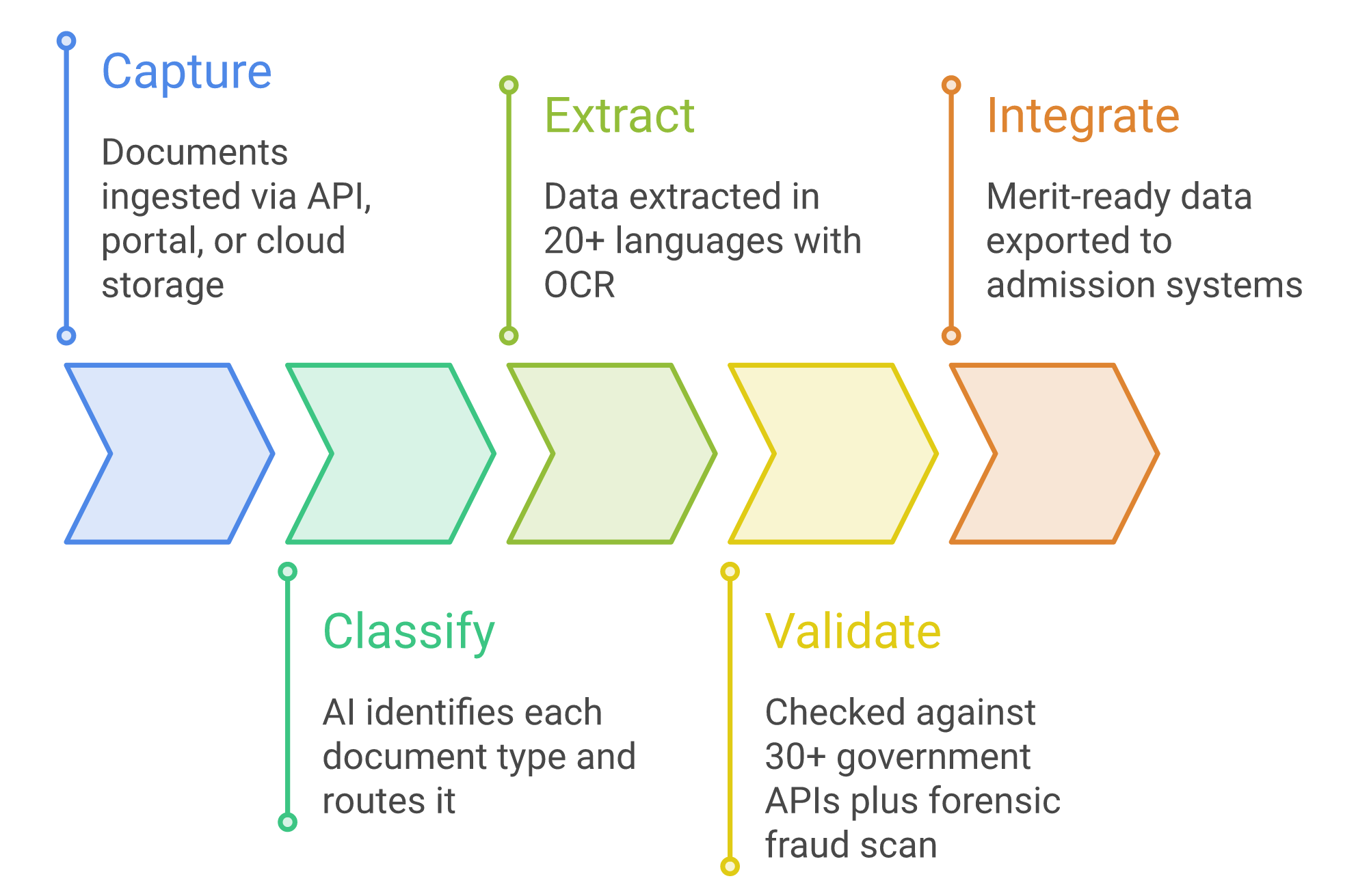
DocuExprt runs every document through its 5-step Intelligent Document Processing (IDP) pipeline. The applicant experience does not change – students upload documents as before. What changes is everything that happens after the upload.
Capture: Thousands of admission documents are passed to DocuExprt via API directly from the admission portal – no separate applicant-facing step.
Classify: The AI identifies whether each file is a marksheet, category certificate, leaving certificate, or income proof, and routes it to the right verification rule.
Extract: Marks, names, categories, and identifiers are extracted from any board, layout, or language – the AI understands the document instead of matching a fixed template.
Validate: Extracted data is cross-checked against 30+ government APIs and DigiLocker, while a forensic layer flags tampering, font changes, and signature anomalies.
Integrate: Clean, structured, merit-ready output is exported to the admission system – ready for merit list generation and seat allotment.
The Impact: Results MCAER Achieved
DocuExprt converted a multi-week manual scrutiny bottleneck into an automated, repeatable step – delivering impact across efficiency, accuracy, and productivity.
Operational Efficiency
3,50,000+ documents verified without human intervention
Scrutiny cycle compressed from weeks to days – 80% faster
180+ colleges served from a single automated pipeline
Accuracy & Trust
99%+ accuracy across every document type
Forgeries and tampering flagged automatically
Standardized, auditable output for every applicant
Productivity Boost
Admission staff freed from manual data entry
No need to scale headcount with application volume
Merit list generation became an automated step
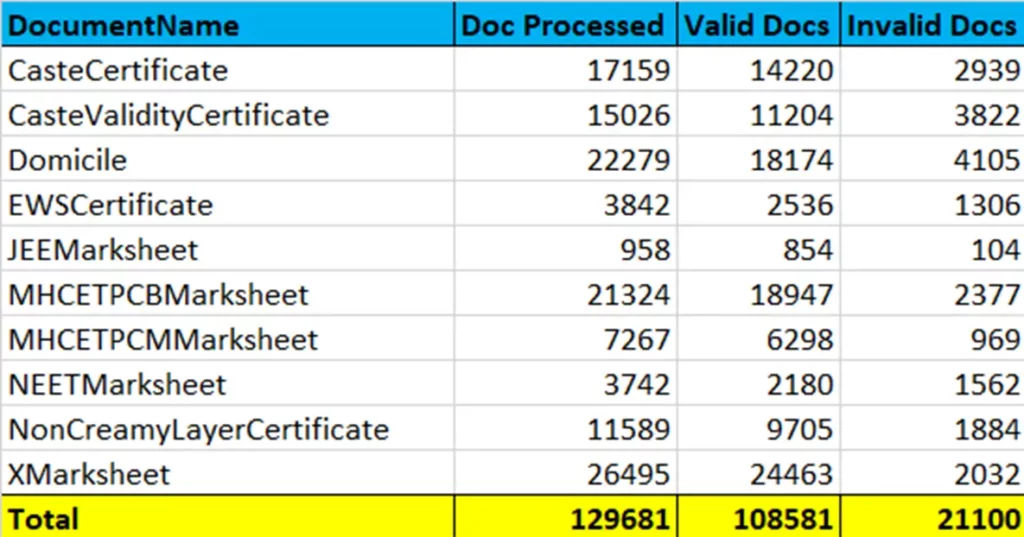
Here is the list of the documents which are auto-verified by DocuExprt-
DocuExprt has helped us simplify the scrutiny of admission documents with high accuracy. Now we are able to verify thousands of educational documents without any human intervention.
– Centralized Admission Committee, Maharashtra Council of Agricultural Education and Research
Beyond Agri Admissions: Proven at Scale
The MCAER agri admission deployment is one of several large-scale document verification programs running on DocuExprt across government, education, and enterprise.
The Takeaway for Admission Bodies
The agri admission pattern is replicable. Any exam board or university running high-volume document scrutiny can deploy the same pipeline, configured to its own eligibility rules.
It scales without headcount. From 50,000 to 8 lakh documents, the workflow stays the same – only the volume changes.
It is built for compliance. CERT-IN, RBI, DPDP, and IT Act 2000 coverage make it defensible in high-stakes, audited admission processes.
How accurate is DocuExprt AI document verification?
DocuExprt delivers 99%+ accuracy across all document types, compared with 85-92% for manual verification. Accuracy reaches 99.7% for insurance claims and 99.2% for government citizen-document verification.
The platform reads scanned, handwritten, and digital documents in 20+ languages and validates extracted data against 30+ government APIs.
Is DocuExprt secure and compliant for government and education use?
Yes. DocuExprt is CERT-IN certified for software security, RBI compliant, and DPDP compliant. Its DigiLocker integration is MeitY-certified and legally valid under the IT Act 2000, making it suitable for high-stakes government, education, and BFSI verification workflows.
What types of documents can DocuExprt verify?
DocuExprt verifies 10th and 12th marksheets, category and caste certificates, leaving certificates, income proofs, domicile certificates, and identity documents such as PAN, Aadhaar, Passport, Driving License, and Voter ID. It supports 50+ document types for education and cross-checks data against 30+ government databases.
How does DocuExprt verify documents directly from the source?
DocuExprt integrates with DigiLocker and the National Academic Depository (NAD). Candidates authenticate with a DigiLocker OTP, and government-issued documents are pulled directly to DocuExprt’s encrypted session – no uploads or copies. Even source-pulled documents pass through a forensic layer that detects tampering, font changes, and signature anomalies.
How much faster is AI document verification compared with manual scrutiny?
Manual verification takes 5 to 10 minutes per document and is prone to errors. DocuExprt processes documents 80% faster, cutting verification cycles from weeks to days while maintaining 99%+ accuracy. For one deployment, it scaled from 5,000 to 8 lakh documents without adding headcount.
Automated document verification is a workflow that extracts the data from a document, confirms the document is genuine, cross-checks it against the authority that issued it, and applies your accept, reject or review rules, without a person opening the file. A document set that takes a reviewer 30 to 75 minutes completes in under 30 seconds at 99% extraction accuracy.
Most teams researching this have already accepted the premise. The question they actually need answered is narrower and more practical: which parts of our current process can be automated, what happens to the cases that cannot, and how long does it take to get there.
This page answers that. If you are still choosing a platform, the document verification software buyer's guide covers evaluation criteria and the 2026 vendor comparison scores ten platforms side by side. This one assumes the decision is made and deals with the build.
⏱
<30 sec
Per document set versus 30-75 minutes manually
🎯
99%
Extraction accuracy across 20+ languages
🏦
30+
Government databases checked in real time
💰
60-80%
Cost reduction on verification operations
See It Run on Your Own Documents
Bring a sample file. We will build the workflow live on the call.
What Automated Document Verification Actually Means
"Automated" covers three very different levels of capability, and vendors rarely say which one they are selling. The dividing line is not who reads the document. It is who makes the decision.
Level
Who extracts the data
Who decides accept or reject
What your team does
Assisted
Software (OCR)
A person
Reviews every case; the software only saves typing
Automated
Software
Software, against your rules
Handles exceptions only
Agentic
Software
Software, against your rules
Handles exceptions; the system also acts on the decision by routing, requesting a re-upload or escalating
Plain OCR sits in the first row. It reduces keystrokes and nothing else, because a person still opens every file to decide whether the document is acceptable. That is why extraction-only projects so often fail to show a return: the expensive step was never the typing.
The test that matters: can the system close a clean case end to end without anyone opening it? If a human still has to look at every file before it moves, the process has been assisted, not automated.
The Six Decisions You Are Automating
Any manual verification, whether it is loan onboarding, admissions or vendor registration, is a sequence of six judgements. Automation means moving each one from a person to a rule.
#
The decision
How it is made manually
How it is automated
1
Is the file usable?
Reviewer opens it, finds it blurred or cropped, emails the applicant
Quality checks on upload; the applicant is asked to re-upload immediately, while they are still in the flow
2
What does it say?
Reviewer reads and keys the fields into a form
Extraction across 20+ languages, including regional scripts, into structured fields
3
Is the document genuine?
Visual inspection, which reliably catches only crude forgeries
Image forensics on metadata, edit trails and pixel-level inconsistency
4
Does it match official records?
Someone logs into a government portal and checks by hand, if at all
Real-time API calls to the issuing authority across 30+ databases
5
Do the documents agree with each other?
Reviewer compares name and date of birth across the file by eye
Cross-document consistency rules with a configurable tolerance for initials and transliteration
6
What happens next?
Reviewer applies judgement, then updates another system
Decision rules route the case to approve, reject or a named review queue
Where projects stop too early: most automate 1 to 3 and call it done, because extraction demos well. Decisions 4 and 5 are where the manual hours actually sit, and they are the two a general-purpose OCR tool cannot make.
Designing the Verification Workflow
The workflow is built visually rather than written in code, which matters more than it sounds: the people who know the verification rules are usually in compliance or admissions, not engineering. When a rule changes, they change it.
A Production Verification Workflow
Step 1
Input
→
Step 2
Extract
→
Step 3
Authenticate
→
Step 4
Verify
→
Step 5
Decide
→
Step 6
Route
Three design choices decide whether the workflow survives contact with real documents.
Write rules as thresholds, not as yes or no. An extraction confidence of 0.94 on a date of birth is not the same as 0.61, and treating both as "extracted" pushes bad data downstream. Set the level at which a field goes to review rather than through.
Separate "failed the check" from "could not be checked". These have opposite remedies. A PAN that does not match the Income Tax record is a rejection. A PAN that could not be checked because the registry timed out is a retry.
Decide what a partial pass means before you go live. If four documents verify and the fifth is unreadable, does the case wait, proceed conditionally, or reject? Answer it in the rules, or your reviewers will answer it inconsistently.
Exception Handling: The Cases That Still Need a Person
No workflow clears everything, and one that appears to is usually approving cases it should have queried. The design goal is not to eliminate review but to make sure a reviewer only sees cases where human judgement adds something.
Exception
Why it happens
How to route it
Unreadable document
Camera scans, glare, cropped edges, low-resolution photocopies
Back to the applicant automatically with the specific reason, not to a reviewer
Name mismatch
Marriage, initials, transliteration between scripts, inconsistent middle names
Reviewer, with all variants shown side by side
No authoritative source
The document type has no queryable registry
Forensics and cross-document consistency only; flag the residual risk explicitly
Registry unavailable
Government API downtime or rate limiting
Hold and retry on a schedule; escalate only when retries are exhausted
Genuine edge case
Legitimate but unusual documents, such as foreign or historical certificates
Reviewer, and feed the outcome back as a new rule
Two operational rules matter more than the queue design itself. Queue by reason rather than by arrival time, so a reviewer works one kind of judgement at a time instead of context-switching. And give the reviewer the evidence, not just the verdict: the extracted field, the confidence, the registry response and the source image, on one screen. Making them open the original file to decide reintroduces the cost you automated away.
Map Your Exception Queue Before You Build
We will walk your current process and show which cases automate cleanly.
Straight-through and exception rates modelled on your volumes
A batch is submitted and returns as a results file with exceptions separated
Watched cloud storage
Documents already land in S3, Azure Blob, GCP, Digital Ocean or iDrive
Files are picked up on arrival; no upload step is added
Direct from source
Digitally issued documents are available, for example through DigiLocker
Authenticity is established at issue, so forensics matter less
Sequencing matters as much as the pattern. Verify at the point of collection, not in a nightly batch after the applicant has left. A re-upload requested while someone is still in your flow costs a few seconds; the same request by email two days later costs a chunk of your completion rate.
Industry-specific requirements sit on top of these patterns. BFSI onboarding carries KYC obligations under RBI Master Directions, while HR background verification is built around employment and academic credentials.
What to Measure
Accuracy alone is the wrong headline metric. A system can be 99% accurate on the cases it chooses to decide while sending half your volume to review, and that is a worse outcome than a slightly less accurate system that clears most cases cleanly.
Metric
How to calculate it
Why it matters
Straight-through rate
Cases decided with no human touch, divided by total cases
The single number that determines how many reviewers you still need
Turnaround time
Upload to final decision, measured at the median and the 95th percentile
Averages hide the backlog; the 95th percentile is what applicants complain about
Cost per document
Fully loaded review cost plus platform cost, divided by documents processed
The only figure that makes the before-and-after comparison honest
Exception ageing
How long cases sit in each review queue
Reveals the queue that is quietly becoming the new bottleneck
Rework rate
Cases reopened after a decision
Rising rework means thresholds are set too loose
Measure the baseline first. Teams that skip the two weeks of before-measurement cannot prove the return afterwards, and end up arguing about whether the project worked instead of showing it.
A 90-Day Rollout Plan
One document type at a time, with a shadow period before anything depends on the result.
Phase
Days
What happens
Exit criteria
1. Baseline
1-15
Measure current volume, turnaround, cost per document and error rate. Pick the highest-volume document type, not the hardest one.
The five metrics above have real numbers against them
2. Pilot
16-45
Configure the workflow for that one type. Run a representative sample, including the messy files, not a curated set.
Rules stable; exception categories identified and owned
3. Shadow
46-70
Run automated verification alongside existing reviewers on live volume. Nothing depends on the automated result yet.
Disagreements investigated and understood, not just counted
4. Cutover
71-90
Automated decisions become authoritative. Reviewers move to the exception queue.
Straight-through rate and turnaround holding for two consecutive weeks
Phase 3 is the one under pressure to be skipped, and it is the one that pays. Shadow mode is where you find the document variant nobody mentioned, the rule that was described differently by two teams, and the threshold that is one decimal place too tight. Finding those while a human decision is still authoritative costs a conversation. Finding them after cutover costs a rollback.
DocuExprt processed 3.5 lakh admission documents at 99% accuracy on this pattern; the case study covers how the exception queue was staffed during the transition.
Five Mistakes That Stall Automation
1. Automating extraction but not the decision. The most common and most expensive. Reading the document was never the bottleneck; deciding about it was.
2. Leaving the exception queue unowned. Every workflow produces exceptions. If no named person owns that queue on day one, it silently accumulates until someone notices a two-week backlog.
3. Going live without a baseline. Without before-numbers you cannot demonstrate the return, and the next phase of the project becomes much harder to fund.
4. Treating registry downtime as rejection. Conflating "could not verify" with "failed verification" generates false rejections and, worse, teaches reviewers to override the system.
5. Rolling out every document type at once. Each type has its own failure modes. Running them in parallel means you cannot tell which rule caused which problem.
Key Takeaways
Automation is about the decision, not the reading. If a person still opens every file, the process has been assisted, not automated.
Six decisions get automated, and the two that carry the most manual hours, database verification and cross-document consistency, are the two plain OCR cannot make.
"Could not be checked" is not "failed the check." Separating those two states prevents a registry outage from becoming a queue of false rejections.
Straight-through rate is the metric that matters, not accuracy in isolation, because it determines how much review capacity you still need.
Shadow mode is the phase to protect. It converts the surprises into conversations instead of rollbacks.
Start With One Document Type
A 90-day path from baseline to production, on your own volumes.
Workflow configured for your document set
Straight-through and exception rates measured in the pilot
Automated document verification is a software workflow that replaces manual document checks: it extracts the data from a document, tests whether the document itself has been tampered with, cross-checks the details against the issuing authority's database, and applies your accept, reject or review rules without a person opening the file. A verification set that takes a reviewer 30 to 75 minutes completes in under 30 seconds. The distinguishing feature is not reading the document, which ordinary OCR does; it is making the decision.
Plan for about 90 days from baseline to production for a first document type. A workable split is 15 days to measure your current volumes, turnaround time and cost per document, 30 days to configure and pilot the workflow on a single document set, 25 days running in shadow mode alongside your existing reviewers, and 20 days to cut over and tune exception handling. API-first deployment means the workflow runs inside your existing onboarding or admissions flow, so there is no separate system for your team to learn.
A well-scoped workflow is designed to clear the large majority of cases without review, with the remainder routed to a person. The exact rate depends on the quality of the documents you receive, whether an authoritative database exists for each document type, and how tightly you set your decision thresholds. Scanned images from a mobile camera produce more exceptions than digitally issued PDFs. Measure your straight-through rate from the first pilot rather than assuming one, because it is the number that determines how many reviewers you still need.
Yes. DocuExprt extracts from documents in over 20 languages, including Indian regional scripts, so marksheets, certificates and identity documents issued by state boards and regional authorities go through the same workflow as English-language documents. Language coverage matters most in admissions and government scheme processing, where a single applicant file routinely mixes scripts.
Treat it as a queue state, not a verification failure. A document that could not be checked because the source registry was unreachable is not the same as a document that failed its check, and collapsing the two is one of the most common design mistakes. The workflow should hold the case, retry on a schedule, and only escalate to a reviewer once retries are exhausted, so a registry outage delays a decision instead of producing a queue of false rejections.
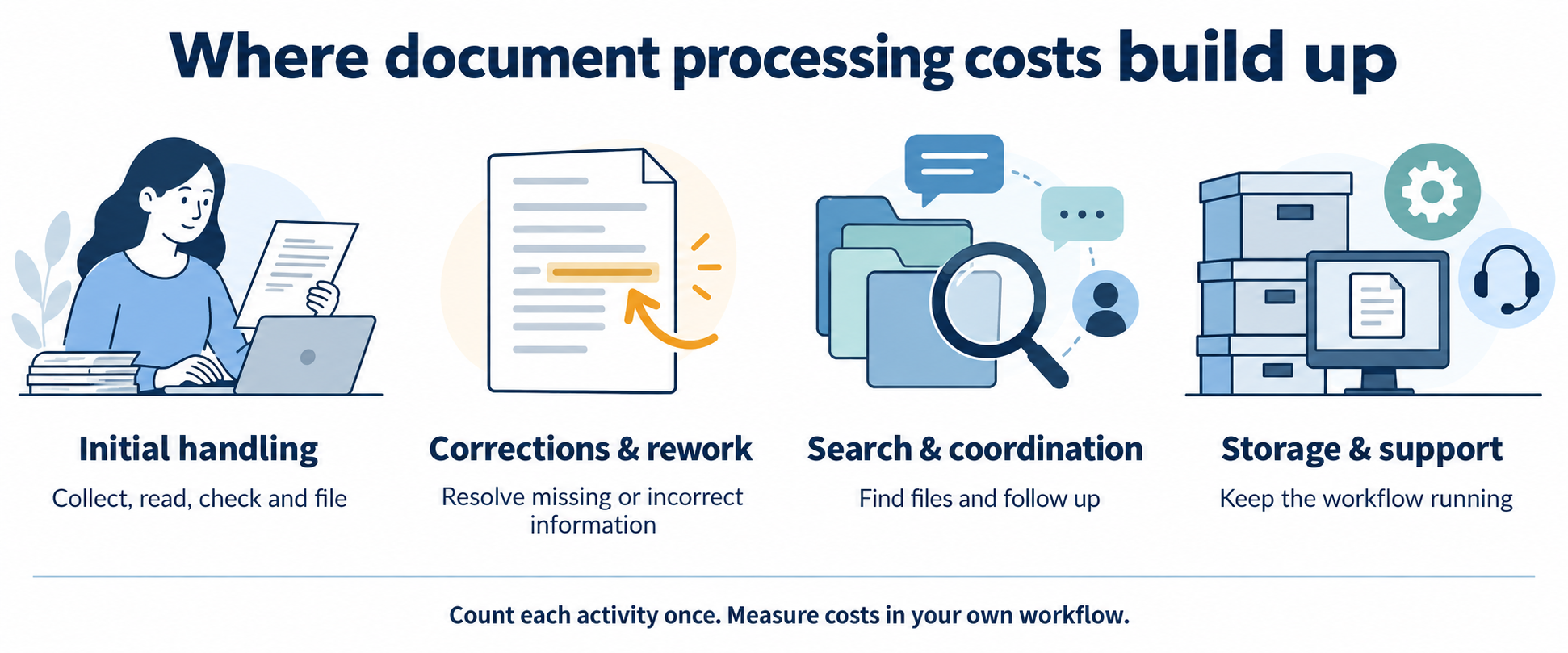
The cost of manual document processing includes more than data entry. Document collection, checking, corrections, retrieval and coordination all consume staff time. Storage, existing software and supervision can add further expense.
Build a reliable estimate by measuring each activity once, then compare it with the full cost of the proposed automated workflow—including human review and implementation.
Which hidden costs should you count?
Count the work required to complete a document, including what happens when it is incomplete or incorrect. Use records and measured time rather than a generic hidden-cost multiplier.
Collection, reading, entry, checking and filing time.
Include these activities once in the initial handling time.
Corrections and rework
Share of documents reworked × extra correction time.
Use incremental time beyond the initial review.
Search and coordination
Retrieval, reminders and status enquiries.
Exclude time already captured in processing or rework.
Overhead
Attributable storage, software, supervision and support.
Exclude costs already included in the loaded hourly rate.
Delays and risk
Recorded missed deadlines, service incidents and other outcomes.
Keep uncertain opportunity costs separate from operating expenses.
How do you measure the current workflow?
Select a representative document sample and record both normal and exception cases. Separate staff effort from elapsed waiting time: a file waiting overnight does not represent eight hours of labour.
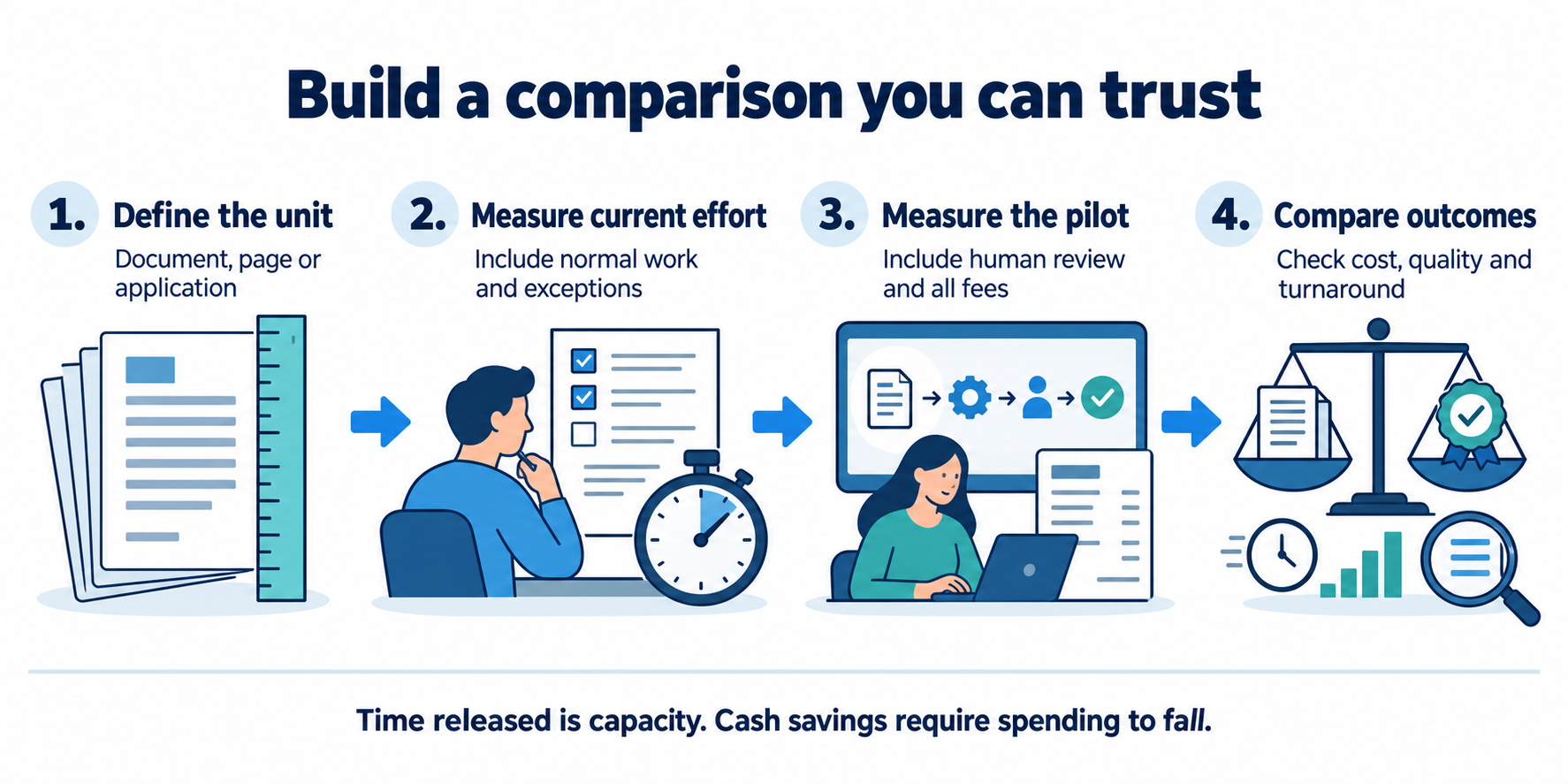
Define one unitChoose a document, page or application packet. Use the same unit throughout.
Measure effortTrack initial work and extra rework across the document mix.
Add actual costsUse a loaded hourly rate and attributable overhead.
Compare a pilotMeasure human review, fees and quality after automation.
Estimate your monthly processing cost
Change the inputs to explore a scenario. Defaults are illustrative assumptions in INR, not market benchmarks, customer results or a DocuExprt price quote. Inputs stay in this page and are not submitted.
Manual monthly cost
Automated monthly cost
Monthly operating-cost difference
Simple modelled payback
First-year modelled net benefit
Released staff time is not automatically a cash saving. First-year benefit assumes 12 full months at the entered operating level, with no ramp-up. Tax, financing, discounting, transition losses and uncertain risk benefits are excluded. Validate your own case before budgeting.
For the default example, 5,000 × (6 + 0.05 × 8) ÷ 60 × ₹300 + ₹10,000 = ₹170,000/month manually. The automated scenario is ₹37,500 in human effort + ₹15,000 in variable fees + ₹20,000 recurring overhead = ₹72,500/month. The modelled difference is ₹97,500/month, with ₹150,000 implementation cost.
What changes when document processing is automated?
Automation changes the mix of work and costs. Some entry and classification tasks may reduce, while exception review, quality checks, software fees, monitoring and integration support remain.
Compare equivalent outcomes: the same document mix, required checks, quality criteria and review scope. A low extraction fee is not the complete cost of a verified application. Include implementation, training and any parallel operation during rollout separately from recurring costs.
Run a pilot against a measured baseline. Record quality and effort together so that speed improvements do not hide missed checks or additional downstream work.
Agree on the unit of work, document mix and required checks.
Measure normal cases, unclear inputs and exceptions in the current process.
Include the same cases in the proposed workflow and measure human review.
Track incorrect results, rework, completion time and recurring costs.
Estimate released capacity and identify which expenses can actually fall.
Compare conservative and expected scenarios before a wider rollout.
A useful result may be increased capacity or shorter turnaround rather than fewer staff. State that benefit accurately instead of presenting every saved hour as reduced expenditure.
Questions about document processing costs
How do I calculate cost per document?
Divide the attributable operating cost for a period by the number of documents processed in that period. Use the same definition of a document and include processing effort, incremental rework and overhead once each.
Are hidden costs always several times direct costs?
No universal multiplier applies. The result depends on your workflow, what you already include in direct costs, exception frequency and overhead. Measure the components rather than assuming a multiplier.
Are staff hours released by automation cash savings?
Not necessarily. Released hours can provide capacity for other work. They reduce cash expenditure only when spending such as overtime, external processing or staffing costs actually falls.
What if the automated scenario costs more?
A negative operating-cost difference means the entered automated scenario costs more per month. There is no cost-based payback under those assumptions; assess whether other measured benefits justify the difference.
Is this calculator a DocuExprt quote?
No. It is an illustrative model using values you can change. Confirm supported services and actual implementation and recurring prices with the team.
What if I say there is actually one AI-supported software that can extract the data from documents and verify it? Yes, it exists, the software can extract the information from the document and can tell you if the document is as per pre-defined requirements or not.
As you can imagine, this software not only helps in automating the industrial manufacturing processes right from Raw Material verification to Final label review but also saves the data to give you insights on process capability and for improving the process to attain operational excellence.
With its wide array of features, the tool helps in two major pillars of Industry 4.0, automation and operational excellence.
Introduction:
As the manufacturing industry moves towards Industry 4.0, the need for automation and digitization is becoming increasingly important. With advancements in artificial intelligence (AI) and machine learning (ML), businesses can now leverage powerful software tools to verify documents and automate various processes.
One such tool which is helping industries in progressing towards smart automation is Automated document verification software. The tool can extract information from documents and verify them against predefined requirements or available databases.
Verify Supplier Documents in Seconds
Certificates, test reports and QC records, checked.
Now we know what the document verification tool is, let us know more about the features that this AI-supported document verification tool has:
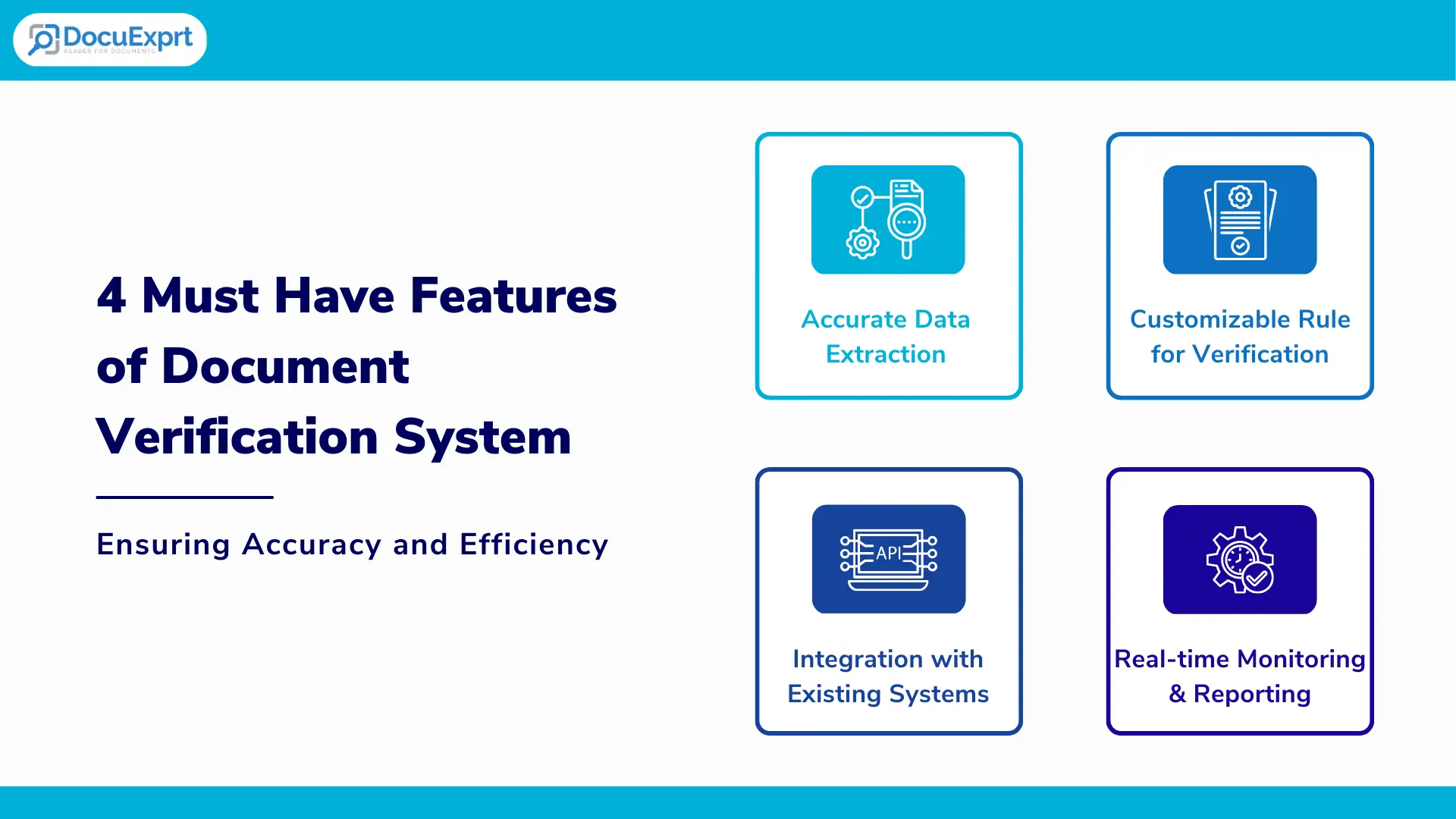
4 must-have features of document verification system for manufacturing automation–
1. Accurate data extraction for document verification:
Accuracy is highly important in the document verification process as it is directly linked to the reliability of the process.
The tool has a high degree of accuracy in extracting data from various types of documents, such as PDFs, images, and scanned documents. This has become possible with robust machine learning algorithms and natural language processing capabilities. System should be able to extract information of Identity from the document.
2. Customizable rule sets for verification:
Based on the scale of operation, the system might need to verify 100s of different types of documents, it is a must for the tool to meet the need of verifying custom documents.
The tool allows users to create customizable rule sets that define what data is extracted and how it is verified. This allows for greater flexibility in adapting the tool to different use cases and industries. The tool learns from the sample data, once the data is fed to the system, the system becomes capable of verifying any such documents in future.
3. Integration with existing systems:
It is always preferable to improve the existing set-up than installing a whole new set-up, especially in the manufacturing environment.
The tool can integrate with existing systems, such as ERP, CRM, and other manufacturing systems, to facilitate data transfer and automate workflows. This feature greatly helps in making the implementation smoother as the data migration task from the existing to a new system for document verification gets nullified.
4. Real-time monitoring and reporting:
In-process document verification is the key to identifying the mistakes in the process or documentation and mitigating the risk in finished goods.
The tool provides real-time monitoring and reporting of the document verification and data extraction process. This allows users to quickly identify and address any issues or errors that arise.
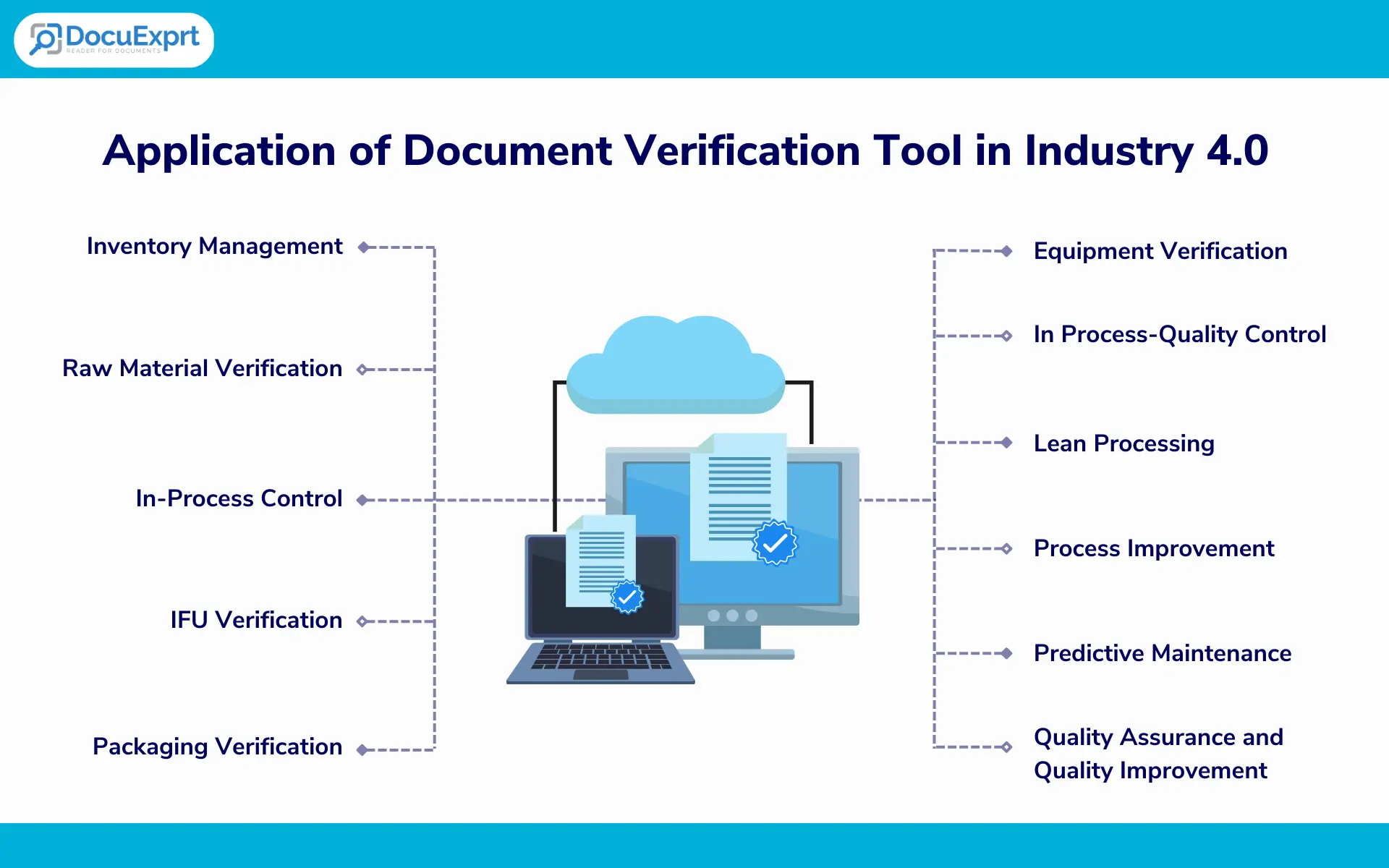
Applications of document verification tools in manufacturing environments for automation that supports Industry 4.0 objectives:
Inventory Management:
The software can verify documents related to inventory management, such as purchase orders, invoices, and bills of lading, to ensure that the correct items are being received and recorded. Document verification can be done in real-time. Further, the data can be extracted and saved in the form of an Excel sheet for future reference and better data management.
Raw Material Verification:
The software can verify the documents related to raw materials, such as material safety data sheets (MSDS) and certificates of analysis (COA), to ensure that the right materials are being used in the manufacturing process. Raw material verification is a very important process as it directly impacts the final product being manufactured.
In-Process Control:
The software can verify different types of documents related to in-process control, such as work instructions, process control plans, and quality control reports, to ensure that the manufacturing process is meeting the required specifications. In industries, the in-process documents are usually reviewed manually, if the manual controls are missed, this may lead to issues with the final product that increases the financial and customer risks. Automating this verification greatly helps in reducing the chances of manual verification errors.
IFU Verification:
For the majority of products, Instructions for use (IFUs) are a very important component of the packaging. These IFUs are critical to guide the user on how to use the product, use of IFUs is dominant in the food, pharmaceutical and medical devices industries. The IFU verification process is largely done manually, the allocated personnel reads through the IFU completely as part of finished good (FG) testing which turns out to be a time-consuming, tedious and error-prone process.
The software can verify documents related to instructions for use (IFU), such as user manuals and product labels, to ensure that they are accurate and comply with regulatory requirements.
Packaging Verification:
The software can verify documents related to packaging, such as packaging specifications, artwork text, and labels, to ensure that they are accurate and comply with regulatory requirements.
This verification helps in identifying if or not the correct information is printed on the final package or not. This process is usually done in industries in a semi-automatic way by installing the vision systems on the final packaging lines, these vision systems verify a few variable components like batch number, lot number, manufacturing date and expiry date.
The document verification tool can greatly help in identifying and verifying the whole information on samples without adding to operation time.
Details on the cartons of the product remain to be highly regulated parts of the products, automation of the packaging verification greatly helps in reducing the operation time while remaining 100% compliant with the regulations laid down by authorities (Like FSSAI, FDA or standard acts like LMA).
Equipment Verification:
Calibration and maintenance of the equipment are one of the best ways you keep your equipment in a manufacturing-ready state. The software can verify documents related to equipment, such as maintenance records, calibration certificates, and inspection reports, to ensure that the equipment is operating properly and meeting the required specifications.
Document verification software can greatly benefit the manufacturing industry by automating document verification and ensuring compliance with regulatory requirements. By leveraging the power of AI and ML, businesses can streamline their operations and improve the quality and efficiency of their manufacturing processes.
The document verification tool has a unique ability to not just extract the data, but also to validate the extracted data against the requirement. This greatly helps as the majority of the operations in the industry require process parameters to be within a certain range.
Let’s take a look at a few more applications of this document verification tool in manufacturing:
In Process- Quality Control:
The software can extract data from inspection reports and compare it with the quality control database in Excel to ensure that the products are meeting the required quality standards.
For example, at the end of the powder mixing stage, a report is produced by the system that tells about the process parameters like speed and frequency of rotation, time of rotation and amount of powder loaded in the mixer.
For getting the final mixture of desired quality, the speed, frequency and amount of powder in the mixer must be within the defined range. Once the data of required ranges are fed into the document verification tool, after each and every mixing run, the document verification tool can check after each and every run if the process was done rightly or not.
Thus, in case the process is done wrongly, that can save a lot of time, effort and loss made by leading to a nonconforming product at the end.
Lean Processing in the manufacturing environment:
The software can extract data from production reports and compare it with the production database in Excel to identify areas where waste can be reduced and efficiency can be improved. This is greatly helpful in yield improvement and waste reduction. In routine processing, the data of wastage is logged in the manual format and makes the supervisor and management miss the key insights on how the waste could be minimized by making the process more efficient.
Process Improvement:
The software can extract and save the process data that can be used to improve the process, which in other words is called operational excellence.
By leveraging the data extraction and comparison feature of this tool, manufacturers can not only automate document verification, but also improve their operations and processes in a variety of areas. This can lead to greater efficiency, cost savings, and ultimately, increased competitiveness in the marketplace. Document Validation can become streamlined task.
Predictive Maintenance:
The data of current manufacturing can be leveraged to predict any possible future failures and prevent them.
By extracting data from maintenance records and equipment performance reports, manufacturers can create a digital database of equipment performance and use this data to predict when maintenance is needed, preventing equipment breakdowns and reducing downtime.
Quality Assurance and Quality Improvement:
By extracting data from quality control reports and defect logs, manufacturers can create a digital database of quality performance and use this data to identify trends and patterns in defects, improving quality control processes and reducing the risk of quality issues.
By leveraging the data extraction feature of this tool, manufacturers can create a powerful digital database of manufacturing data that can be used for a variety of applications, ultimately improving efficiency, reducing costs, and increasing competitiveness.
The application of document verification software spans all industries like food, beverage, pharmaceutical, medical devices and automobile industries to count a few.
Here’s a case study on how a car manufacturing company used AI-powered document verification and data extraction software to improve their manufacturing process.
Case Study: AI-Powered Document Verification and Data Extraction Software in Car Manufacturing Automation
Overview
A major car manufacturing company was facing a challenge in their manufacturing process. They were struggling to keep up with the increasing demand for their cars while maintaining the quality and accuracy of their production. They needed a solution that could help them automate their manufacturing process and reduce the risk of errors and delays.
Solution
The car manufacturer decided to implement an AI-powered document verification and data extraction software that could automatically verify the accuracy and completeness of manufacturing documents, such as purchase orders, production reports, and quality control records.
The software could also extract relevant data from these documents and compare it with the existing data in their database, ensuring that all information was up-to-date and accurate.
Implementation
The implementation process was smooth and efficient. The software was integrated into existing manufacturing processes, allowing the documents to be automatically verified and the relevant data to be extracted and compared with their existing database.
Results
After implementing the AI-powered software, the company saw significant improvements in their manufacturing process. Here are some of the key results:
Higher accuracy:
The software was able to identify and correct errors in the manufacturing documents, ensuring that all data was accurate and up-to-date. This reduced the risk of errors and delays in the manufacturing process.
Better efficiency:
By automating the document verification and data extraction process, the company was able to save time and improve efficiency in its manufacturing process. This allowed them to keep up with the increasing demand for their cars while maintaining quality and accuracy.
Reduced costs:
The software helped the manufacturer to reduce costs by eliminating the need for manual document verification and data entry. This also reduced the risk of errors and delays, which could have resulted in additional costs.
Improved quality:
The software allowed the manufacturer to maintain a high level of quality in their manufacturing process by ensuring that all data was accurate and up-to-date. This reduced the risk of quality issues and helped to maintain customer satisfaction.
Takeaway of the success case
The implementation of AI-powered document verification and data extraction software helped the manufacturer to improve their manufacturing process and maintain their competitiveness in the market. The software improved accuracy, increased efficiency, reduced costs, and improved quality, ultimately leading to a more streamlined and effective manufacturing process. Manufacturing automation is one of the greatest revolutions that have happened in the last few decades, AI document verification tool is yet another example of such a breakthrough.
Run It on Your Own Documents
Bring one supplier packet. We run it on the call.
Supplier and QC workflows mapped
30+ government databases, real time
Inspection-ready audit trails
Cloud, private cloud or on-premise
Trusted by enterprises and government boards
CERT-IN CertifiedISO/IEC 27001:2013Data stays in India
Free trial tokens available for testing.
Conclusion:
The advantages of document verification tools are many, right from automation to the processes for supporting lean manufacturing to data collection for workflow and process improvement. With the advent of AI and the introduction of tools like DocuExprt, it is the best time for industries to utilize the tools which are ‘nice to have’ now, but will soon become ‘must have’ to remain competitive in the world of manufacturing.
Frequently Asked Questions
What is document verification?
Document verification; also called document authentication is the process of checking the documents for their correctness, a verified document is considered to be complying with the expectations for that particular document.
What is the use of document verification tools in manufacturing?
The AI document verification tool can be used in manufacturing in various ways, right from the automation of document verification to building the data for process improvement. The AI document verification tool finds its application in all major departments of manufacturing including RM verification, In Process Control, Quality assurance and non-conformance handling
What are the benefits of using an AI document verification tool?
There are various benefits of using the AI tool for document verification. The tool can process documents with high accuracy and supports 24×7 document verification. It also reduces the manual errors of document verification.
Introduction: The Tender Document Processing Challenge
As someone who has spent years implementing tender management systems for government agencies and large enterprises, I’ve witnessed firsthand the monumental challenges that tendering authorities face in processing procurement documents.
The complexity of modern tender document processing goes far beyond simple document review. It encompasses compliance verification, multi-vendor comparison, contract analysis and risk assessment, all under strict deadlines and regulatory scrutiny.
This guide represents the culmination of thousands of hours spent working with procurement teams across government agencies, municipalities, utilities, and large corporations.
It provides a comprehensive roadmap for implementing automated tender management systems that address the most critical pain points while delivering measurable improvements in speed, accuracy, and compliance.
The Core Problem: Manual Tender Processing Cannot Scale
Tendering authorities today face an impossible equation: increasing tender volumes (up 35% since 2020), growing regulatory complexity, shrinking budgets, and persistent staffing shortages. Manual tender document processing simply cannot keep pace.
Volume Overload: Average government agency processes 150-300 tenders annually, each with 5-25 vendor submissions
Compliance Burden: Each tender must comply with 20-50 regulatory requirements across multiple jurisdictions
Time Pressure: Tender review cycles compressed from 60 days to 30 days on average
Cost Impact: Manual processing costs $2,500-$8,000 per tender in labor hours alone
Risk Exposure: 23% of tenders face protests or challenges, often due to process inconsistencies
127 Hours is the Average Time to Manually Process a Single Complex Tender (Multiple Vendor Submissions)
The solution lies in strategic automation of tender document processing; not replacing human judgment, but augmenting it with technology that handles the repetitive, time-consuming and error-prone tasks that consume 70-80% of tender review time.
Understanding the Tender Process Lifecycle
Before diving into automation solutions, it’s essential to understand the complete tender document processing lifecycle and identify where automation delivers the greatest impact.
The 7 Stages of Tender Document Processing
1
Tender Publication
RFP/RFQ documents published with detailed requirements, specifications, and submission guidelines.
Manually checking 20-40 required documents per vendor
2-4 hours per submission, high error rate (12%)
95% time reduction
Compliance Checking
Cross-referencing requirements against 100+ pages of vendor responses
8-16 hours per submission, inconsistent evaluation
85% time reduction
Multi-Vendor Comparison
Creating comparison matrices across 5-15 vendors manually
6-10 hours, prone to transcription errors
90% time reduction
Contract Redlining
Line-by-line comparison of vendor contract modifications
4-8 hours per vendor, risk of missing critical changes
80% time reduction
Documentation Audit Trail
Manual record-keeping of all decisions and evaluations
3-5 hours, incomplete audit trails
100% automated
70% is the Average Time Reduction in Tender Processing with Automated Tender Management Systems
Document Requirements Validation Automation
The first critical checkpoint in tender document processing is validating that vendor submissions contain all required documents in the correct formats.
This seemingly straightforward task becomes monumentally time-consuming when dealing with multiple vendors submitting dozens of documents each.
The Manual Validation Challenge
Real-World Example: Municipal Infrastructure Tender
Scenario: City government issues RFP for $15M infrastructure project
Required Documents: 32 mandatory submissions per vendor
Errors Discovered: 4 vendors had incomplete submissions, requiring clarification requests and deadline extensions
Automated Document Requirements Validation
Modern RFP document processing systems automate validation through intelligent document recognition and requirement matching:
Key Automation Capabilities:
Intelligent Document Classification: AI automatically identifies and categorizes each submitted document (technical proposal, financial statements, insurance certificates, etc.)
Requirement Checklist Matching: System cross-references submitted documents against RFP requirements checklist
Format Validation: Verifies documents are in required formats (PDF, Excel, CAD drawings, etc.) and meet size/quality requirements
Completeness Scoring: Automatically generates completeness score for each vendor submission
Missing Document Alerts: Instant notification of missing or incomplete submissions
Automated Clarification Requests: System generates vendor-specific clarification requests for missing items
Version Control: Tracks resubmissions and maintains audit trail of all document iterations
Implementation: Document Validation Workflow
Validation Step
Manual Process
Automated Process
Time Savings
Document Receipt
Download from portal, organize in folders
Automatic ingestion from e-procurement system
100%
Document Identification
Manual review of each file to determine document type
AI classification based on content and metadata
95%
Checklist Verification
Excel spreadsheet, manual checkboxes
Automated requirement matching and scoring
98%
Completeness Report
Manual report creation in Word/Excel
Auto-generated dashboard with vendor-by-vendor status
100%
Clarification Requests
Individual emails drafted for each vendor
Template-based automated emails with specific missing items
90%
Result: 95% Time Reduction in Document Validation
What previously took 28 hours of manual work is now completed in 1.5 hours, with higher accuracy and complete audit trail. Procurement teams can immediately identify qualified vendors and focus attention on substantive evaluation rather than administrative document checking.
Compliance Checking Automation
Compliance verification is the most critical and time-intensive aspect of tender document processing. Tendering authorities must ensure that every vendor submission meets mandatory requirements across regulatory, technical, financial and legal dimensions. Missing a single compliance failure can result in contract disputes, protests, or even legal liability.
The Compliance Verification Burden
In my experience implementing tender systems for government agencies, compliance checking typically represents 40-50% of total tender review time. Here’s why:
The automated system generates a comprehensive compliance matrix showing each vendor’s compliance status across all categories:
Manual Process Pain Point
Creating compliance comparison matrices manually requires building Excel spreadsheets with hundreds of rows and columns, manually entering data from each vendor submission, and constant cross-checking for accuracy. For a 10-vendor tender, this takes 8-12 hours and is highly prone to data entry errors.
Automated Solution
The system automatically generates interactive compliance dashboards showing:
Overall compliance score for each vendor (e.g., 98% compliant, 2 minor exceptions)
Specific non-compliance items highlighted with explanation
Side-by-side vendor comparison across all compliance dimensions
One-click drill-down to source documents for verification
Exportable compliance reports for evaluation committees
Time Required: Dashboard generated in 45 minutes vs. 8-12 hours manually
85% Time Reduction in Compliance Verification with Automated Checking
Multi-Vendor Document Comparison
One of the most challenging aspects of tender evaluation is comparing proposals from multiple vendors across dozens of evaluation criteria. This is where automated tender management systems provide transformative value.
Documents Per Vendor: 15-20 documents, 200-300 pages total
Manual Comparison Time: 12-18 hours to create comprehensive comparison matrices
Procurement staff must extract relevant information from hundreds of pages, normalize data formats, create comparison tables, and ensure accuracy across all vendors. This process is tedious, error-prone, and consumes valuable evaluation time.
Automated Multi-Vendor Comparison
Automated RFP document processing systems transform multi-vendor comparison from a days-long manual exercise to an automated analysis completed in minutes:
Technical Comparison Automation
Criteria-Based Extraction: AI identifies vendor responses to each evaluation criterion across all submissions
Automatic Normalization: Converts different data formats to standardized units (e.g., all weights to kilograms, all dimensions to meters)
Side-by-Side Tables: Generates comparison tables showing all vendor responses to each criterion
Gap Analysis: Highlights best-in-class responses and identifies vendors falling short of requirements
Scoring Assistance: Calculates preliminary scores based on objective criteria (performance specs, delivery times, etc.)
Commercial Comparison Automation
Pricing Extraction: Automatically extracts all pricing elements from vendor submissions (unit prices, total prices, optional items)
Price Normalization: Converts to common currency, adjusts for different units (per unit, per case, per pallet)
Total Cost Calculation: Computes total cost of ownership including shipping, installation, training, maintenance
Procurement team reviewed and validated results: 4 hours
Total time: 5.5 hours
Result: 90% Time Reduction + Improved Accuracy
The automated system completed in 5.5 hours what previously took 54 hours, while eliminating data entry errors and providing more comprehensive analysis.
90% Time Reduction in Multi-Vendor Comparison with Automated Systems
Automated Redline Analysis
Contract redlining is the process of identifying and analyzing vendor-proposed modifications to standard contract terms which is one of the most critical yet time-consuming aspects of tender evaluation. Missing a significant contract change can expose the organization to substantial legal and financial risk.
The Redline Analysis Challenge
In complex tenders, vendors often submit contracts with proposed modifications to standard terms and conditions. These modifications can range from minor clarifications to significant liability limitations or payment term changes.
Manual Redline Review Challenges:
Time-Intensive: Line-by-line comparison of 30-50 page contracts against master template takes 4-8 hours per vendor
Error-Prone: Easy to miss subtle wording changes in dense legal text
Inconsistent: Different reviewers may categorize changes differently (material vs. non-material)
Lack of Comparison: Difficult to compare redlines across multiple vendors to identify patterns
Risk Exposure: Missing significant contract modifications can result in unfavorable terms or legal disputes
Automated Redline Analysis Solution
Modern automated tender management systems provide sophisticated contract comparison and redline analysis:
How Automated Redline Analysis Works
1
Document Ingestion
System ingests master contract template and all vendor-submitted contracts
2
Text Comparison
AI performs word-by-word comparison identifying additions, deletions, and modifications
3
Change Classification
Machine learning categorizes changes by type (liability, payment terms, termination, etc.)
4
Risk Scoring
System assigns risk scores to changes based on materiality and business impact
5
Redline Report
Generates detailed redline report with all changes highlighted and categorized
6
Comparison Matrix
Creates vendor comparison showing which vendors accepted terms vs. proposed changes
Key Features of Automated Redline Analysis
Comprehensive Change Detection: Identifies every word-level change, including subtle wording modifications
Visual Redline Display: Traditional redline view (strikethrough deletions, underlined additions) for easy review
Multi-Vendor Comparison: Shows which vendors accepted standard terms vs. which proposed modifications
Exception Summary: Generates executive summary of all material exceptions for decision-makers
Legal Review Workflow: Routes high-risk changes to legal counsel automatically
Audit Trail: Maintains complete record of all contract changes and review decisions
Contract Modification Example
Contract Clause
Original Terms
Vendor Modification
System Analysis
Liability Cap
“Contractor liability unlimited for all damages”
“Contractor liability capped at contract value”
HIGH RISK – Material change limiting liability exposure
Payment Terms
“Payment within 30 days of invoice”
“Payment within 15 days of invoice”
MEDIUM RISK – Accelerated payment may impact cash flow
Termination
“Either party may terminate with 90 days notice”
“Either party may terminate with 60 days notice”
LOW RISK – Minor modification, acceptable
Result: 80% Time Reduction + Risk Mitigation
Automated redline analysis reduces contract review time from 4-8 hours per vendor to 45-60 minutes, while ensuring no material changes are missed. Legal teams can focus on high-risk modifications rather than manual document comparison.
80% Time Reduction in Contract Redline Review with Automation
Integration with Procurement Systems
The true power of automated tender document processing is realized when it integrates seamlessly with your existing procurement ecosystem. Standalone systems create data silos; integrated systems create end-to-end procurement automation.
The Integration Imperative
Based on my experience implementing tender automation for government agencies and enterprises, I’ve found that successful deployments always include robust integration with:
Core Integration Points
E-Procurement Platforms
Systems: SAP Ariba, Oracle Procurement Cloud, Jaggaer, BidSync
Integration: Bi-directional data flow—tender documents flow in, evaluation results flow out
Benefit: Eliminates manual document downloads and data entry
ERP Systems
Systems: SAP, Oracle ERP, Microsoft Dynamics, NetSuite
Executive Sponsorship: Procurement leadership actively championing the initiative
Cross-Functional Team: Including procurement, IT, legal, technical evaluators
Realistic Timeline: Allowing adequate time for configuration, testing, training
Change Management: Proactive communication and training to drive user adoption
Start Simple: Begin with straightforward tenders before tackling most complex scenarios
Measure Results: Track and communicate time savings, accuracy improvements, capacity gains
Continuous Improvement: Treat implementation as ongoing optimization, not one-time project
Conclusion: The Future of Tender Document Processing
After years in tender management technology, I’ve witnessed the evolution from entirely manual processes to today’s sophisticated automated systems.
The transformation is not just about speed, though 70%-time reduction is substantial, it’s about fundamentally improving the quality, consistency, and defensibility of procurement decisions.
Run It on Your Own Queue Bring one real batch. We scrutinise it on the call. Your scrutiny workflow mapped 30+ government databases, real time Inspection-ready audit trails Cloud, private cloud or on-premise Trusted by enterprises and government boards CERT-IN...
ROI for HR TeamsThe business case for automated HR document verification is clear and the cost of NOT automating is growing. 90-95% Faster verification per candidate 60-80% Lower cost per background check 92-98% Document fraud detection...